
[SOLVED] Bonding Multiple Spectrum Internet Connections
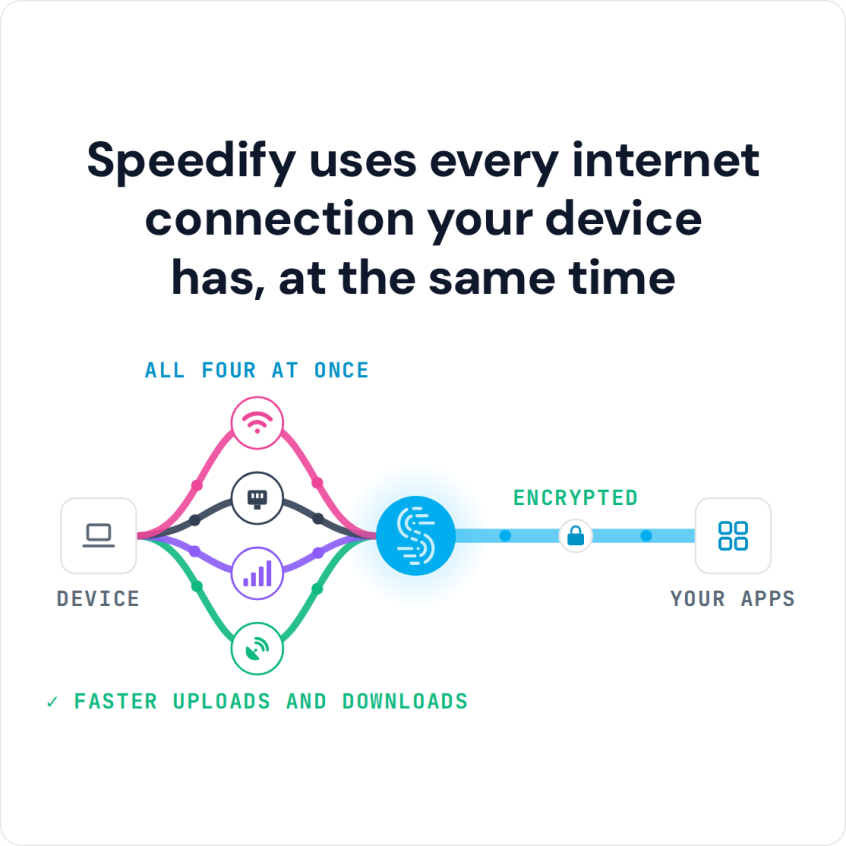
Want faster upload and download speeds and more reliable internet on your Spectrum service? Run two internet connections at the same time – for example your Spectrum line plus a second connection like cellular data. Speedify is an app that combines two or more internet connections at once, so you get faster uploads and downloads and stay online if one connection drops out.
Speedify uses every internet connection your device has, at the same time
How do I use WiFi and 4G/5G cellular at the same time with Speedify?

Pick your two internet connections and your device below and we'll take you to the step-by-step setup guide.


Why Consider Charter Spectrum Channel Bonding?
Short answer: to get better Internet, both in terms of speed, but also reliability. Not to mention secure.
You don’t have to look very far for reasons. Now that you’re working from home, the whole family and/or all your friends are using the same connection. How’s that working out so far?
- Are you doing any live streaming and had to lower quality or even postpone streaming sessions?
- seeing high latency when gaming online?
- trying to watch video on demand and seeing nothing but buffering?
- websites barely load?
If you answered “yes” to at least one of the questions above, then you definitely need a faster, more reliable and secure connection. The solution we mentioned earlier: bonding multiple Spectrum Internet connections.
Combine Multiple Spectrum Connections at Once for Faster and More Reliable Internet
You might be thinking: “what if I just get a more higher tier plan from Spectrum? That would fix my Internet problems.” Well – that’s not always the case. Think about it – you’d still have just one connection available. And if it’s affected or they’re doing maintenance works, it’ll drop. It’s always better to have multiple Internet connections. Preferably from different providers. This way, if one of them fails, you will still be connected through the other connection(s).
And that’s exactly what Speedify can help you with. Speedify is a bonding VPN service that allows you to combine multiple Internet connections simultaneously directly on your device. It allows you to do Spectrum channel bonding easily. The same works with other providers, for example bonding two Comcast connections. You’ll get the combined speed of the connections you’re bonding, plus failover protection along side VPN benefits like encryption.
3 Steps for Spectrum Channel Bonding
Forget about complicated schemes of using dedicated bonding hardware together with the Spectrum routers. You’ll spend a lot more on that. Software bonding is the way you get the best bang for your buck.
Requirements
You’ll need at least two separate Spectrum Internet connections. That usually means Spectrum Internet from two or more routers. They can all be your home Internet connections; some may be nearby Spectrum public Wi-Fi connections.
Depending on the devices you want to use the bonding on – you may need extra Wi-Fi / Ethernet USB adapters to plug into your computer / laptop.
How to do Spectrum Connection Bonding
Here’s what you have to do for faster, more reliable and secure Spectrum Internet:
- Get a Speedify subscription and install it on your computer / mobile device. Naturally, you can try before you buy, but there’s also a 30 days money back guarantee policy.
- Make sure all your Spectrum connections are active and connect them to your device. On computers – use both the internal / existing network adapters and external ones.
Typical setups include using wired Ethernet from one Spectrum router the Wi-Fi connection from the other. Or combining two wired Ethernet connections (with the help of extra USB adapters), for best performance in gaming or live streaming. Or even bonding two Wi-Fi connections, for increase mobility around the house. - Run Speedify, choose a server to connect to and you’re done. It will detect all connections and start bonding them. In the Speedify user interface you will be able to see stats about the bonding performance, jitter, etc.
PRO TIP
If you’re running Speedify on a Linux device – e.g. Raspberry Pi – you can turn that into a bonding router easily. This way, you can share the fast, reliable and secure Internet with all devices in your household.
Speedify
Get started with Speedify today.
Combine Wi-Fi, 4G/5G cellular, Ethernet, Starlink, and more into one faster, steadier connection. Free to try — no credit card required.
🚀 Speed
Faster uploads and downloads by bonding all your connections at once.
📶 Stability
Automatic failover in under a second when any connection drops.
🔒 Security
AES-256 encryption on every connection, on every network you join.



15M+ downloads worldwide. 75K+ five-star reviews on iOS and Android.