
The Best Internet for Food Trucks: Keep POS and Payments Online
The lunch rush is exactly when a food truck cannot afford a frozen card reader. A single line forms, ten orders come in at once, and if the truck’s only cellular connection dips even briefly, the POS system stalls and the line stalls with it. Coverage maps rarely tell the full story either, and cross-checking the FCC’s national broadband map for a regular parking spot often shows marginal coverage from more than one cellular provider, which is precisely the gap a single-SIM setup cannot close.
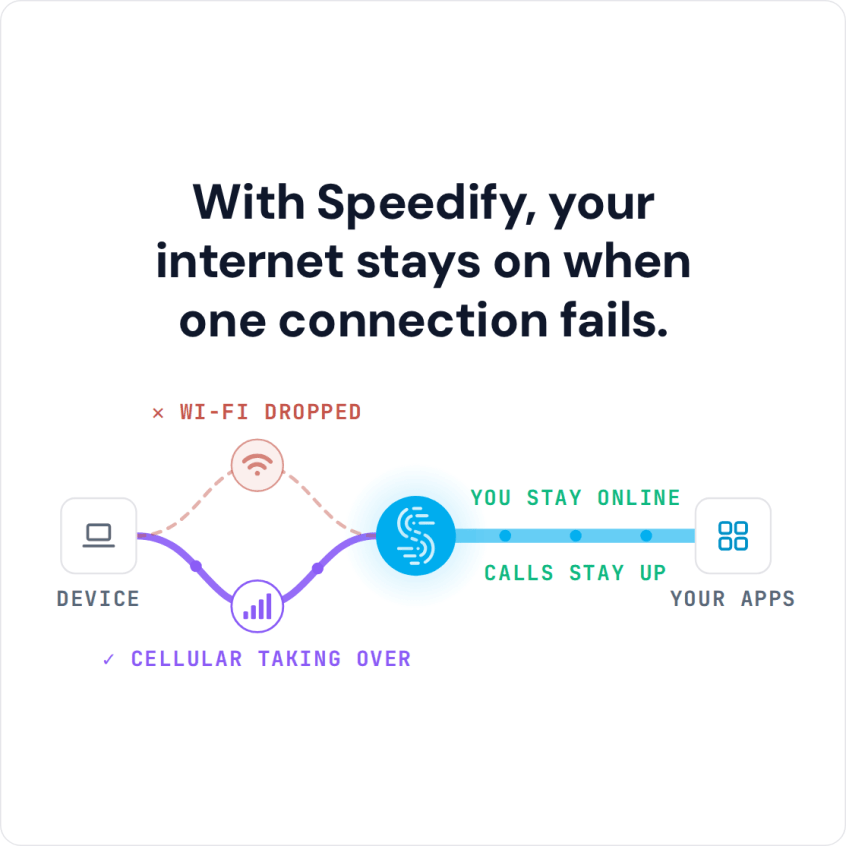
Speedify solves this by combining more than one cellular carrier into a single connection, so a food truck is not riding on just one signal. Speedify’s technology for combining internet connections uses up to 95% of the combined capacity of every connected carrier and fails over in milliseconds if one carrier’s signal drops at a parking spot (both are Speedify’s published figures). That needs two working connections; with only one carrier, Speedify works as an encrypted VPN and cannot stop that connection from dropping.
Watch now
How Speedify combines internet connections on any hardware
Get started with Speedify for your business
Speedify offers three commercial paths. They work together, and most enterprise customers use two or more.
01
Speedify Teams
Speedify on every supported OS for every team member
Centralized dashboard for billing, user provisioning, and usage analytics
CSV import/export and a RESTful management API
02
Speedify for Routers
License for supported OpenWrt routers
Powered by Speedify hardware lineup ready to deploy out of the box
Miri, GL.iNet and other partner models
Covers every device on the network, with no per-device install
03
Embed Speedify into your product
A · DIY
Build it yourself with the Speedify SDK.
Integrate Speedify into your iOS, Android, Windows, macOS, Linux or QNX product. Full developer documentation, sample code and supported integration paths. Your team owns the build, and the Speedify SDK handles combining the internet connections.
B · CUSTOM ENGINEERING
Have the Speedify team build it for you.
Why Food Truck Internet Fails at the Lunch Rush
Mobile food businesses run into the same connectivity problems no matter what city they operate in:
- One cellular carrier, one weak spot. A single SIM card means one dead zone at a favorite parking spot takes down the whole POS system.
- Peak-hour congestion. Lunch rush brings a spike in nearby phone traffic on the same cell tower, slowing everyone sharing it.
- Constantly changing locations. A truck that moves between spots or events faces different signal strength every single day. Pop-up shops run into the same thing, covered in internet for pop-up shops and temporary locations.
- Payment terminals with no fallback. Most card readers have no way to switch networks mid-transaction on their own. Here is how to keep a card payment terminal online when the internet drops.
Combining Two Cellular Carriers for Coverage at More Parking Spots
Two SIM cards from two different carriers rarely go dead in the exact same spot at the exact same time. Speedify combines both into one connection, so if one carrier is weak at a particular curb, the other keeps carrying traffic.
A Powered by Speedify router mounted in the truck handles this combining at the hardware level, giving every device on board (POS terminal, tablet menu board, kitchen display) one shared, combined connection. The underlying principle is the same one used when combining Starlink and 5G for business connectivity: two independent networks beat one, no matter how strong that one looks on a coverage map.
How Speedify Keeps POS and Card Readers Online
Card processors and POS software need a stable connection to authorize a transaction in a second or two, not stall waiting on a slow or dropped signal. Speedify spreads that authorization traffic across both carriers and keeps it moving if one weakens, and it encrypts all traffic with DTLS 1.2 and AES-256-GCM or ChaCha20-Poly1305. Kitchen display systems and order-ahead apps can run on the same combined connection and keep syncing in the background.
Failover When One Signal Drops, and Simple Setup for Owners
If one carrier drops out mid-shift, Speedify fails over to the working connection in milliseconds, according to Speedify, fast enough that a card swipe in progress usually completes without the customer noticing anything happened. Setting this up does not require a technician:
- Get a second SIM card from a different carrier than the truck’s current plan.
- Install both SIMs in a Powered by Speedify router, or run Speedify on the tablet or computer that runs the POS software, with two cellular connections attached to it.
- Let Speedify combine both connections automatically; no manual switching required.
- Download Speedify on any tablet or laptop used for order-ahead, scheduling, or accounting so it gets the same combined connection.
Two weak signals combined will not outperform one strong connection, and combining cannot invent bandwidth that neither carrier actually has. Speedify needs at least two working connections to combine in the first place, so a spot with only one usable carrier still depends on that carrier alone.
Speedify Is Used on Millions of Devices Worldwide
Speedify has made internet connections faster and more reliable for businesses and individuals since 2014.
15M+
Speedify downloads worldwide75K+
5-star reviews for Speedify on iOS and Android82
Speedify server points of presence in 50+ cities on 6 continents500TB+
Of internet traffic carried by Speedify every weekSpeedify Partners
Speedify works with these companies to bring faster, more reliable internet and networking technology to their customers and employees.


Food Truck Internet: FAQ
Do both cellular carriers need to be the same provider?
No. Speedify works best with two different carriers, since they rarely have weak signal in the exact same location at the same time.
Will Speedify slow down card transactions by combining connections?
With two carriers, Speedify spreads traffic across both and keeps it moving when one weakens, so authorization is usually steadier, not slower. On a single connection Speedify works as an encrypted VPN and can be a little slower.
Does a food truck need a technician to set up Speedify?
No. Speedify runs on a Powered by Speedify router, or as an app on the tablet or computer that runs the POS software, and combines connected SIMs automatically without manual configuration during service.
What happens if a food truck parks somewhere with only one usable carrier?
Speedify needs at least two working connections to combine, so in that situation the truck runs on the single available carrier until a second connection is added.
Speedify Business Solutions
Speedify Teams
Speedify for Routers

Speedify Embedded Solutions and Integrations
Add Speedify to your own app or hardware with the Speedify SDK. Your product then combines internet connections, fails over automatically when one drops, and encrypts the traffic, using the same technology as the Speedify app.