
The Best Internet for Pop-Up Shops and Temporary Locations
A pop-up shop has one shot at a strong opening weekend, and a stalled card reader or a frozen POS screen during the first rush is the fastest way to waste it. Temporary retail spaces, seasonal kiosks, and market stalls often get stuck with whatever single Wi-Fi or wired line the landlord happens to offer, and that one connection becomes a source of network congestion the moment foot traffic picks up. Food trucks hit the same wall, and here is how to keep food truck card payments online.
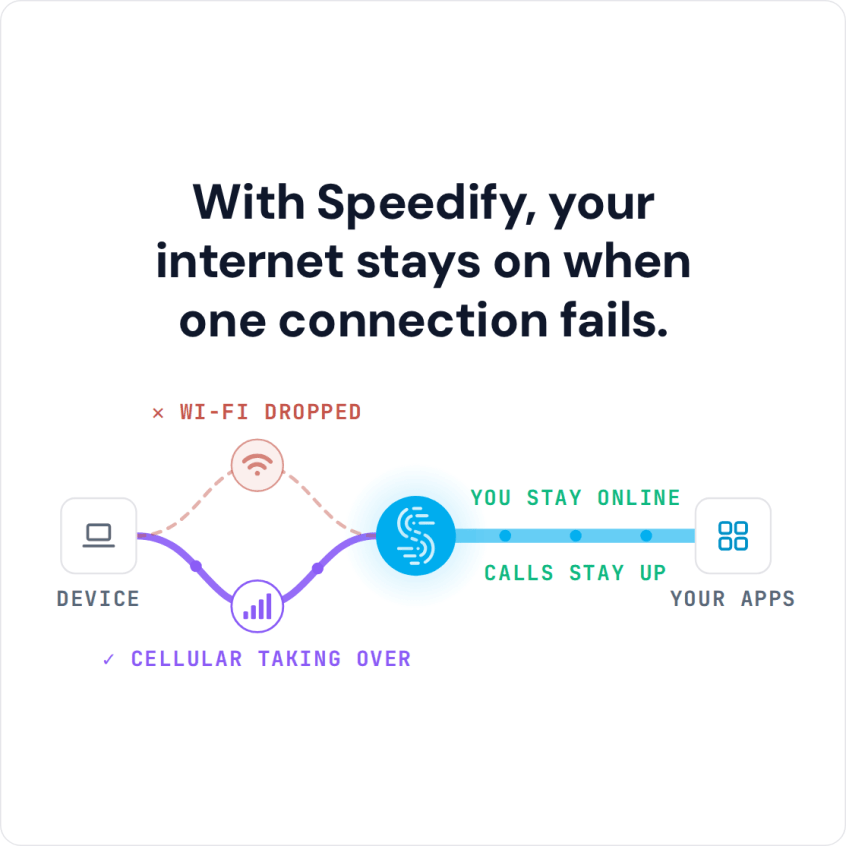
Speedify solves the temporary-location problem by turning whatever internet connections are available on site into one connection. Speedify’s technology for combining internet connections splits traffic per packet across Wi-Fi, 4G/5G cellular, Ethernet, Starlink and other satellite connections, and Speedify’s published figure is up to 95% of their combined upload and download speed, so a pop-up location is not limited to whatever one line the building happens to have. That needs at least two internet connections on site: with only one, Speedify works as an encrypted VPN and cannot stop that connection from dropping. For a router that moves with the shop, see mobile routers for business running Speedify.
Watch now
How Speedify combines internet connections on any hardware
Get started with Speedify for your business
Speedify offers three commercial paths. They work together, and most enterprise customers use two or more.
01
Speedify Teams
Speedify on every supported OS for every team member
Centralized dashboard for billing, user provisioning, and usage analytics
CSV import/export and a RESTful management API
02
Speedify for Routers
License for supported OpenWrt routers
Powered by Speedify hardware lineup ready to deploy out of the box
Miri, GL.iNet and other partner models
Covers every device on the network, with no per-device install
03
Embed Speedify into your product
A · DIY
Build it yourself with the Speedify SDK.
Integrate Speedify into your iOS, Android, Windows, macOS, Linux or QNX product. Full developer documentation, sample code and supported integration paths. Your team owns the build, and the Speedify SDK handles combining the internet connections.
B · CUSTOM ENGINEERING
Have the Speedify team build it for you.
Why Temporary Sites Can’t Rely on One Connection
Pop-up shops and seasonal locations face a specific set of connectivity problems that permanent stores rarely deal with:
- No time for a proper install. A landlord’s shared building Wi-Fi is often the only option on short notice, and it is rarely fast or reliable.
- Unknown coverage until move-in. Cellular signal strength at a new location is not confirmed until the team is already on site.
- Short lease terms. Running a dedicated business fiber line does not make sense for a four-week seasonal location.
- Opening-day traffic spikes. The first weekend often brings the heaviest foot traffic and the least tested network.
Combining 4G/5G Cellular and Any Available Wi-Fi to Keep a Pop-Up Online
Speedify does not need a dedicated business internet install to work. A pop-up team can bring two or three cellular hotspots on different carriers plus the building’s guest Wi-Fi, and Speedify combines all of them into one connection once they are connected. Plug the hotspots in by USB or Ethernet where they support it, because one Wi-Fi adapter joins only one Wi-Fi network at a time. For events built around the same short-notice constraints, this mirrors what teams already rely on for reliable internet at a trade show booth. Staff phones can add their own 4G/5G cellular through Speedify’s cellular sharing feature, which works when the phones and the Speedify device are on the same Wi-Fi network.
How Speedify Gets a Location Online in Minutes
There is no cabling to run and no ISP appointment to wait on. A staff member plugs in or powers on each available connection, whether that is a mobile hotspot, a phone in tethering mode, or the venue’s own Wi-Fi, and Speedify starts combining them automatically. Point-of-sale terminals, tablets, and the store’s own Wi-Fi network all draw from the same combined connection, so a pop-up location can go from an empty storefront to fully online in the time it takes to set up the fixtures.
Keeping POS and Payments Running on Opening Day
Card payments and POS software cannot tolerate a dropped connection mid-transaction. Speedify states that its failover completes in milliseconds when one connection degrades, so a payment that starts on cellular can finish on Wi-Fi without the terminal timing out.
For retailers running several seasonal pop-ups at once, the Speedify Teams Dashboard gives a regional manager one web console to add and remove users and monitor usage statistics, so data use can be checked without visiting every site.
Packing List and Setup Steps
A pop-up connectivity kit is short and repeatable across every location:
- Two to three cellular hotspots on different carriers.
- A basic router or switch to connect POS terminals and staff devices.
- A laptop or gateway device with Speedify installed and configured to combine all available connections.
- A backup battery pack for hotspots during outdoor or power-limited setups.
- Download Speedify on every device that needs its own combined connection, such as a standalone card reader tablet.
Combining connections adds reliability, but it cannot create bandwidth beyond what the connections physically provide. Speedify needs at least two working connections on site to combine them, and a location with only one weak cellular signal and no alternative will still be limited by that single path.
Speedify Is Used on Millions of Devices Worldwide
Speedify has made internet connections faster and more reliable for businesses and individuals since 2014.
15M+
Speedify downloads worldwide75K+
5-star reviews for Speedify on iOS and Android82
Speedify server points of presence in 50+ cities on 6 continents500TB+
Of internet traffic carried by Speedify every weekSpeedify Partners
Speedify works with these companies to bring faster, more reliable internet and networking technology to their customers and employees.


Pop-Up Shop Internet Connectivity: FAQ
Does a pop-up shop need a professional internet install for Speedify to work?
No. Speedify combines whatever connections are already available on site, including cellular hotspots and building Wi-Fi, without requiring a dedicated business line.
Can Speedify keep card payments running if a hotspot loses signal?
Yes, if the shop has a second internet connection. Speedify states that it fails over to another connection in milliseconds, so a payment in progress can continue on a different path instead of timing out.
How quickly can a new pop-up location get online with Speedify?
A location can be online as soon as its cellular hotspots and Wi-Fi are powered on and connected to Speedify, often within minutes of arriving on site.
Can one team monitor multiple pop-up locations running Speedify at once?
Yes, with Speedify Teams. The Teams Dashboard is one web console for monitoring usage statistics across the team, so a manager can check data use without visiting each site.
Speedify Business Solutions
Speedify Teams
Speedify for Routers

Speedify Embedded Solutions and Integrations
Add Speedify to your own app or hardware with the Speedify SDK. Your product then combines internet connections, fails over automatically when one drops, and encrypts the traffic, using the same technology as the Speedify app.