
Speedify Combines Starlink and 4G/5G Cellular for Faster Internet Upload and Download Speeds
Speedify combines your Starlink internet connection and a 4G/5G cellular connection and uses both at the same time, so your business gets close to their combined upload and download speed. When one drops, Speedify switches your traffic to the other automatically.
Speedify is software for your computers, phones or routers, and it works with Ethernet and Wi-Fi too, with no special hardware. Below: why Starlink and 4G/5G cellular make a good pair, how Speedify combines them, which setups work, and how to set them up. Contact the Speedify team to plan your deployment.
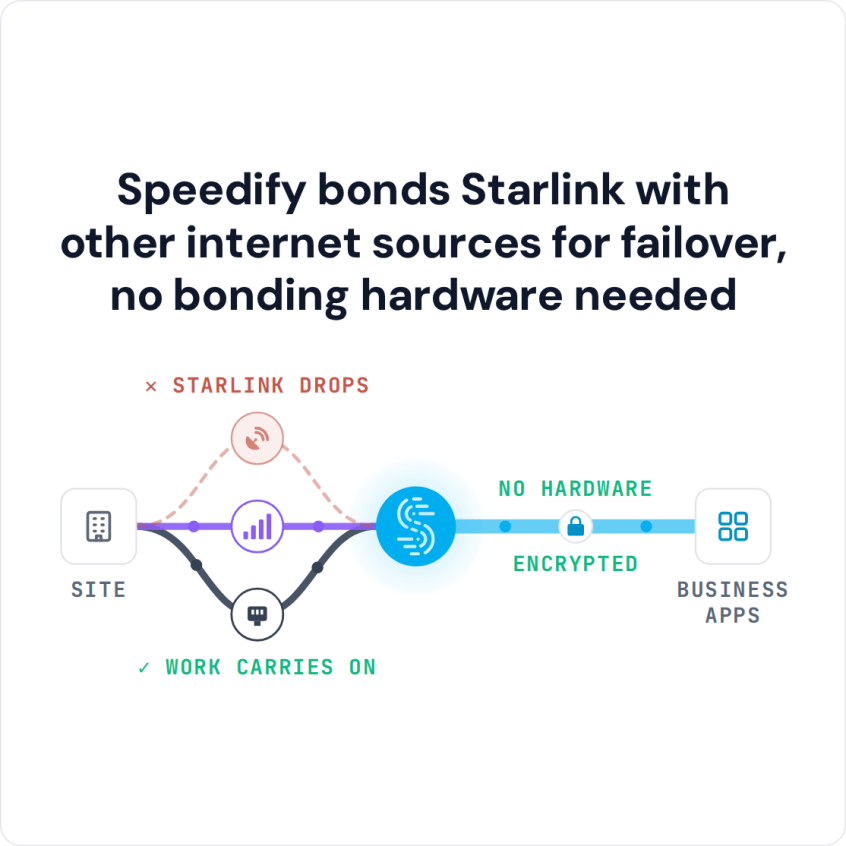
Speedify bonds Starlink with other internet sources for failover, no bonding hardware needed
Watch now
How Speedify combines internet connections on any hardware
Get started with Speedify for your business
Speedify offers three commercial paths. They work together, and most enterprise customers use two or more.
01
Speedify Teams
Speedify on every supported OS for every team member
Centralized dashboard for billing, user provisioning, and usage analytics
CSV import/export and a RESTful management API
02
Speedify for Routers
License for supported OpenWrt routers
Powered by Speedify hardware lineup ready to deploy out of the box
Miri, GL.iNet and other partner models
Covers every device on the network, with no per-device install
03
Embed Speedify into your product
A · DIY
Build it yourself with the Speedify SDK.
Integrate Speedify into your iOS, Android, Windows, macOS, Linux or QNX product. Full developer documentation, sample code and supported integration paths. Your team owns the build, and the Speedify SDK handles combining the internet connections.
B · CUSTOM ENGINEERING
Have the Speedify team build it for you.
Why Starlink and 4G/5G Cellular Work So Well Together for Business
Starlink isn’t 4G or 5G. Starlink is satellite internet: your Starlink dish talks to satellites, not to cell towers. That’s exactly why Starlink and 4G/5G cellular make such a good pair. They run on completely separate networks and fail for different reasons, and they’re the two most widely available fast internet options for businesses beyond the reach of fiber or cable.
Starlink says its downloads run 45 to 280 Mbps, with most users over 100 Mbps, and Starlink’s Priority plans for businesses (Local Priority and Global Priority) get 135 to 310 Mbps. A Starlink dish works where no cell tower reaches. Starlink doesn’t care about fiber cuts, cell tower outages or local internet provider failures. 4G/5G cellular often has less delay than Starlink, and it doesn’t care about storms over the Starlink dish, trees in its view, or a busy satellite network.
Used alone, each has weak spots. A Starlink internet connection drops for short moments when the Starlink dish switches satellites, about every 15 seconds. 4G/5G cellular has coverage gaps, and it slows down when many people near the same tower use it. Used together with Speedify, each covers the other:
- When the Starlink network is busy, Speedify automatically sends more traffic over 4G/5G cellular.
- When the 4G/5G cellular signal weakens, Speedify automatically sends more traffic over Starlink.
- When both work well, Speedify uses both at the same time, for more upload and download speed than either gives alone.
If your business already has a wired line, adding Starlink and 4G/5G cellular gives you three separate internet connections.
How Speedify Combines Starlink and 4G/5G Cellular
Speedify sends all your internet traffic through one encrypted connection to a Speedify server. Along the way, Speedify splits the traffic in small pieces across Starlink and 4G/5G cellular, based on the speed, delay and lost data it measures on each one every few milliseconds.
Because Speedify splits the traffic itself, not whole calls or downloads, a single video call, file upload or remote desktop session uses both internet connections at the same time. Your team gets close to the combined upload and download speed of Starlink and 4G/5G cellular.
When either internet connection weakens or fails, Speedify moves its traffic to the other right away. Nothing restarts: internet phone calls carry on and video meetings stay connected.
Speedify needs both internet connections to do this. With Starlink alone, Speedify can’t add upload and download speed or cover Starlink’s short dropouts.
In the Speedify app, you can set a priority for each internet connection, for example Starlink on Primary and 4G/5G cellular on Backup, or both on Primary, and put a data limit on the cellular connection to keep costs down on plans with a data cap.
Ways to Set Up Starlink and 4G/5G Cellular with Speedify
- Starlink first, 4G/5G cellular as the failover. Speedify sends all your traffic over Starlink and keeps 4G/5G cellular ready on Backup. When Starlink weakens or drops, all traffic moves to 4G/5G cellular automatically, and moves back when Starlink recovers. The cellular connection only carries traffic when it’s needed, so it uses little data.
- Starlink and 4G/5G cellular both used all the time. Speedify spreads traffic across both at the same time, and both add to your upload and download speed all the time. The right setup when speed matters most and cellular data costs don’t.
- Starlink plus several 4G/5G cellular carriers. Where more than one carrier has coverage, Speedify can use Starlink together with cellular connections from two or more carriers at once. If one carrier’s signal weakens, the others keep going alongside Starlink.
- 4G/5G cellular first, Starlink as the failover. In towns and suburbs where 4G/5G cellular has less delay and is more reliable than Starlink, Speedify can use cellular first and keep Starlink as the failover, for the moments the cellular network lets you down.
How to Set Up Speedify to Combine Starlink and 4G/5G Cellular
Option 1: The Speedify App on Each Device
- Connect your device to Starlink, through the Starlink Wi-Fi network or an Ethernet cable from the Starlink router.
- Connect your device to 4G/5G cellular, through a hotspot, a USB cellular modem, or the Wi-Fi network of a cellular router.
- Install the Speedify app. Speedify runs on Windows, macOS, Linux, iOS and Android.
- Speedify finds both internet connections automatically and starts combining them. Set connection priorities and data limits in the Speedify app.
Option 2: Speedify on a Router
- Connect your Starlink dish and your 4G/5G cellular modem or router to a router that works with Speedify. The Miri X510 router, built to run Speedify, has several internet ports and works with cellular modems.
- Speedify combines Starlink and 4G/5G cellular on the router. Every device on your business network uses both, with nothing to set up on each device.
- Set connection priorities and data limits, and see data use, in Speedify’s interface on the router.
Which Businesses Need Starlink and 4G/5G Cellular Together with Speedify
- Remote offices and branch locations. Any business site without fiber or cable that needs reliable internet and a failover internet connection. Starlink and 4G/5G cellular with Speedify cover both, with no wired line.
- Field teams on the move. Workers who move in and out of cellular coverage and Starlink coverage get Speedify handling both internet connections and using whichever works better at each moment.
- Businesses watching cellular data costs. Speedify lets you cap the data the 4G/5G cellular connection uses each day or month. Starlink carries most of the traffic, and cellular steps in when Starlink isn’t enough, up to the limit you set.
- Retail, hospitality and events. Businesses running checkouts, card readers or guest Wi-Fi at temporary or remote sites can use Starlink and 4G/5G cellular together with Speedify, so one internet connection going down doesn’t stop sales.
- Connected sensors and machines (IoT). Remote sites with connected sensors and machines can use a router running Speedify to combine Starlink and 4G/5G cellular for every device on the network, with no software on each device.
Speedify Plans for Combining Starlink and 4G/5G Cellular
Speedify Teams gives IT admins one account for the whole business: the Teams dashboard handles team members, seats, billing and usage statistics, and the Speedify Teams API can push Speedify settings to the whole team. Speedify Teams costs $89.99 per user per year.
For businesses that need a private server, static IP addresses and port forwarding, Speedify Dedicated Servers are a managed option. For businesses with rules about where data must be kept, Speedify Self-Hosted Servers let your team run Speedify traffic through servers you own.
To plan Starlink and 4G/5G cellular with Speedify for your sites, including how much cellular data to allow, Contact Us.
Speedify Business Solutions
Speedify Teams
Speedify for Routers

Speedify Embedded Solutions and Integrations
Add Speedify to your own app or hardware with the Speedify SDK. Your product then combines internet connections, fails over automatically when one drops, and encrypts the traffic, using the same technology as the Speedify app.