
How to Get a Working Booth Internet Connection at a Trade Show or Conference
Speedify combines venue Wi-Fi, Ethernet, and 4G/5G cellular into one reliable internet connection so your team stays connected at trade shows and conferences.
Congested venue networks can’t keep up with hundreds of exhibitors and thousands of attendees all on the same infrastructure. Speedify adds 4G/5G cellular as a second internet connection and handles failover automatically, so your demos, streams, and video calls don’t depend on the venue network holding up.
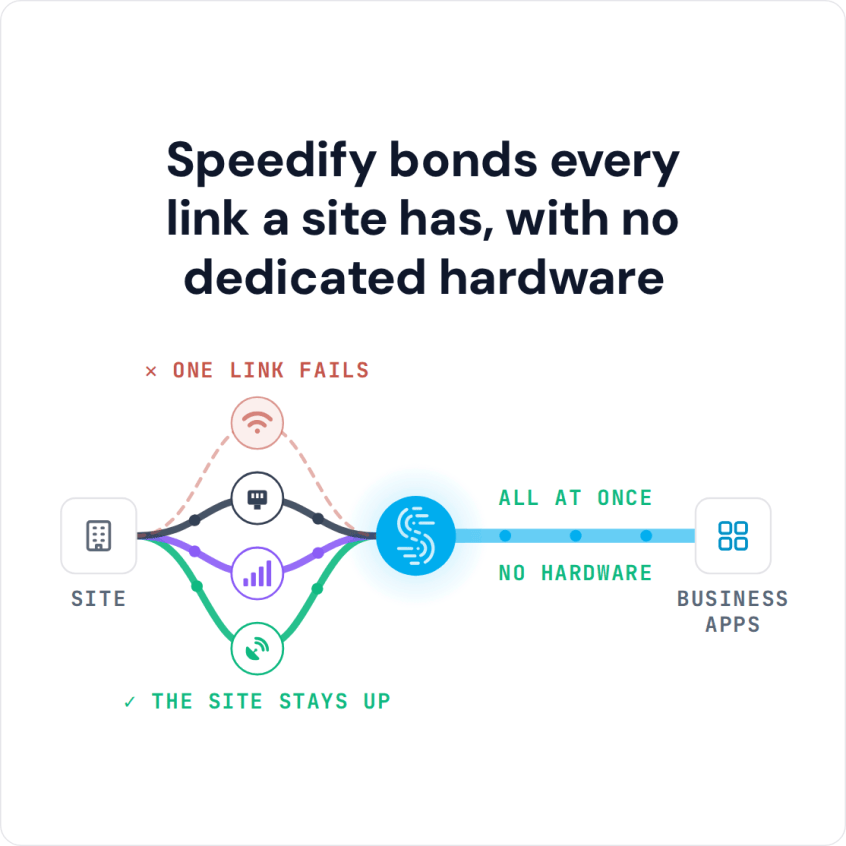
Speedify bonds every link a site has, with no dedicated hardware
This article covers how Speedify works at trade shows and conferences, what setups work best, and how to deploy it across your team.
Watch now
How Speedify combines internet connections on any hardware
Get started with Speedify for your business
Speedify offers three commercial paths. They work together, and most enterprise customers use two or more.
01
Speedify Teams
Speedify on every supported OS for every team member
Centralized dashboard for billing, user provisioning, and usage analytics
CSV import/export and a RESTful management API
02
Speedify for Routers
License for supported OpenWrt routers
Powered by Speedify hardware lineup ready to deploy out of the box
Miri, GL.iNet and other partner models
Covers every device on the network, with no per-device install
03
Embed Speedify into your product
A · DIY
Build it yourself with the Speedify SDK.
Integrate Speedify into your iOS, Android, Windows, macOS, Linux or QNX product. Full developer documentation, sample code and supported integration paths. Your team owns the build, and the Speedify SDK handles combining the internet connections.
B · CUSTOM ENGINEERING
Have the Speedify team build it for you.
Why Trade Show and Conference Internet Fails
Trade show and conference venues present some of the worst internet conditions you’ll encounter outside of a disaster zone. The problem is not the venue’s infrastructure in isolation. It’s the simultaneous load placed on that infrastructure by everyone in the building at the same time.
- Every exhibitor on the trade show floor is running their booth’s connected devices on the same shared venue Wi-Fi network.
- Every attendee in the conference center has their phone connected to the same cellular towers, congesting 4G/5G cellular coverage for the entire venue footprint.
- Venue-provided wired Ethernet at exhibitor booths is often shared infrastructure routed through a single uplink that services dozens of booths simultaneously.
- Keynotes, product launches, and live streams happen at exactly the moment when the venue network is under maximum load.
A single internet connection (whether venue Wi-Fi, venue Ethernet, or 4G/5G cellular) will degrade under these conditions. Teams that depend on a single connection for live demonstrations, video calls with remote stakeholders, live streaming, and real-time content uploads will encounter failures at the worst possible time.
Speedify combines all available internet connections at the same time, so your team’s internet reliability is not determined by which single connection happens to be least congested at any given moment.
Trade Show Wi-Fi vs Wired Ethernet for Booth Demos
Wired venue Ethernet is usually steadier than venue Wi-Fi for demos, because it does not compete over the air with every attendee’s phone and laptop. The booth’s wired line is still often shared with other booths through one uplink, so it can slow down at peak hours. For demos that cannot fail, use the booth’s wired line and 4G/5G cellular together rather than choosing one.
How Speedify Works at Trade Shows and Conferences
Speedify’s technology for combining internet connections distributes your internet traffic across all active connections in real time. At a trade show booth, this typically means combining three or more connections at once: the venue-provided wired Ethernet at the booth, the venue Wi-Fi network, and one or more 4G/5G cellular connections from different carriers via USB cellular adapters or tethered smartphones.
When the venue Ethernet slows down because other booths are saturating the shared uplink, Speedify automatically shifts more traffic to 4G/5G cellular. When a cellular carrier’s tower becomes congested, Speedify shifts load to the other carrier and to venue internet.
The result is a stable, usable internet connection that draws from all available sources rather than being limited to any one of them.
For live streaming from a booth or stage (product demos, keynotes, and conference sessions), Speedify’s Enhance Streaming mode prioritizes stream traffic over all other internet traffic on the production device and manages redundancy automatically when packet loss is detected.
Speedify and Multi-Connection Router Hardware, Compared for Trade Show and Conference Internet
| Feature | Multi-connection routers (Peplink, Teltonika and similar appliances) | Speedify |
|---|---|---|
| What you buy | A multi-connection router for every site or vehicle | A software subscription per user, running on devices you already operate |
| Typical entry cost | From roughly $500 for an entry LTE router to several thousand for a multi-SIM unit, plus a vendor cloud subscription | $89.99 a year per user, billed yearly |
| Internet connections combined | Ethernet, Wi-Fi and cellular, limited by how many SIM slots the model has | Ethernet, Wi-Fi, 4G/5G cellular and Starlink, up to 31 connections |
| Top combined throughput | Around 200 Mbps through the vendor’s cloud service on common models | 300 Mbps on shared servers, up to 1 Gbps on a Dedicated Server |
| Static IP and port forwarding | A vendor cloud add-on | A Dedicated Server or Self-Hosted Server add-on, from $75 a month |
| Central management | The vendor’s own dashboard | The Speedify Teams dashboard, with per-device analytics and a REST API |
| Moving between sites or vehicles | Ship or reinstall the appliance | Sign in on another device |
| If you do want hardware | Required | Optional: a Router License on a compatible OpenWrt router, or the Miri X510 |
Trade Show and Conference Internet Setups with Speedify
- Booth deployment via Speedify for Routers. Install Speedify on a Miri X510 router or an OpenWrt-compatible router at the booth. Connect venue Ethernet and any available Wi-Fi as WAN inputs. Connect USB cellular adapters from two or more different carriers to add 4G/5G cellular connections and failover. Every device at the booth (demo screens, laptops, tablets, presentation hardware) automatically gets the combined connection without any per-device configuration.
- Per-device deployment via Speedify Teams. For team members who need reliable internet on individual laptops and phones throughout the conference (not just at the booth), install Speedify on each device. Speedify on each device combines the venue Wi-Fi it’s connected to with the device’s own 4G/5G cellular connection. Manage all devices from the centralized Speedify Teams Dashboard.
- Live streaming setup for keynotes and demos. For product launches and keynotes streamed live from the event, combine venue Ethernet with 4G/5G cellular from multiple carriers on the production laptop. Use Speedify’s cellular sharing feature to wirelessly pull additional cellular connections from other team members’ phones at the venue for additional upload throughput during the broadcast. For a full production crew, see live event production without a rack of hardware.
How to Set Up Speedify for a Trade Show or Conference
- Before the event, set up a Speedify Teams account and add all team members who will need internet access at the event. Purchase the appropriate number of Speedify Router Licenses if deploying on booth routers.
- At the venue, connect a Miri X510 or compatible OpenWrt router to the venue-provided Ethernet at the booth. Connect USB cellular adapters from two different carriers to the router as additional WAN inputs. Install Speedify on the router and activate the Router License.
- Connect all booth devices to the router’s local Wi-Fi. Every device on the network immediately benefits from Speedify’s combined connection.
- For individual team members moving through the conference, confirm Speedify is installed and signed in on each device. Speedify combines venue Wi-Fi with the device’s 4G/5G cellular automatically.
- For live streaming from the event, open Speedify on the production laptop and confirm all internet connections are active in Speedify before starting the stream. Test upload speed against your target bitrate before going live.
Which Businesses Need Speedify at Trade Shows and Conferences
- Technology and SaaS companies. Companies doing live software demonstrations at booths or on conference stages need a reliable internet connection for cloud-based products. A demo that fails due to a dropped internet connection is a direct sales impact. Speedify provides the combined, redundant connection that prevents this.
- Media and marketing agencies. Agencies managing live social media coverage, on-site video production, and real-time content uploads from conferences depend on reliable upload throughput in congested venue environments. Speedify combines all available connections to keep uploads and streams running throughout the event day.
- Event AV and production companies. AV teams managing live streams of keynotes, panel discussions, and conference sessions from venues where they don’t control the internet infrastructure. Speedify combines the upload speed of whatever connections are available at the venue.
- Sales teams at trade shows. Sales representatives running video calls with remote stakeholders, accessing CRM systems, and making presentations from booth laptops need stable internet throughout the show floor hours. Speedify keeps individual devices connected through venue network congestion.
- Broadcast and media companies. Press and media teams covering conferences and trade shows who need to upload video, file stories, and go live from the venue floor. Speedify combines available connections and encrypts all traffic for secure reporting in shared network environments.
Speedify Plans for Trade Shows and Conferences
Speedify Teams is the right plan for businesses deploying at trade shows and conferences. Speedify Teams gives IT and event managers a centralized dashboard to add team members, monitor connection performance across all devices, and manage deployments before, during, and after the event. The REST API allows automated user provisioning for large teams.
For booth deployments that need network-wide coverage from a single hardware device, a Speedify Router License runs Speedify on a compatible OpenWrt router or Miri X510. For production teams that need dedicated upload bandwidth and a static IP address for streaming platform whitelisting, Speedify Dedicated Servers are available as a Teams add-on.
How to Set Up Speedify with Starlink at a Trade Show or Conference
Step 1: Deploy Starlink at or Near Your Booth
Set up your Starlink dish with a clear view of the sky outside the venue or at a rooftop access point. Use the Starlink app to confirm signal. Run the Starlink connection to your booth via Ethernet.
Step 2: Add 4G/5G Cellular as a Second Internet Connection
Connect a 4G/5G cellular modem or hotspot to your booth router or device. Use SIM cards from two different carriers if you can: attendees’ phones crowd each carrier’s towers at peak hours, so a second carrier gives Speedify another path when one slows down.
Step 3: Download and Run Speedify
Download Speedify on your booth device or router. Speedify detects all active connections and begins combining them. Your booth internet becomes faster and more resilient automatically.
Speedify Business Solutions
Speedify Teams
Speedify for Routers

Speedify Embedded Solutions and Integrations
Add Speedify to your own app or hardware with the Speedify SDK. Your product then combines internet connections, fails over automatically when one drops, and encrypts the traffic, using the same technology as the Speedify app.