
Unbreakable VPN Connection to Connect to McDonalds Wi-Fi by Combining Multiple Internet Sources with Speedify
Sitting at McDonald’s with a laptop, you pick the restaurant Wi-Fi, the icon says connected, and the sign-in page never arrives. Even after it does, a hotspot shared with a full dining room uploads files at a crawl.
Speedify helps with both. Speedify runs on the McDonald’s Wi-Fi and your phone’s 4G/5G cellular connection at once, adding their speeds together instead of picking one, and encrypts everything so nobody on that network can read it. Those gains need both connections; on the restaurant Wi-Fi alone, Speedify works as an encrypted VPN and can be a little slower.
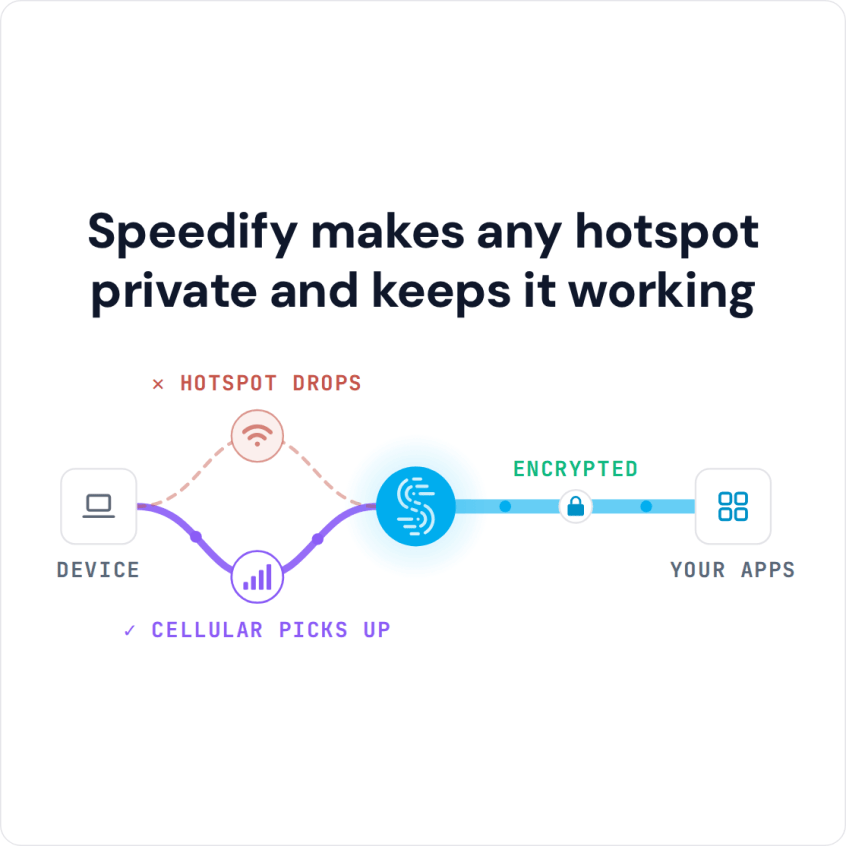
Speedify makes any hotspot private and keeps it working
Most of the time the fix is getting that sign-in page to open: forget the network and join it again, open any web address that starts with http:// in a new browser tab, or pause your VPN while you sign in. The sections below explain what those sign-in pages are, why a VPN keeps them from loading, and how Speedify opens the page with your other traffic still encrypted and makes the restaurant internet connection fast enough to work on.
What a Captive Portal Is and Why McDonald’s Wi-Fi Uses One
To see why you can’t connect to McDonald’s Wi-Fi, start with captive portals.
Captive portals are web pages that the user of a public network is redirected to once they connect to the Wi-Fi hotspot. They must interact with those before they are able to access the Internet.
You’ve seen this: when you join the McDonald’s Wi-Fi hotspot, a webpage asks you to accept the terms and conditions before you get internet access. To connect, pick the restaurant’s Wi-Fi network from your device’s Wi-Fi list (the network name varies by country), wait for that page to open, and accept the terms.
Why you can’t connect to McDonald’s Wi-Fi is hard to pin down from a customer’s seat. Sometimes the captive portal itself fails; a computer set to use a custom DNS server can cause problems with a captive portal; and a VPN keeps the sign-in page from loading. When the fault is in the restaurant’s network, you as a customer cannot fix it.
Besides the quick fixes above, switch off any custom DNS (Private DNS on Android) while you sign in, and if a VPN is running, turn it off for a moment or use Speedify, which handles the sign-in page for you.
How to Connect to McDonald’s Wi-Fi When Using a VPN
If you care about your online security and privacy, you may already use a VPN, and it is worth using one on public Wi-Fi hotspots. A VPN encrypts your data, which makes it much harder for anyone on the network to steal personal and sensitive information like social media passwords and credit card details.
However, you may have noticed that you can’t connect to McDonald’s Wi-Fi while the VPN is on. You have to disconnect the VPN to sign in, which leaves your traffic exposed on a public network.
With a VPN on, your device sends everything through the encrypted tunnel to the VPN server, so the request never reaches the McDonald’s login page, and the hotspot will not carry the tunnel’s traffic until you accept the terms. So you cannot get online at all.
Speedify gets around this: it shows you the McDonald’s sign-in page while the rest of your traffic stays encrypted.
Use the McDonald’s Wi-Fi with a VPN and Stay Safe Online
When you join the McDonald’s Wi-Fi hotspot while running Speedify, Speedify will:
- Show you a notification asking if you want to log in.
- Keep you connected over 4G/5G cellular, so your other online activities (like Microsoft Teams or Slack calls, streaming and gaming) continue over the cellular connection, protected by Speedify, without dropped calls or streams.
- If you click the notification prompting you to connect to the McDonald’s Wi-Fi hotspot, Speedify will pop up the login screen in a window.
- Once you log in successfully, Speedify will immediately start using the Wi-Fi connection, switching from cellular to Wi-Fi without stopping anything you are doing online.
Speedify does this by combining internet connections: it uses multiple Internet connections at once, in this example Wi-Fi and 4G/5G cellular on your smartphone or laptop.
On the next public Wi-Fi hotspot with a sign-in page, you can log in without switching your encryption off.
Speedify
Get started with Speedify today.
Speedify combines Wi-Fi, 4G/5G cellular, Ethernet, Starlink and satellite into one faster, more reliable internet connection. Free to try: 5 GB a month with a free account. No credit card required.
🚀 Speed
Faster uploads and downloads, because Speedify uses all your internet connections at once.
📶 Stability
If one internet connection drops, Speedify moves your traffic to the others in milliseconds.
🔒 Security
AES-256 encryption on every internet connection, on any network you join.



15M+ downloads worldwide. 75K+ five-star reviews on iOS and Android.