
An Egypt VPN keeps your traffic private on hotel, cafe and airport Wi-Fi shared with strangers. VPNs are not explicitly banned in Egypt, though the law gives authorities broad discretion, and some VPN services have been blocked at times, which is one reason a VPN stops working there.
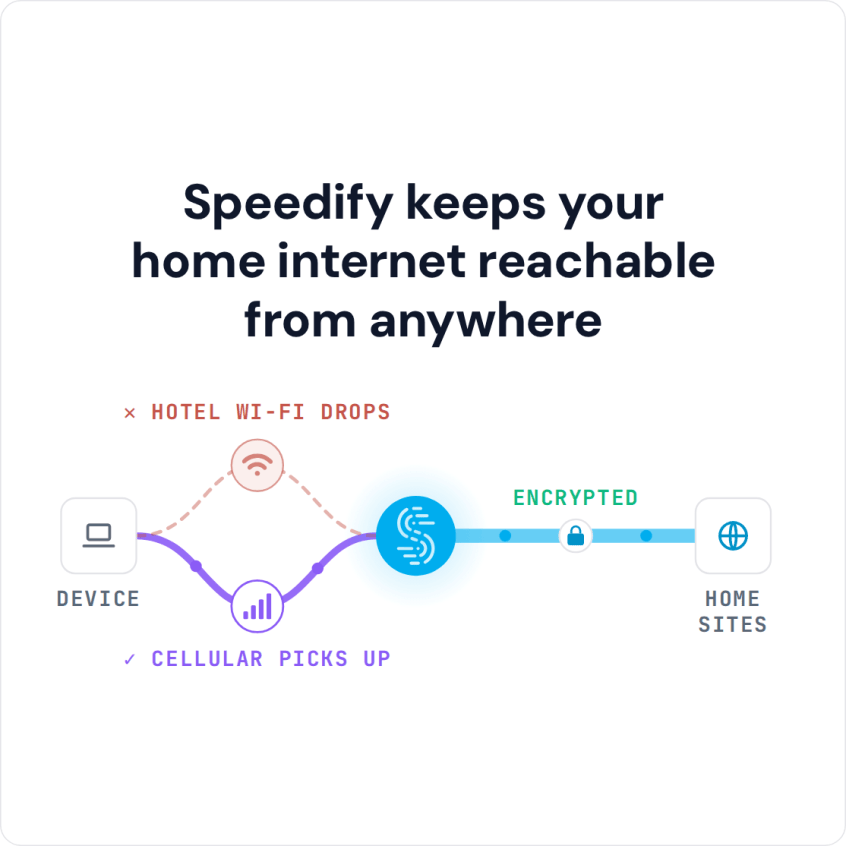
Speedify encrypts your internet traffic like a VPN while using two internet connections at once: the hotel Wi-Fi plus 4G/5G cellular from an Egyptian SIM card. With only the hotel Wi-Fi, Speedify works as an encrypted VPN and cannot stop that Wi-Fi from freezing a call.
Read on for the steps to set up Speedify, the reasons residents and visitors use an Egypt VPN, what Egyptian law allows, and why free VPN apps are a poor bet. With Speedify running, your traffic stays private on shared Wi-Fi and calls stop freezing when that Wi-Fi weakens.
How to Set Up Speedify as an Egypt VPN in Five Steps
- Download Speedify on the phone or computer you bring to Egypt. Speedify runs on Windows, macOS, iOS, Android and Linux.
- Open Speedify and create a free account (the free tier includes 5 GB per month on Windows, macOS, iOS and Android; Linux needs a paid plan), or sign in.
- On a phone, tap Allow when your phone asks to add a VPN configuration.
- Speedify connects to a Speedify server automatically. The hotel or café Wi-Fi network now sees only an encrypted connection to that server, not the apps and sites you open.
- Open the apps and sites you need and use them as usual.
Why a VPN Stops Working in Egypt, and What to Try
A VPN usually stops working in Egypt for one of three reasons. Egypt has blocked VPN services before: between 2017 and 2020, Egyptian authorities blocked about 400 VPN and proxy services, and Freedom House rates Egypt’s internet “Not Free” in its 2025 report. Hotel and airport Wi-Fi often blocks the ports a VPN uses, or holds every connection until you accept its login page. And a weak Wi-Fi signal can drop a VPN connection even when nothing is blocked.
- Install Speedify before you travel. If a VPN provider’s website is blocked in Egypt, you cannot download the app or sign in for the first time there. Install Speedify and sign in at home.
- Accept the Wi-Fi login page first. Open a browser, accept the hotel or airport login page, then connect Speedify.
- Switch Speedify to HTTPS. Speedify’s Transport Mode is set to Auto, which tries TCP and UDP and uses HTTPS only when those cannot connect. On a network that lets TCP and UDP through but slows them to a crawl, set Transport Mode to HTTPS by hand. HTTPS adds overhead, so expect some speed loss.
- Add 4G/5G cellular from an Egyptian SIM card. Speedify needs higher-numbered ports, usually above 49000. If the hotel Wi-Fi blocks them, Speedify can still connect over cellular, and it uses the Wi-Fi again as soon as the Wi-Fi lets it through.
Reasons to Use a VPN in Egypt
Egypt monitors and filters parts of the internet. Freedom House documents extensive internet monitoring and censorship measures, and some international websites, social media platforms and calling apps have been blocked or restricted at times.
Egypt’s internet infrastructure, while improving, still has connectivity problems in some regions, and outages and slowdowns happen, especially at peak hours. Encryption alone does not fix a weak connection; a second internet connection, such as 4G/5G cellular next to Wi-Fi, keeps you online when one of them falters.
Tourists and business travelers use a VPN to keep their traffic private on hotel, café and airport Wi-Fi, which is shared with strangers and often poorly secured. Some banking apps, streaming services and news sites from home may also work differently or not at all from an Egyptian IP address.
How to Choose the Right Egypt VPN
When choosing an Egypt VPN, look at a few factors specific to Egypt’s internet. Start with server locations: look for providers with servers in nearby regions like Europe and the Gulf states, which keeps the distance your traffic travels short.
Speedify has no server in Egypt; the nearest Speedify server locations include Tel Aviv, Istanbul and Dubai.
Connection stability matters as much as encryption, because a VPN is only as steady as the internet connection under it. Look for a VPN that keeps working when the local network fluctuates, and check whether it offers multiple protocol options.
For security, look for encryption standards (AES-256), a published privacy policy that says what is and is not logged and DNS leak protection, so your traffic stays private on shared networks.
Customer support availability is particularly important for an Egypt VPN, as users may need assistance with connection issues or advice on optimal server selection. Look for providers offering at least email support.
Why You Should Avoid Free VPNs for Egypt
Free VPN apps are a poor fit for Egypt. Most free VPN providers do not have the money to run secure, reliable servers, and crowded free servers struggle on networks that are already weak.
Data privacy concerns are amplified when using free services in Egypt. These providers often monetize their offerings by collecting and selling user data, which could potentially be shared with third parties or even government entities. This defeats the fundamental purpose of using a VPN for privacy protection.
Performance limitations make free VPNs practically unusable for most activities in Egypt. Bandwidth restrictions, overcrowded servers, and limited protocol options result in extremely slow connections that cannot handle basic internet activities, let alone streaming or video conferencing.
Free VPNs can also expose you to risks beyond surveillance: weak encryption, logging and, in some apps, injected malware. A free tier from a paid service is a different case: Speedify’s free tier is the same app with a 5 GB monthly limit, so you can test it before paying.
Legal Aspects when Using a VPN in Egypt
The legal status of Egypt VPN usage exists in a gray area under current Egyptian law. While VPNs are not explicitly banned, their use falls under broader internet regulations that give authorities significant discretion in enforcement. The government has historically taken action against VPN providers and users during periods of heightened security concerns.
Egyptian telecommunications law requires all internet services to comply with government monitoring requirements, and authorities have blocked access to various VPN websites and services intermittently. However, many businesses, educational institutions, and individuals continue to use VPNs for legitimate purposes without interference.
The key to legal Egypt VPN use is using a VPN for privacy protection, business communications and legitimate content, not to get around specific government restrictions or for prohibited activities. While VPN technology itself is not illegal, the government keeps broad authority to regulate internet access.
It’s advisable to research current regulations and choose VPN providers with strong privacy policies and no local presence that could be subject to Egyptian jurisdiction.
How Speedify Keeps an Egypt VPN Connection Private and Fast
Speedify does more than most VPNs: it can improve your internet’s performance along with your online privacy.
Speedify combines internet connections: it uses Wi-Fi, 4G/5G cellular, Ethernet, Starlink and satellite connections at the same time. Combining them helps in Egypt, where internet connectivity is often weak, especially for upload, which causes problems with live streaming, video calls and other heavy internet use.
Combining connections also answers the most common VPN complaint: slow VPN speeds. Speedify splits your traffic across all of your connections, so streaming, video conferences and browsing stay fast and reliable even when one connection weakens.

For businesses and individuals who need consistent internet access in Egypt, Speedify keeps the connection private and, once you add a second internet connection such as 4G/5G cellular, holds it steady when the first one weakens. If your problem is speed rather than privacy, see how to get faster internet in Egypt.
Speedify
Get started with Speedify today.
Speedify combines Wi-Fi, 4G/5G cellular, Ethernet, Starlink and satellite into one faster, more reliable internet connection. Free to try: 5 GB a month with a free account. No credit card required.
🚀 Speed
Faster uploads and downloads, because Speedify uses all your internet connections at once.
📶 Stability
If one internet connection drops, Speedify moves your traffic to the others in milliseconds.
🔒 Security
AES-256 encryption on every internet connection, on any network you join.



15M+ downloads worldwide. 75K+ five-star reviews on iOS and Android.