

Share an Unbreakable VPN Connection over Wi-Fi by Combining Starlink, Wi-Fi, 4G, 5G, and DSL with Speedify
One Windows laptop can share a VPN over Wi-Fi with every screen in the house. Turn that laptop into a Wi-Fi hotspot, a Wi-Fi network the laptop broadcasts the way a router does, and every device that joins it goes online through the same encrypted VPN connection: a Roku, a Chromecast, a games console, a visitor’s phone.
Speedify, an app that encrypts your traffic like a VPN, provides that encrypted connection, and Connectify Hotspot, a separate Windows app, does the sharing. Speedify can also combine the laptop’s own internet connections, for example Ethernet plus a tethered phone’s 4G/5G cellular, for more speed and failover. That gain needs two or more connections; on one connection Speedify works as an encrypted VPN and can be a little slower. Setup takes three steps and about five minutes.
What You Need to Share a VPN over Wi-Fi from a Windows Laptop
Here’s what you need to share your VPN connection over Wi-Fi:
- A working Windows laptop or PC with a Wi-Fi card or dongle. This can be the laptop you’re currently using or an older laptop or PC that’s just collecting dust
- A VPN that can keep up with all your devices at once: Speedify is a next generation mobile VPN that can combine multiple internet connections for more bandwidth
- A hotspot app that shares the VPN internet connection from the laptop or PC over Wi-Fi: Connectify Hotspot, which works as a virtual router inside your Windows machine. The free version runs 60-minute hotspot sessions that you can restart; Connectify Hotspot PRO removes that limit and adds a custom hotspot name.
3 Steps to Share a VPN over Wi-Fi in About 5 Minutes
Follow these steps on the Windows laptop or PC:
- Download and install Connectify Hotspot and Speedify on your Windows laptop or PC
- Open Speedify and connect to a server (usually the closest is best). If the laptop has two or more internet connections, for example Ethernet and a tethered phone’s 4G/5G cellular, you can combine and use them at the same time with Speedify for more bandwidth, plus failover if one connection drops.
- Run Connectify Hotspot. Under Wi-Fi Hotspot mode, set a password (a custom hotspot name needs Connectify Hotspot PRO), select the “Speedify Virtual Adapter” from the Internet to Share drop-down menu, then click “Start Hotspot”.
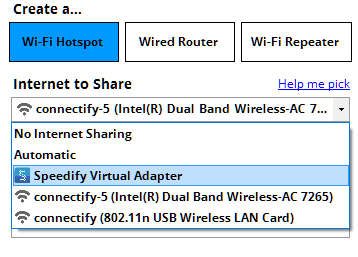
Now connect your devices to the hotspot you set up in Connectify. All traffic going through this Wi-Fi hotspot is encrypted by Speedify.
A VPN and Wi-Fi Work at the Same Time
A VPN does not replace Wi-Fi. A device connects to the internet over Wi-Fi as usual, and the VPN runs on top of that connection, encrypting everything sent over it, so you use a VPN and Wi-Fi at the same time. Sharing the VPN over Wi-Fi, as in the steps above, lets devices that cannot run a VPN app use that encrypted connection too.
Sharing a VPN from a Router Instead of a Laptop
Speedify also runs on routers: OpenWrt 23.05 or later (x86_64 and aarch64), GL.iNet firmware on listed models, and Powered by Speedify routers such as the Miri X510. A router needs a paid Router License (there are no free accounts on routers), and every device on its Wi-Fi then goes online through Speedify without a laptop left running.
Additional Benefits of Sharing a VPN over Wi-Fi with Connectify Hotspot
Outside of helping you share a VPN over Wi-Fi easily, there are other perks of using Connectify as your personal hotspot app:
- Save bandwidth and time with the embedded universal ad blocker. You can also eliminate ads from native iPhone and Android apps.
- Extend your range with Wi-Fi repeater mode: rebroadcast your existing Wi-Fi network so it reaches more rooms (Wi-Fi Repeater mode is part of Connectify Hotspot MAX).
- Save money while traveling: stuck at a hotel that charges for Internet per-device? With Connectify Hotspot, join the Wi-Fi, start a hotspot, and get all of your devices online for the price of one.
- Share any type of Internet Connection with All your Devices: Connectify Hotspot shares Internet from existing Wi-Fi networks and Ethernet, and Connectify Hotspot PRO also shares from 4G/5G cellular devices and tethered smartphones. Speedify can also share its connection with your phones and tablets.
How Speedify Keeps a Shared VPN Connection Private and Steady
Using a VPN will protect you, but most of them will also slow down the Internet, as all data passes through their servers first before going to or from its final destination.
Speedify is a next generation mobile VPN built for speed and reliability. Speedify encrypts traffic with standard, fast ciphers (AES-256-GCM or ChaCha20-Poly1305 over DTLS 1.2), and with two or more internet connections Speedify adds their bandwidth together. That extra bandwidth matters when several devices share the same VPN connection.
Speedify keeps no record of the sites you visit and does not sell personal data, unlike some VPNs and even your own ISP, which may sell browsing data to advertisers. Speedify does record connection details (IP address, device ID, connection time and data used), as its privacy policy explains.
Protect all traffic from your household with Speedify and Connectify Hotspot, a flexible personal hotspot app. Get started with Speedify now: the free tier gives you 5 GB per month with a free account.
Speedify
Get started with Speedify today.
Speedify combines Wi-Fi, 4G/5G cellular, Ethernet, Starlink and satellite into one faster, more reliable internet connection. Free to try: 5 GB a month with a free account. No credit card required.
🚀 Speed
Faster uploads and downloads, because Speedify uses all your internet connections at once.
📶 Stability
If one internet connection drops, Speedify moves your traffic to the others in milliseconds.
🔒 Security
AES-256 encryption on every internet connection, on any network you join.



15M+ downloads worldwide. 75K+ five-star reviews on iOS and Android.