
Get an Unbreakable VPN Connection for Tablets by Combining Starlink, Wi-Fi, 4G, 5G, and DSL with Speedify
A VPN for a tablet encrypts everything your iPad or Android tablet sends and receives, so nobody else on the network can read it. Picture your tablet on airport Wi-Fi, syncing work files that should stay private.
Speedify is an app for iPadOS and Android that encrypts that traffic (scrambles it, so strangers on the hotspot see nothing usable) while running your tablet’s Wi-Fi and 4G/5G cellular together instead of one at a time.
Read on for the reasons a tablet needs a VPN, the truth about VPN apps slowing tablets down, and what Speedify changes on your iPad or Android tablet: private traffic, quicker file transfers, and no interruption when the airport Wi-Fi gives out. The speed and failover gains need two internet connections, such as Wi-Fi plus 4G/5G cellular on a cellular model, or a phone’s 4G/5G added through Speedify’s cellular sharing feature. On Wi-Fi alone, Speedify works as an encrypted VPN and can be a little slower.
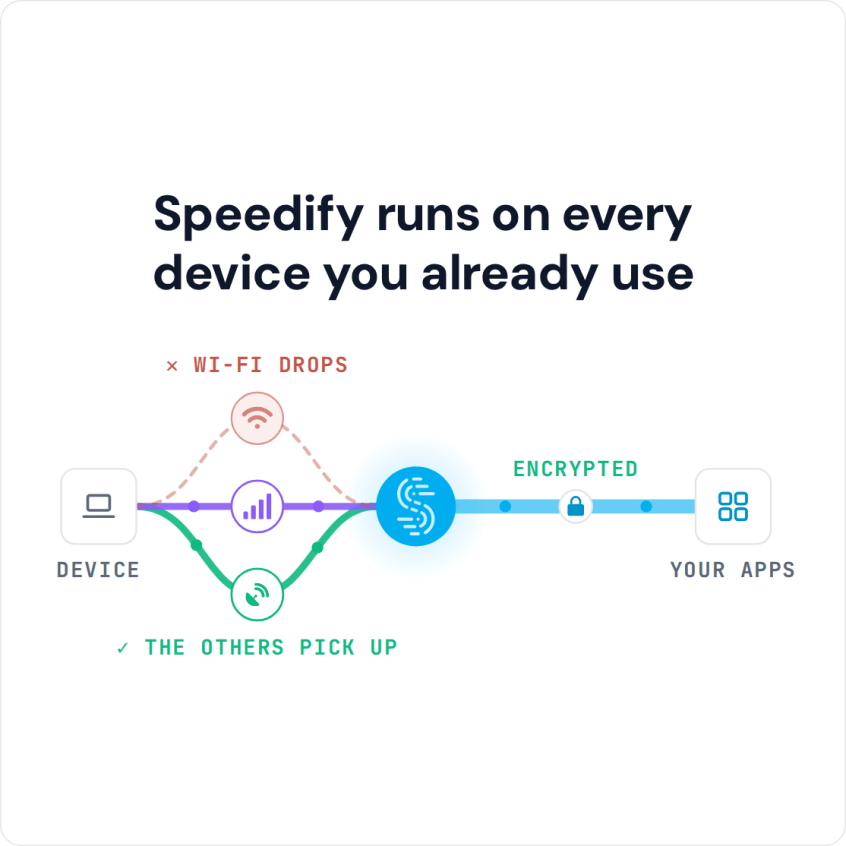
Speedify runs on every device you already use
Reasons to Use a VPN on iPad or Android Tablet
Every device you use, including iPads and Android tablets, is constantly connected to the Internet. Tablets sync your email and social media accounts. But what if somebody intercepts that internet traffic and gets hold of your credit card numbers, social media passwords or email password?
Tablets are portable, so they are great for gaming, drawing and watching streaming movies. When you travel abroad, a VPN helps you reach your own home services and subscriptions, though streaming services set their own regional rules in their terms.
Here are the main reasons people use a VPN on a tablet:
- Reach your own home services and subscriptions while you travel.
- Avoid internet censorship.
- Get past network blocks at the office, at school or in college.
- Avoid ISP throttling.
There is one more reason to use a VPN on your tablet, and it is the one most people miss: speed.
How Speedify Avoids the Usual VPN Slowdown on iPads and Android Tablets
Traditional VPNs slow down your internet speed: with strong encryption and your traffic making one additional stop at the VPN server, a VPN on one connection makes your internet a little slower.
Speedify is a VPN app that combines connections: it secures your online traffic while getting you faster, more reliable Internet when your tablet has two internet connections.
- As a VPN, Speedify encrypts your internet traffic, so the networks you use cannot read it, and it can load websites that a local network blocks.
- With its technology for combining internet connections, Speedify lets you combine multiple different networks at once to provide faster internet.
With two connections, Speedify makes up for the usual VPN slowdown and can improve your internet speed.
What Speedify Adds as a VPN for iPads and Android Tablets
Speedify lets your tablet use its 4G/5G cellular and Wi-Fi connections together, plus others such as wired Ethernet through an adapter, if the tablet supports it. See how Speedify combines Wi-Fi and 4G/5G cellular on an iPad. If you mainly use an iPad, here is what to look for in an iPad VPN.
On a cafe’s free Wi-Fi, that encryption means a hacker on the same network cannot read your traffic while you enjoy your pumpkin spice latte and catch up on work or banking.
By combining multiple different connections into one, Speedify gives you boosted speeds and a more reliable connection. Speedify also offers failover protection: when one connection drops, your traffic moves to the other with the same public IP address, so you stay connected.
There are more reasons to use a VPN on tablets, and Speedify covers them too. Get started by downloading Speedify from the Apple App Store or Google Play Store; the free tier includes 5 GB per month with a free account.
How to Install, Change or Turn Off a VPN on a Tablet
To set up Speedify on a tablet, download it from the App Store on an iPad (iPadOS 17 or later) or from Google Play on an Android tablet (Android 9 or later). Open Speedify, create a free account (5 GB per month) or sign in, and tap Allow when the tablet asks to add a VPN configuration. Speedify then connects to a server automatically; to change servers, open Servers and pick a country or city. To turn the VPN off, disconnect in the Speedify app.
Speedify
Get started with Speedify today.
Speedify combines Wi-Fi, 4G/5G cellular, Ethernet, Starlink and satellite into one faster, more reliable internet connection. Free to try: 5 GB a month with a free account. No credit card required.
🚀 Speed
Faster uploads and downloads, because Speedify uses all your internet connections at once.
📶 Stability
If one internet connection drops, Speedify moves your traffic to the others in milliseconds.
🔒 Security
AES-256 encryption on every internet connection, on any network you join.



15M+ downloads worldwide. 75K+ five-star reviews on iOS and Android.