
How to Stay Connected and Minimize Lag While Gaming on Steam
Does a VPN have to knock you out of ranked matches on Steam? Not if the VPN stops relying on one internet connection. Any VPN adds a short detour through its server, so expect steadier play, not lower ping.
Speedify is an app that encrypts your internet traffic the way a VPN does, then spreads that traffic across Wi-Fi, 4G/5G cellular, wired Ethernet, Starlink and other internet connections at once. When one internet connection wobbles, Speedify moves your Steam traffic to the others, so the match continues. That needs two or more internet connections; on a single connection, Speedify works as an encrypted VPN and can be a little slower. Inside: how Steam treats VPNs, what to look for in one, how to set Speedify up, and how Speedify gives you steadier play.
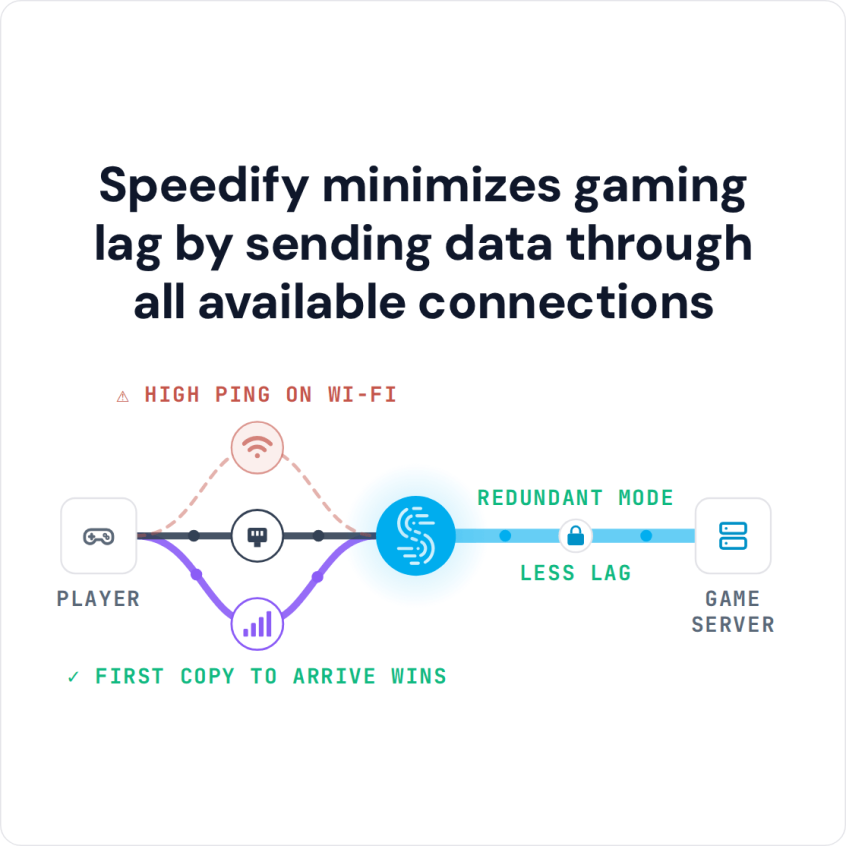
Speedify minimizes gaming lag by sending data through all available connections
How to Set Up Speedify as a VPN for Steam
- Download Speedify on the Windows PC or Mac you play Steam on.
- Open Speedify and create a free account (the free tier includes 5 GB per month), or sign in.
- Add a second internet connection if you have one, for example your phone over USB tethering (an iPhone works on a Mac or a Windows PC, an Android phone on Windows) or Ethernet next to Wi-Fi. Speedify uses them together.
- Speedify connects to a Speedify server automatically. Keep a server in the country you are in, then open Steam and play as usual.
Steam Deck: Speedify’s Linux app supports Ubuntu 22.04 or later, Debian 11 or later and Raspberry Pi OS, and SteamOS is not on that list. To protect a Steam Deck, run Speedify on a supported router (a Router License covers OpenWrt 23.05 or later, GL.iNet firmware and Powered by Speedify routers) or on a computer that shares its connection, and connect the Steam Deck to that network.
Why Gamers Need to Use VPNs for Steam
Living in developed gaming markets doesn’t shield you from the network issues that plague online gaming. In fact, being in major metropolitan areas often means dealing with network congestion during peak hours when everyone’s trying to game after work or school.
Privacy has become a major concern for serious gamers. With the rise of swatting incidents and targeted harassment in competitive communities, protecting your real IP address isn’t paranoia, it’s smart gaming. DDoS attacks targeting streamers and pro players have made VPN protection standard practice in the esports community.
ISP throttling is another problem in some countries. Some internet providers manage gaming traffic at peak hours, causing lag spikes or lower speeds right when you need steady performance. A VPN encrypts your traffic, so the provider cannot tell game traffic apart and slow it down by type.
Routing matters too, but do not expect a VPN to lower your ping: the extra stop through a VPN server usually adds a little latency. A VPN helps with steadiness, not raw ping.
Why Most VPNs Ruin Your Gaming Experience
Traditional VPNs create a nightmare scenario for Steam users. Picture this: you’re in the final round of a ranked match, your team is counting on you, and suddenly your VPN drops. Your real IP gets exposed, Steam disconnects you from the server, and you may be hit with a competitive cooldown penalty.
If your VPN connection drops, so does the protection that a VPN provides. This creates a domino effect that every serious gamer dreads: connection drops lead to rank penalties, exposed IP addresses make you vulnerable to attacks, and inconsistent performance destroys your competitive edge.
The technical limits of some VPNs show up quickly in games. A VPN that tunnels over TCP adds buffering and delay that make fast-paced games feel sluggish, while real-time games send their traffic over UDP, so a gaming VPN has to carry UDP traffic well.
Network handoffs are the ultimate failure point. When your connection switches between Wi-Fi and 4G / 5G cellular, or when your main internet connection hiccups, a traditional VPN drops and forces a full reconnection. Those seconds of downtime are enough to lose a match and hurt your ranking.
How Steam Handles VPNs: What You Need to Know
Steam watches for VPN use mainly to stop region manipulation for pricing. The platform’s Terms of Service say you are not allowed to use a VPN “for circumvention purposes”, meaning spoofing your location in any way to buy products or access content (games, DLCs) from another region.
The “Steam please disconnect from VPNs or proxies and try again” error typically appears when Steam suspects you’re trying to access region-locked content or purchase games at different regional prices. For legitimate privacy and performance use, this rarely becomes an issue.
However, using a VPN for Steam might get you banned if you use it for cheating, accessing region-restricted games, or changing your location to buy games at lower prices. Valve’s Steam Subscriber Agreement goes further: you agree not to use IP proxying or other methods to disguise where you live, for any purpose, and Valve may end access to the account if you do. With Speedify, stay on a server in the country you live in.
If Steam still shows the “disconnect from VPNs or proxies” error, switch Speedify to a server in the country you live in, or turn Speedify off while you use the Steam store. Speedify’s Bypass setting (Settings > Bypass) can also send chosen sites directly from your device, outside the encrypted tunnel, while the rest of your traffic stays encrypted.
Technical Requirements for Gaming VPNs
Competitive gaming demands VPN specifications that go far beyond what casual browsing requires. Latency becomes the make-or-break factor; anything above 50ms additional delay can impact your reaction times in first-person shooters or fighting games.
Jitter consistency matters more than raw speed for gaming applications. A connection that delivers consistent 40ms ping is infinitely better than one that fluctuates between 20ms and 80ms. Look for VPNs that specifically optimize for latency stability rather than peak bandwidth.
Protocol optimization separates gaming VPNs from general-purpose services. UDP protocols provide the low-latency packet delivery that real-time games require, while TCP connections introduce buffering delays that destroy competitive performance.
Server infrastructure quality directly correlates with gaming performance. Premium gaming VPNs maintain dedicated gaming servers with direct peering agreements to major game networks, reducing the number of network hops between you and the game servers.
How Speedify Keeps Steam Games Connected
Speedify takes a different approach, combining internet connections: Wi-Fi, 4G/5G cellular, Ethernet, Starlink and satellite act together as one faster, more reliable internet connection.
Instead of depending on a single internet connection that can fail, Speedify uses all of your connections at once and distributes your traffic between them as conditions change.
For competitive Steam games, that removes the single point of failure. When your main connection hits packet loss or congestion, the game carries on over your other connections. Your traffic still leaves through the same Speedify server, so your public IP address stays the same during the switch and the game server does not see a new address.
Speedify also gives real-time traffic such as games, video calls and streams priority over downloads and updates on the same device, so a background update does not cause stutter mid-match.
Advanced VPN Gaming Configuration for Maximum Performance
If you’re experiencing slow speeds or high latency while using a VPN, try setting your Transport Mode to UDP or TCP Multiple, if available.
In Speedify, check the Bonding Mode setting. Speed Mode with Enhance Streaming is the default; switch to Redundant Mode when steadiness matters more than data use.
- Speed Mode spreads traffic across all your connections at once for the most throughput, which helps most with large downloads and updates for games like Call of Duty or Apex Legends.
- Redundant Mode sends duplicate packets across multiple connections, ensuring data delivery even when individual connections have problems. It suits competitive games where any packet loss can decide a round, and it uses more data, since every packet is sent more than once.
Server selection matters less when Speedify combines your connections, but a nearby server still gives the lowest base latency. Speedify spreads traffic across your available connections to smooth out differences between them.
The Competitive Gaming Advantage of Using Speedify as a VPN for Steam
Competitive players care most about consistent network performance under pressure; the difference between winning and losing often comes down to a connection that does not stall.
A second internet connection also takes one worry away: when one connection drops mid-match, the game keeps going over the other.
As anti-cheat systems become more sophisticated and competitive gaming grows more demanding, the ability to maintain stable, protected connections while avoiding the pitfalls of traditional VPNs becomes a genuine competitive advantage.
Use Speedify as a VPN for Steam to Keep Matches Connected
Using a VPN for Steam should not mean trading performance for privacy. By combining internet connections, Speedify gives you a more reliable connection than a single unprotected one, while keeping the security and privacy benefits of a VPN.
With two or more internet connections, a dropout on one no longer has to cost you the match, the rank or the session.
Download Speedify and see how combined internet connections keep your Steam games running.
Speedify
Get started with Speedify today.
Speedify combines Wi-Fi, 4G/5G cellular, Ethernet, Starlink and satellite into one faster, more reliable internet connection. Free to try: 5 GB a month with a free account. No credit card required.
🚀 Speed
Faster uploads and downloads, because Speedify uses all your internet connections at once.
📶 Stability
If one internet connection drops, Speedify moves your traffic to the others in milliseconds.
🔒 Security
AES-256 encryption on every internet connection, on any network you join.



15M+ downloads worldwide. 75K+ five-star reviews on iOS and Android.