
Fix “Network Lag Detected” PUBG Error with an Internet Bonding App
The “Network Lag Detected” message in PUBG appears when the game notices data going missing between your device and its servers – you feel it as freezing and characters snapping back a few steps. A route to the game server that struggles at busy times, or a home internet connection shared with other heavy users, is the common cause.
Speedify runs your internet over Wi-Fi, 4G/5G cellular data, wired Ethernet, Starlink and other internet connections at the same time, covering for whichever one falters. This post explains what triggers that error and how playing with Speedify clears it, even on a restricted school network.
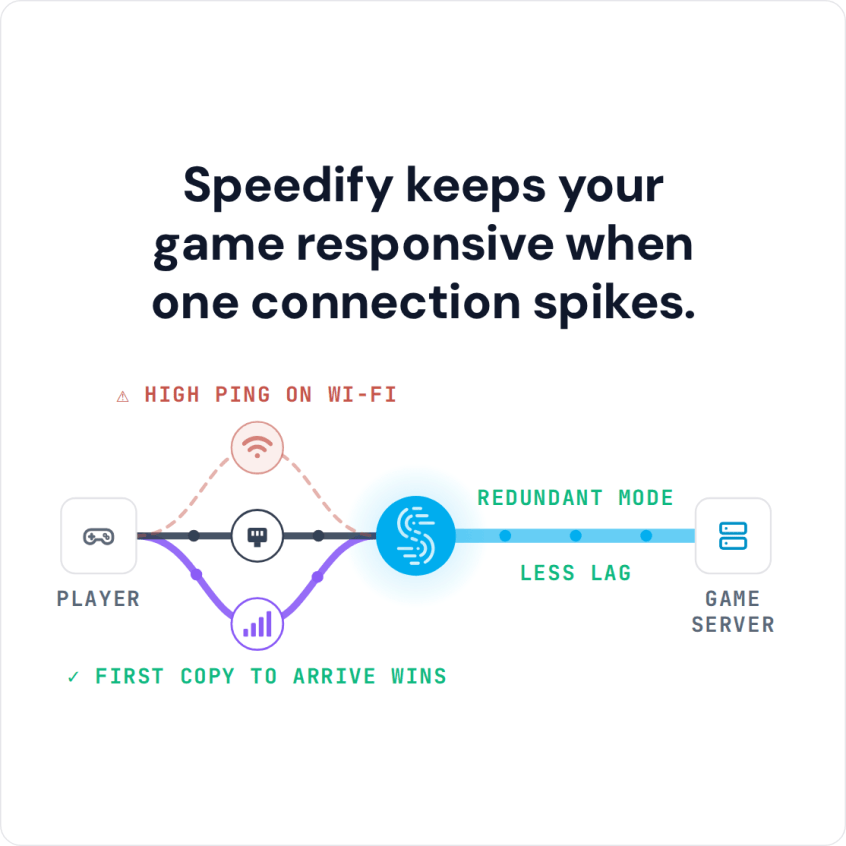
Speedify keeps your game responsive when one connection spikes.
Why Do I Get the Network Lag Detected Error in PUBG?
Now that you’ve successfully purchased and installed PUBG, you’re ready to play! Unfortunately, even after the download, your lagging troubles may not be over. Users all over the internet are complaining about about glitches and poor gameplay. One recurring error in PUBG is “Network lag detected“. So how to fix it?
In cloud-based games, lag is often caused by an unreliable internet connection. Lag in PUBG can also be a result of system requirements, like insufficient RAM or a sub-par graphics card. For this article, we will focus on solving network-based lagging problems.
What Causes PUBG Lagging?
When you play an online game like PUBG, information is passed between your device (e.g. a smartphone or a computer) and the game servers. This information is transferred in small bundles of data called packets. Unfortunately, sometimes packets are lost along the way, which slows down your connection. In severe cases of packet loss, you may find that you become disconnected from gameplay entirely!
Another factor that can cause PUBG to display that “network lag detected” message is latency. This is the amount of time it takes for data to travel between your device and the game servers. Lower latency means a faster connection — and less PUBG lag!
FIXED: PUBG Network Lag Detected
Whether you are running PUBG on your computer or on your smartphone, Speedify solves the problem of slow, unreliable internet. You can fix PUBG lagging once and for all and not get that “network lag detected” error anymore! How? By unleashing the full capabilities of your device!
By default, computers and smartphones only connect to the internet through one connection at a time. You are either connected through a cellular signal, through Wi-Fi, or through Ethernet. Speedify allows your device to connect to the internet using multiple internet connections simultaneously. It increases the bandwidth you have available, which can help fix PUBG lag.
On your phone, Speedify allows you to use both WiFi and cellular data. Don’t worry about going over your data caps – you can set limits so that never happens. If you’re playing PUBG on your computer, you can combine your home network Internet with a public WiFi or a 4G / LTE dongle. If you’re playing from your game console, you can share the Speedify bonded VPN connection over WiFi to your gaming device using a Windows PC.
Unblock PUBG at School or on Other Restricted Networks
Speedify is a bonding VPN – this means that it encrypts all traffic from your device. So you should be able to play without any issues from your school network, workplace or other restricted networks.
Speedify also has auto failover. When it detects a signal is weak or spotty–like when you’re playing PUBG on your commute to work–it reroutes all the data through the working connection(s). This gives you a smooth, uninterrupted connection without any network lag detected. Once the other connection is available again, Speedify automatically tosses it back into the mix.
If you want to level-up your game and fix PUBG lag, download Speedify and enjoy a faster, smoother uninterrupted experience.
Speedify
Get started with Speedify today.
Combine Wi-Fi, 4G/5G cellular, Ethernet, Starlink, and more into one faster, steadier connection. Free to try — no credit card required.
🚀 Speed
Faster uploads and downloads by bonding all your connections at once.
📶 Stability
Automatic failover in under a second when any connection drops.
🔒 Security
AES-256 encryption on every connection, on every network you join.



15M+ downloads worldwide. 75K+ five-star reviews on iOS and Android.