
Unbreakable VPN Connection to Bypass Data Throttling by Combining Starlink, Wi-Fi, 4G, 5G, and DSL with Speedify
Paying for a fast internet plan and still getting stalled video usually means your provider is deliberately slowing certain kinds of traffic (that is throttling) rather than that your line is full.
A VPN can bypass data throttling because a provider cannot slow down what it cannot identify. Speedify is an app that combines Wi-Fi, 4G/5G cellular, Ethernet, Starlink and satellite internet connections into one faster, more reliable connection, and encrypts your traffic like a VPN. With Speedify on, your provider sees one encrypted connection instead of streaming or large file transfers. The extra speed needs a second internet connection, such as a phone’s 4G/5G cellular next to Wi-Fi; on a single connection, Speedify works as an encrypted VPN and can be a little slower. See how to tell throttling apart from a genuinely overloaded internet connection, and how Speedify both hides your traffic from your provider and adds real bandwidth.
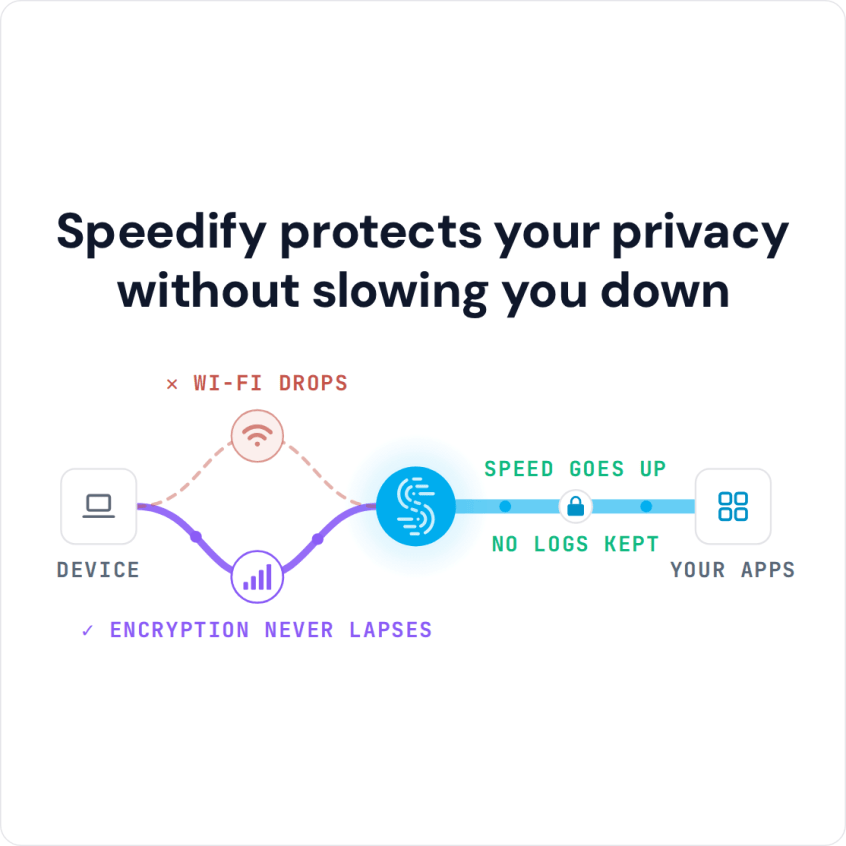
Speedify protects your privacy without slowing you down
Bypass Data Throttling: Check Whether Your ISP Is Throttling or You Need More Bandwidth
Before jumping to any conclusions, read your contract with the ISP to see how much bandwidth you should be getting, and run a speed test to see whether you get the speeds you pay for.
Then, there are 3 resources you can use to test and see if you need to bypass data throttling: the Netflix FAST speed test, the Google Video Quality Report and the Internet Health Test.
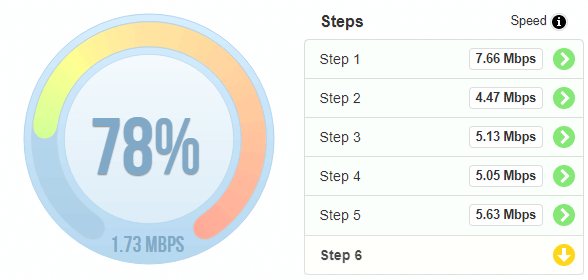
Naturally, if there’s no evidence of ISP throttling after running the tests above, you may just need to upgrade to an Internet plan that delivers more bandwidth to you. You should contact your ISP for that.
How a VPN Bypasses ISP Data Throttling, and What It Cannot Bypass
Most cases of ISP data throttling are specifically tied to certain websites / services. Your ISP analyzes your traffic and, depending on the services you’re accessing, it may have a policy to intentionally slow down that traffic.
If your ISP cannot “inspect” your traffic, it cannot throttle your Internet speed for certain services, and that is the idea behind bypassing data throttling. A VPN is the easiest and most affordable fix for ISP throttling, because it encrypts all Internet traffic on your device, so ISPs will not be able to distinguish between traffic.
A VPN does not get around a data cap or a fair usage (FUP) limit, though: your provider still counts every byte you send and receive, encrypted or not. To get more data, add a second internet connection with its own plan; Speedify can combine it with the first one and lets you set a data cap on each connection.
A VPN also cannot lift a download speed limit that a website or app sets itself, such as a slower download speed for free accounts, because the site applies that limit to your account, not to your internet connection.
On your computer or phone, Speedify works as a mobile VPN that encrypts your online data. With two or more internet connections, Speedify also gives you faster downloads and uploads by combining internet connections, and Internet failover protection keeps you online when one of them drops.
How to Bypass Data Throttling with Speedify
- Download Speedify on the phone or computer where your traffic is throttled. Speedify runs on Windows, macOS, iOS, Android and Linux.
- Open Speedify and create a free account (the free tier includes 5 GB per month; Linux needs a paid plan), or sign in.
- On a phone, tap Allow when your phone asks to add a VPN configuration.
- Speedify connects to a Speedify server automatically. Your provider now sees only an encrypted connection to that server, not which apps and sites you use.
- For more bandwidth, turn on a second internet connection, such as your phone’s 4G/5G cellular next to Wi-Fi, then run the same speed or video test again.
How Speedify Differs from Other VPNs Against Data Throttling: Combined Connections
Plenty of VPNs do the basics: they encrypt your online data and hide what kind of traffic it is, so your ISP cannot monitor it, which is enough to bypass data throttling.
But with bandwidth-hungry applications like live audio and video streaming, Amazon Prime, Hulu, YouTube and other streaming websites, Twitch, online gaming and business calls, other VPNs slow down your connection, because all the traffic is encrypted and sent through one connection to the VPN server.
Speedify is different: while securing your online data, it can also combine multiple Internet connections at the same time. At home, you can combine Wi-Fi, Ethernet and 4G/5G cellular; when traveling, Wi-Fi and 4G/5G cellular. Combining them gives you more bandwidth and failover, so you stay connected during critical moments.
If your ISP is throttling your Internet connection, Speedify can help. Get started with Speedify: you use all the bandwidth you pay for, with encryption and failover on top, and a free account includes 5 GB per month.
Speedify
Get started with Speedify today.
Speedify combines Wi-Fi, 4G/5G cellular, Ethernet, Starlink and satellite into one faster, more reliable internet connection. Free to try: 5 GB a month with a free account. No credit card required.
🚀 Speed
Faster uploads and downloads, because Speedify uses all your internet connections at once.
📶 Stability
If one internet connection drops, Speedify moves your traffic to the others in milliseconds.
🔒 Security
AES-256 encryption on every internet connection, on any network you join.



15M+ downloads worldwide. 75K+ five-star reviews on iOS and Android.