
Unbreakable VPN Connection to Fix VPN Disconects by Combining Starlink, Wi-Fi, 4G, 5G, and DSL with Speedify
When a VPN keeps disconnecting at random, congestion or a network change is usually behind it. A loaded cell tower or a busy home line stalls the VPN long enough for it to give up, or the device hands over from one Wi-Fi access point or cell tower to the next, and a VPN built on one internet connection cannot survive the change. If it happens all the time, work through the steps for a VPN that keeps disconnecting.
Speedify is an app that removes that single point of failure: it encrypts your traffic like a VPN and sends it across every internet connection available at once (Wi-Fi, 4G/5G cellular, Ethernet, Starlink and satellite), shifting your data onto the connection that is still healthy the moment another one bogs down. That needs two or more internet connections; on one connection, Speedify works as an encrypted VPN and can be a little slower.
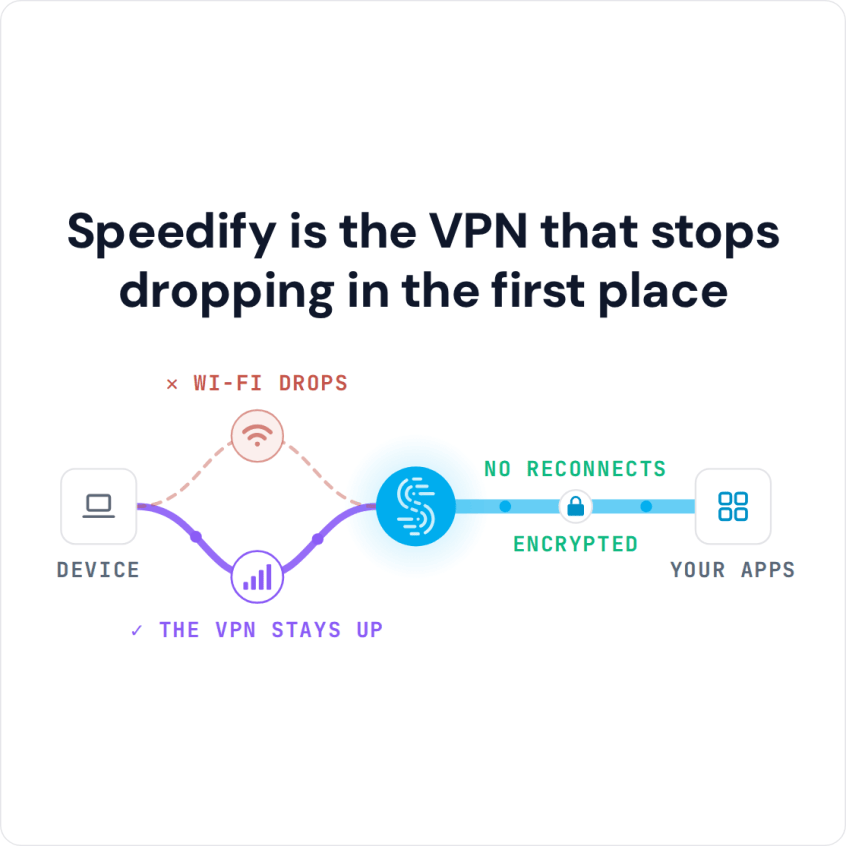
Speedify is the VPN that stops dropping in the first place
You are not the only one losing the VPN at random. Below you will find what causes VPN disconnects, including during video calls and on betting apps, what to do about each cause, and the difference Speedify makes: sessions, file backups and video calls that finish in one piece.
Why a VPN Disconnects at Random
Almost all VPNs work the same way. They use a single Internet connection and create an AES encrypted socket with the VPN server. All of the data that is sent or received by your device goes through the VPN server, and the encryption adds some overhead to every packet.
The VPN software essentially puts all the eggs in one basket: if something happens to the internet connection it uses, there is no failover, the connection breaks and your device is disconnected from the VPN server. This can happen if your cell signal suddenly becomes unstable or if there is an issue with the Wi-Fi connection you are using.
Most VPN software cannot combine internet connections. Even if your device is able to connect to the Internet via Wi-Fi and 4G/5G cellular simultaneously, the VPN relies on a single connection, so you don’t benefit from the extra bandwidth or the redundancy.
Why a VPN Disconnects When a Video Call Starts
A video call sends and receives video continuously, so a connection that copes with browsing can run out of upload capacity or start losing packets as soon as the call starts. A VPN on that one connection times out and drops, often taking the call with it. Pause large uploads and cloud backups during calls, move closer to the router, or give the device a second internet connection so the call has more room.
Why a VPN Keeps Disconnecting on Betting Apps
Betting apps and sites check your real location, and many block or log out connections that come from VPN servers, which looks like the VPN dropping. Speedify does not change where you are legally allowed to bet, and the betting site’s terms decide whether a VPN is allowed at all. If a betting app will not work with Speedify on, add it to Bypass (Settings > Bypass) so the app connects directly from your device while the rest of your traffic stays encrypted.
Why a VPN App Keeps Crashing
A VPN app that closes by itself, rather than losing its connection, usually needs an update or a clean reinstall. Update the app and your operating system and restart the device. If it still crashes, uninstall the VPN app, restart, and install the latest version. Two VPN apps installed side by side can also conflict, so remove any you no longer use.
Why a VPN Disconnects When the Internet Works or the Laptop Sleeps
If the rest of your internet keeps working while the VPN drops, the cause is usually on the VPN side: a busy or distant VPN server, a firewall or security app blocking the VPN, or power saving that pauses the VPN app. When a laptop sleeps or locks, its network adapter can switch off, so the VPN disconnects and reconnects when the laptop wakes. Connect to a closer server, check your security software, and change the power settings if the VPN must stay up while the screen is locked.
How to Fix VPN Disconnects with Speedify
If the drops come from the connection itself, try a different kind of VPN. The team behind Speedify set out to build a new kind of VPN that is faster and more reliable than the old single-connection model: a VPN for mobility that keeps your connection secure and keeps you from getting disconnected.
Here is what Speedify has that a conventional single-connection VPN does not:
- Automatic failover from one internet connection to another
- Combining different internet connections (Wi-Fi, 4G/5G cellular, Ethernet, Starlink and satellite) at once
- Several parallel sockets to the Speedify server
- Encryption that runs well on phones (ChaCha20-Poly1305 as well as AES-256-GCM)
- The same public IP address when one connection drops, so logins and calls do not see a new address
Speedify allows a mobile device, or a computer tethered to a mobile device, to connect to the VPN server via multiple connections at the same time. Speedify carefully monitors the quality of the connections in the background. Because it was designed with auto failover, if any single connection is lost, all the data packets are automatically rerouted through another connection. The user doesn’t have to do anything to stay connected, and will not even notice the change.
How to Keep a VPN from Disconnecting at Random with Speedify
- Download Speedify on the computer or phone where the VPN keeps disconnecting (Windows, macOS, iOS, Android and Linux).
- Open Speedify and create a free account (the free tier includes 5 GB per month; Linux needs a paid plan), or sign in.
- On a phone, tap Allow when your phone asks to add a VPN configuration.
- Give Speedify a second internet connection: on a phone, keep Wi-Fi and 4G/5G cellular both on; on a computer, add Ethernet or a phone tethered over USB.
- Speedify connects to a Speedify server automatically and sends your traffic over both connections, so if one of them drops, the VPN stays connected.
The use of multiple internet connections and several parallel sockets reduces errors, minimizes packet loss and, with two or more connections, gives you more bandwidth than a single-connection VPN can.
There is no longer any reason to compromise on speed and reliability for the sake of security: with two or more internet connections, a drop on one of them no longer disconnects the VPN.
Try Speedify on Your Own Internet Connections
Stop reconnecting a VPN by hand. Get started with Speedify today for FREE: create a free account and get 5 GB per month.
Speedify
Get started with Speedify today.
Combine Wi-Fi, 4G/5G cellular, Ethernet, Starlink, and more into one faster, steadier connection. Free to try — no credit card required.
🚀 Speed
Faster uploads and downloads by bonding all your connections at once.
📶 Stability
Automatic failover in under a second when any connection drops.
🔒 Security
AES-256 encryption on every connection, on every network you join.



15M+ downloads worldwide. 75K+ five-star reviews on iOS and Android.