
You Can Combine Multiple Internet Connections Together – Like Starlink, Wi-Fi, 4G, 5G, and DSL – with Speedify, to Fix Slow WhatsApp
A WhatsApp message stuck on a single grey tick, or a video that will not finish sending, means the app has data to push and nowhere steady to push it through.
Speedify is an app that carries WhatsApp over two or more internet connections at once – Wi-Fi, 4G/5G cellular data, wired Ethernet, Starlink – so messages go out when you send them rather than when the signal recovers.
Below is what causes the delay, how running several internet connections together clears it, and what else Speedify adds while it is on.
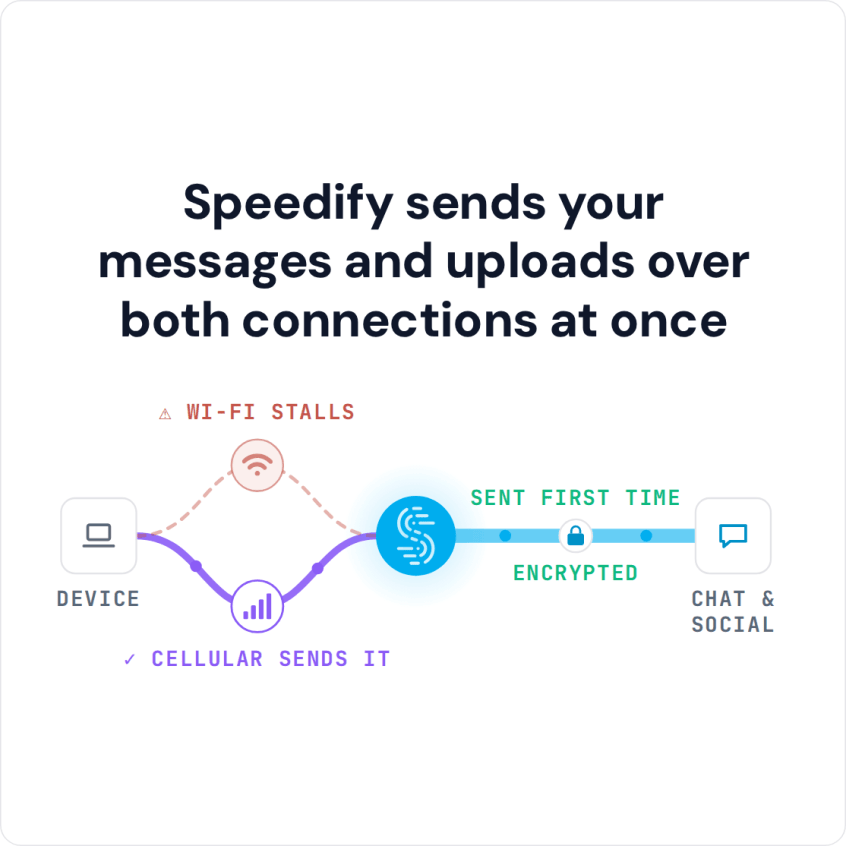
Speedify sends your messages and uploads over both connections at once
What Causes Slow WhatsApp Connections?
Many times when WhatsApp is running slow for you, it has nothing to do with the app, and everything to do with your connection. All iOS and Android phones are setup to have all data traffic be sent through a single connection. When you are running WhatsApp and trying to stream a video or send a message, all that data is either going through the Wi-Fi Internet connection or the mobile data Internet connection.
If your signal strength is fluctuating because you are moving or because the signal strength is spotty in your location, you will experience a lag while using WhatsApp. You just aren’t able to send and receive the data fast enough.
How to Make Your Whatsapp Work Faster with Speedify
Are you experiencing slow WhatsApp? Do you use it a lot while commuting or on the move? See below how to quickly and easily fix this issue.
Speedify, the only VPN on the market for combining multiple Internet connections at the same time, changes the way your phone handles data transmission. Instead of focusing everything into either Wi-Fi or cellular data, Speedify unlocks your device’s full capabilities and uses both connections simultaneously for data transmission. This allows for a faster, smoother video experience. It also helps prevent messages from getting “stuck”.
Speedify is also constantly monitoring the quality of all of your internet connections. If one connection goes down or fluctuates too wildly, the app will use its auto failover ability to route everything through a single internet connection to optimize the speed of WhatsApp. Speedify does everything automatically, in the background. You get to keep enjoying a seamless, fast WhatsApp connection.
Speedify is a game changer for any serious WhatsApp user, as the app will work better on trains and other forms of public transportation where wifi signal can be unreliable. It also allows you to move easily from room to room in your office or home, without worrying about dropping a connection.
Speedify’s Extra Features
If Speedify only fixed a slow WhatsApp connection, it would totally be worth your time to download and install it. But, Speedify does so much more. Speedify is built on powerful, secure and fast mobile VPN technology with a very strict no-log policy.
When you are using WhatsApp, or any internet connected app, your data is being kept safe from surveillance and your device is being protected against hackers who have compromised the wifi network you are using.
Speedify gives you faster and more secure internet connections. But, it does all of its work automatically in the background. You never have to worry about the state-of-the-art encryption or the industry-leading Internet connection speeds. The Speedify app takes care of everything for you. All you have to do is download and install Speedify from the AppStore or Google Play and set it up once.
Make WhatsApp what it’s supposed to be – a quick and easy way to keep in touch with your friends and family! Get Speedify for FREE – no strings attached, no email sign-up necessary!
How to Troubleshoot WhatApp Connection Issues
The first thing you should do if you are having any kind of Internet connectivity issues with WhatsApp is to make sure you are in place with the best possible connection. That means a strong reliable WiFi connection.
Still having issues? Follow the troubleshooting guide below.
- Make sure WhatsApp is closed and not running in the background;
- Restart or put your phone into airplane mode for 30 seconds and then reconnect;
- Open WhatsApp and see if the problems persists.
Closing the app and restarting / turning on airplane mode are the fastest way to clear common memory caches issues.
If this still doesn’t solve your problem:
- Uninstall WhatsApp from your phone;
- Reinstall WhatsApp by getting the latest version from the Google Play or Apple Store.
This will stop the app from crashing. But, if it doesn’t solve other issues such as being able to connect to the servers or sending and receiving messages, you need to deal with your device’s Internet connectivity problem.
Speedify
Get started with Speedify today.
Combine Wi-Fi, 4G/5G cellular, Ethernet, Starlink, and more into one faster, steadier connection. Free to try — no credit card required.
🚀 Speed
Faster uploads and downloads by bonding all your connections at once.
📶 Stability
Automatic failover in under a second when any connection drops.
🔒 Security
AES-256 encryption on every connection, on every network you join.



15M+ downloads worldwide. 75K+ five-star reviews on iOS and Android.