
Why Your Game Disconnects on Wi-Fi but Not on Ethernet
Games disconnect on Wi-Fi but not on Ethernet because Wi-Fi loses short bursts of packets (from interference, congestion and band switching) that a cable does not, and a game server reads even a brief loss as a disconnect. Speedify is an app that combines two or more internet connections at once, such as Wi-Fi and 4G/5G cellular, and can carry game traffic over both connections at the same time. On a single Wi-Fi connection, Speedify works as an encrypted VPN and cannot stop that connection from dropping.
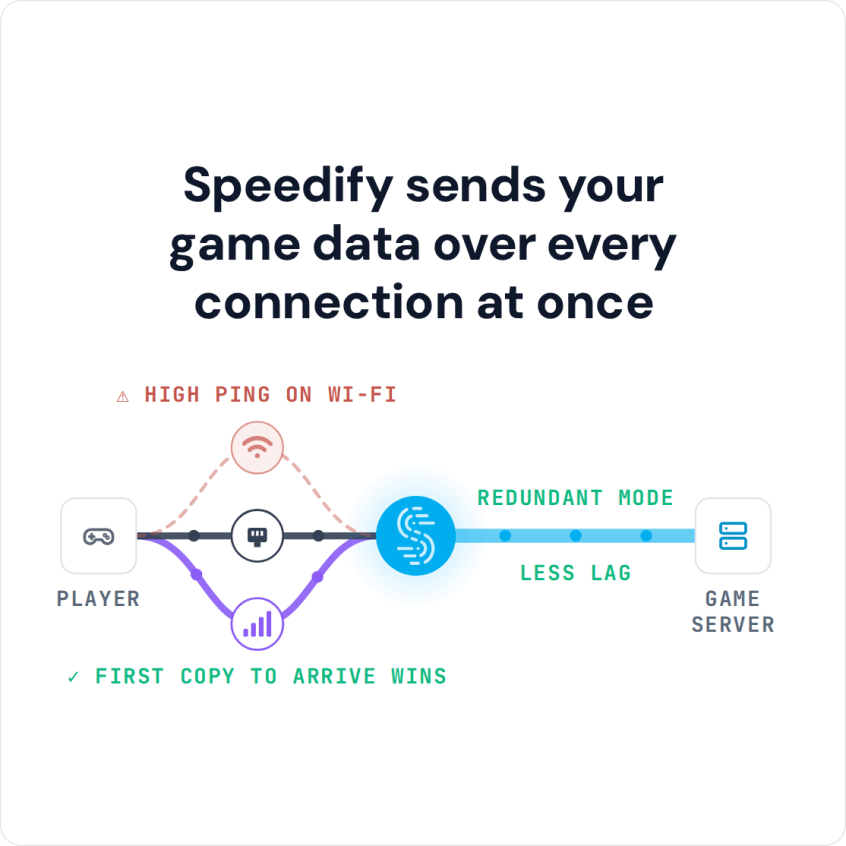
When Wi-Fi briefly drops a packet, a copy sent over the other connection still arrives, and if Wi-Fi cuts out completely, Speedify moves the game to the other connection, so a short Wi-Fi break no longer ends the game.
Speedify sends your game data over every connection at once
How do I use WiFi and 4G/5G cellular at the same time with Speedify?

Pick your two internet connections and your device below and we'll take you to the step-by-step setup guide.


Wi-Fi vs Ethernet for a Stable Game Connection
Ethernet wins on stability for a few concrete reasons.
- No shared airtime. A wired link is not competing with phones, TVs, and smart-home gear for the same radio space.
- No roaming. Wi-Fi devices drift between 2.4 GHz and 5 GHz and between access points, and each handoff is a chance to drop.
- Less interference. Walls, microwaves, and neighboring networks all nibble at a Wi-Fi signal in ways a cable never sees.
What Actually Disconnects Your Game
On Wi-Fi, any of these is enough to kick you from a session:
- Interference and range. A weak or noisy signal drops packets the game cannot afford to lose.
- Channel congestion. A busy household or apartment building crowds the airwaves at peak hours. On some 5 GHz channels, your router also has to share the airwaves with radar and moves off a channel when it detects one.
- Band steering and roaming. The moment your device switches bands or access points, the connection can stutter.
- A brief loss spike. Even a fraction of a second of lost packets can register as a disconnect to the game server.
How Speedify’s Redundant Mode Protects the Session
Speedify treats a second connection as insurance for the first.
- Send traffic two ways at once. Speedify’s Streaming Mode duplicates real-time traffic across two connections, so a packet dropped on Wi-Fi still arrives over the other path. Redundant Mode does this for all traffic; see how Redundant Mode keeps you online.
- Add 4G/5G cellular as a second internet connection. Use a phone’s 4G/5G alongside the Wi-Fi, and Speedify keeps the game alive when the Wi-Fi dips.
- Automatic failover. If a connection drops entirely, Speedify carries the session on the remaining connections without disconnecting you.
The same redundancy helps on tougher links too, as covered in gaming on Starlink.
How to Set Up Speedify to Stop Wi-Fi Game Disconnects
- Download Speedify on your PC, Mac, or phone. Speedify runs on Windows, macOS, Android, and iOS.
- Keep Wi-Fi on and add a second internet connection: your phone’s 4G/5G cellular by USB tethering (on a Mac, use an iPhone, because Android USB tethering does not work on current macOS), or Ethernet if you can run a cable. On a phone, just leave 4G/5G cellular turned on.
- Switch Speedify to Redundant Mode so all game traffic goes out over both connections.
- Launch your game as usual. Speedify protects the session in the background.
Speedify’s Limit: Combining Connections Cannot Shorten the Route to a Game Server
Combining connections solves packet loss and disconnects, and in Redundant Mode it can also lower ping: each packet goes over both connections, and Speedify uses whichever copy arrives first. What it cannot do is shorten the route. If your ping is high because the game server is far away or your ISP routes poorly, adding a second connection will not shrink that base number, and for the lowest latency a wired connection to a nearby server still wins. Where Speedify helps most is keeping a Wi-Fi session from dropping.
Game Disconnecting on Wi-Fi: FAQ
Why does my game disconnect on Wi-Fi but not Ethernet?
Wi-Fi shares the air, roams between bands and access points, and picks up interference, so it drops brief bursts of packets that a wired link does not. Those short losses are enough to disconnect a game.
Will Speedify lower my ping?
It can, with two connections. In Redundant Mode Speedify sends each packet over both connections and uses the copy that arrives first, so ping follows whichever connection is faster at that moment and lag spikes shrink. Speedify cannot shorten the route to a distant game server or make a single connection faster.
Do I need Ethernet to use Speedify?
No. Speedify can combine Wi-Fi with a phone’s 4G/5G cellular, which is often the easiest way to add a second path for a Wi-Fi-only setup.
Does redundant mode use more data?
Yes. Duplicating packets across two connections trades some extra data for a session that survives a dropped link. It is meant for real-time traffic like games and calls.
Speedify
Get started with Speedify today.
Speedify combines Wi-Fi, 4G/5G cellular, Ethernet, Starlink and satellite into one faster, more reliable internet connection. Free to try: 5 GB a month with a free account. No credit card required.
🚀 Speed
Faster uploads and downloads, because Speedify uses all your internet connections at once.
📶 Stability
If one internet connection drops, Speedify moves your traffic to the others in milliseconds.
🔒 Security
AES-256 encryption on every internet connection, on any network you join.



15M+ downloads worldwide. 75K+ five-star reviews on iOS and Android.