
Apple Music Slow for Anyone Else?
Apple Music is slow, cuts out mid-song, or a track will not start at all and you get a network error instead. The app is rarely the problem: your iPhone or iPad uses one internet connection at a time, so when the Wi-Fi thins out or you walk out of range the music runs out of data to play.
Speedify is an app that lets an iPhone or iPad use Wi-Fi and 4G/5G cellular at the same time, so songs keep the bandwidth they need. That needs two or more internet connections; on a single connection Speedify works as an encrypted VPN and cannot stop that connection from dropping.
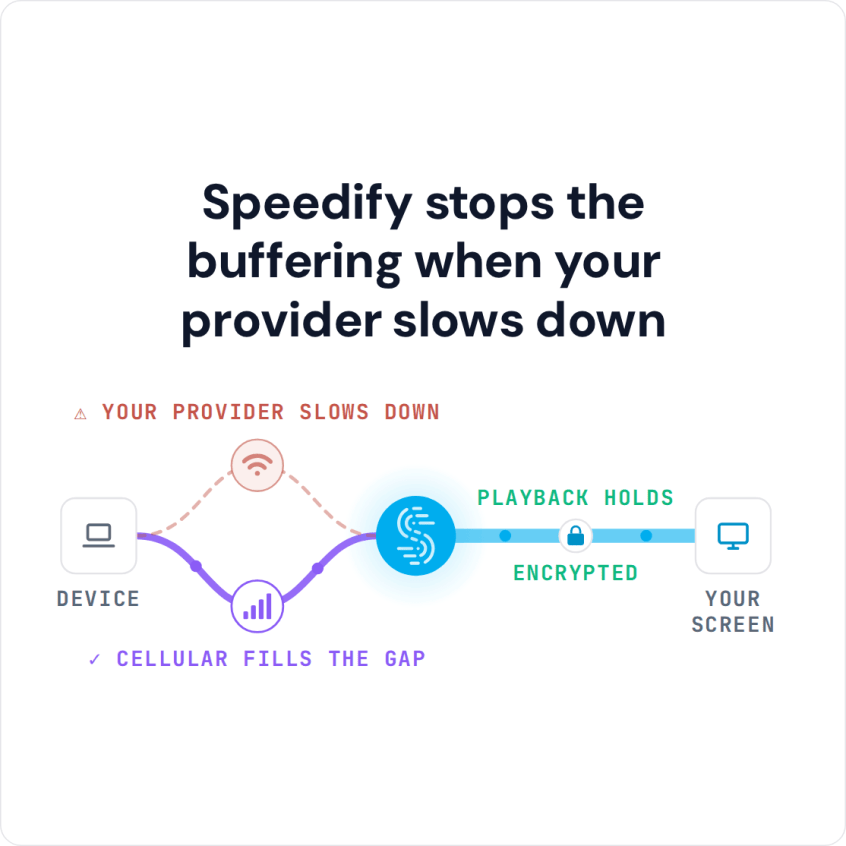
Speedify stops the buffering when your provider slows down
The rest of this post covers why Apple Music slows down and the three steps to get Apple Music playing smoothly with Speedify.
Why Apple Music Is Slow on iPhone and iPad
It is easy to blame the Apple Music app for slow streaming. But, the true cause of the problem is trickier. Your iPhone or iPad is the real culprit. By default, iOS devices do not take full advantage of all the bandwidth available to them. Instead, they only use a single Internet connection at a time. They are either connected via Wi-Fi or via 4G/5G cellular.
This means that data intensive apps, like Apple Music, don’t have enough bandwidth to run smoothly when there are signal fluctuations or when you are moving between Wi-Fi networks. The Apple Music servers are delivering the requested data without an issue, but it is not getting to your device because of a bottleneck created by the way iPhones and iPads connect to the Internet.
3 Steps to Fix Slow Apple Music Streaming
Speedify changes the way your iPhone and iPad devices connect to the Internet. If you want to solve your slow Apple Music streaming problems all you need to do is follow these three steps:
- Download Speedify from the AppStore.
- Run Speedify with both Wi-Fi and 4G/5G cellular turned on.
- Leave Speedify running in the background while you enjoy Apple Music.
You don’t need any special technical skills or knowledge. If you can download an app, you can use Speedify.
Speedify Fixes Slow Apple Music Streaming on Your iPhone and iPad
Speedify works by changing the way your iOS device connects to the Internet. Instead of just using one connection at a time, Speedify allows your device to be connected to the Internet via Wi-Fi and 4G/5G cellular at the same time. This increases your bandwidth and removes the one-connection bottleneck.
Speedify also carefully monitors the quality of your connections. If it detects a connection is becoming unstable or unreliable, it reroutes all the data through the remaining connection. This auto failover happens without you having to do anything.
Speedify is a VPN service that combines connections. Speedify was engineered to be fast, secure and reliable: the app encrypts your data, keeps you safe from hackers and snoops, and delivers a fast internet experience.
The app is also designed to go easy on your battery life, and it routes as much data as possible over Wi-Fi instead of a more expensive 4G/5G cellular connection.
If you want to fix slow Apple Music when one connection fades, and also enjoy the peace of mind of knowing that your personal data is protected, try the Speedify app.
Get started today for FREE: the free tier includes 5 GB per month with a free account.
Speedify
Get started with Speedify today.
Speedify combines Wi-Fi, 4G/5G cellular, Ethernet, Starlink and satellite into one faster, more reliable internet connection. Free to try: 5 GB a month with a free account. No credit card required.
🚀 Speed
Faster uploads and downloads, because Speedify uses all your internet connections at once.
📶 Stability
If one internet connection drops, Speedify moves your traffic to the others in milliseconds.
🔒 Security
AES-256 encryption on every internet connection, on any network you join.



15M+ downloads worldwide. 75K+ five-star reviews on iOS and Android.