
Snapchat Won’t Load Snaps or Stories? You Can Combine Multiple Internet Connections Together – Like Starlink, Wi-Fi, 4G, 5G, and DSL – with Speedify
Grey boxes where your friends’ snaps should be mean the download never finished. Phones and tablets use one internet connection at a time, and when the signal is weak small pieces of data never arrive, which you see as a story that spins forever or simply refuses to open.
Speedify draws on Wi-Fi and 4G/5G cellular data together on the same device, so a missing piece of data comes in over the other signal instead of stalling the app. What follows explains why Snapchat stories will not load, and how using Speedify gets them opening straight away.
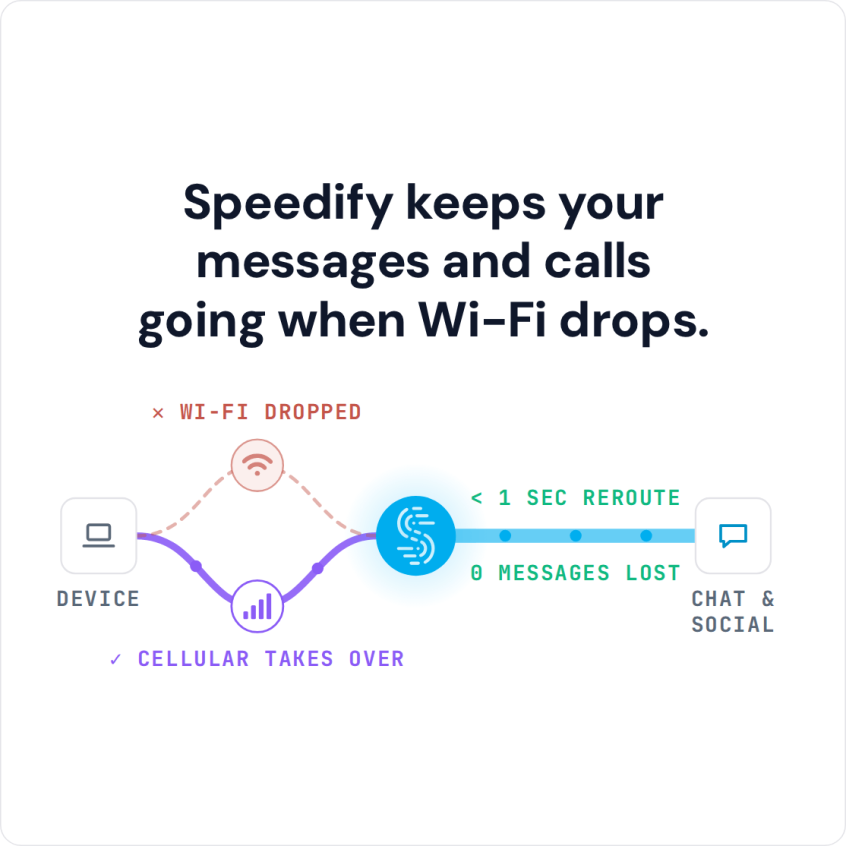
Speedify keeps your messages and calls going when Wi-Fi drops.
Why Won’t My Snapchat Stories or Snaps Load?
By default iOS and Android phones and tablets use only one Internet connection at a time. You must either connect through Wi-Fi or through a 4G/3G data connection. If your signal is weak or spotty for any reason, your device can lose little bits of information called packets. This results in uploads and downloads getting hung up or stopping entirely. That is why it can seem like nothing is happening, or why stories and images don’t load and videos lag or are constantly buffering.
There may not be enough bandwidth available to complete your request as quickly as you would like.
Improve Your Connection With Speedify and Your Snapchat Stories Will Load Instantly
Speedify is an app you can download for your iOS or Android device (Mac & PC too!) that solves connection related Snapchat issues like stories not loading. Instead of only having a single internet connection at a time, Speedify allows your device to use cell and Wi-Fi simultaneously. This gives you a faster, more reliable Snapchat experience. You don’t have to worry about lagging or buffering.
Speedify does much more than simply opening up an additional Internet connection. It is a sophisticated connection quality tracker that runs in the background. Speedify is equipped with failover protection and it’s cost aware.
This means that Speedify constantly monitors the quality of your Wi-Fi and cell signal strength and reliability. It uses free Wi-Fi connections before sending data over an expensive cell connection. Speedify also automatically reroutes data to an open connection if one of your connections should become unreliable. Then Speedify automatically reconnects once the connection is available. All of this happens without you ever having to do anything. Instead, you just keep enjoying Snapchat.
Speedify Fast Bonding VPN: Features
Speedify also gives your mobile device one additional feature. It is an industry-leading fast VPN. This means when you use Speedify, not only do you get a smoother, faster, and more reliable Snapchat, but also all of your data is encrypted.
Speedify keeps your private information secure, protects you against a variety of cyber threats, and even keeps your ISP from spying on you.
You get to upload and watch all of the Snapchat images and videos you want, without waiting for the app the catch-up to you. You also get state-of-art security so you can post to Snapchat with the peace of mind of knowing that your data and device are safe, even on public Wi-Fi networks.
Snapchat is fun, easy and quick to use with Speedify – get started now for FREE – no strings attached, no email sign-up necessary!
Speedify
Get started with Speedify today.
Combine Wi-Fi, 4G/5G cellular, Ethernet, Starlink, and more into one faster, steadier connection. Free to try — no credit card required.
🚀 Speed
Faster uploads and downloads by bonding all your connections at once.
📶 Stability
Automatic failover in under a second when any connection drops.
🔒 Security
AES-256 encryption on every connection, on every network you join.



15M+ downloads worldwide. 75K+ five-star reviews on iOS and Android.