

Zwei Starlink-Verbindungen kombinieren für besseres Internet in Deutschland
Wer in Deutschland mit einer einzelnen Starlink-Verbindung arbeitet, kennt das Problem: In Stosszeiten sinken die Geschwindigkeiten spürbar, bei schlechtem Wetter bricht die Verbindung ein, und Upload-Raten reichen für Videokonferenzen oft nicht aus. Ein zweiter Starlink-Anschluss löst diese Probleme grundlegender als jede Einstellungsänderung oder Neupositionierung der Antenne – vorausgesetzt, beide Verbindungen werden gleichzeitig genutzt.
Diese Anleitung erklärt, wie du einen zweiten Starlink zu deinem bestehenden Account hinzufügst, was das in Deutschland konkret kostet, und wie Speedify beide Anschlüsse über Channel Bonding gleichzeitig nutzt – für höhere Geschwindigkeit und automatischen Failover.
Quick answer
Should you get a backup connection for Starlink?
Yes. Starlink goes down every day — an always-on dish averages about 34 minutes of downtime daily from routine satellite handoffs. A second connection keeps you online when Starlink drops.
What’s the best backup connection for Starlink?
A 4G/5G cellular hotspot or SIM is the most practical backup for most Starlink users — it works anywhere Starlink works, requires no installation, and uses a different network so outages rarely overlap. Cable or DSL broadband is a strong option if you have it at a fixed location. A second Starlink dish is also possible if you need maximum throughput.
How do you use two internet connections at once with Starlink?
Speedify combines Starlink with any other connection — cellular, cable, Wi-Fi, or a second dish — into one bonded connection. Speedify runs on your phone, laptop, or router. When Starlink drops, Speedify moves your traffic to the backup instantly, so calls don’t cut out and downloads don’t stall. Speedify is free to try.
71% of Speedify’s Starlink users already run a second connection. The data below shows why.
Try Speedify free →Speedify Starlink Index — real-world performance from 6,209 Starlink users: 2.4% downtime, about 34 minutes a day for always-on connections
Starlink goes down every day.
Here’s what that actually looks like.
Speedify passively monitors every connection it bonds. These figures come from 6,209 Starlink users over 14 days — compared in real time against the other connections on the same devices. No speed tests, no lab conditions.
Daily downtime
~34 min
2.4% of connected time unreachable
Median latency
60 ms
p90 spikes to 257 ms
Avg packet loss
0.17%
vs 0.08% on T-Mobile
71% ran at least one other connection simultaneously — 4,381 of 6,209 users. Cellular is the most common backup.
Use Speedify to stay online during satellite handoffs every 15 seconds
Research confirms Starlink switches between satellites every 15 seconds on a fixed schedule. Each satellite handoff is a potential dropout, and on a congested network or with any obstruction, those Starlink dropouts become real interruptions.
Speedify fixes Starlink connection drops by combining your Starlink internet connection with another satellite dish, Wi-Fi, 4G/5G cellular, or wired Ethernet at the same time. When Starlink drops, Speedify keeps your traffic moving on the backup internet connection instantly.

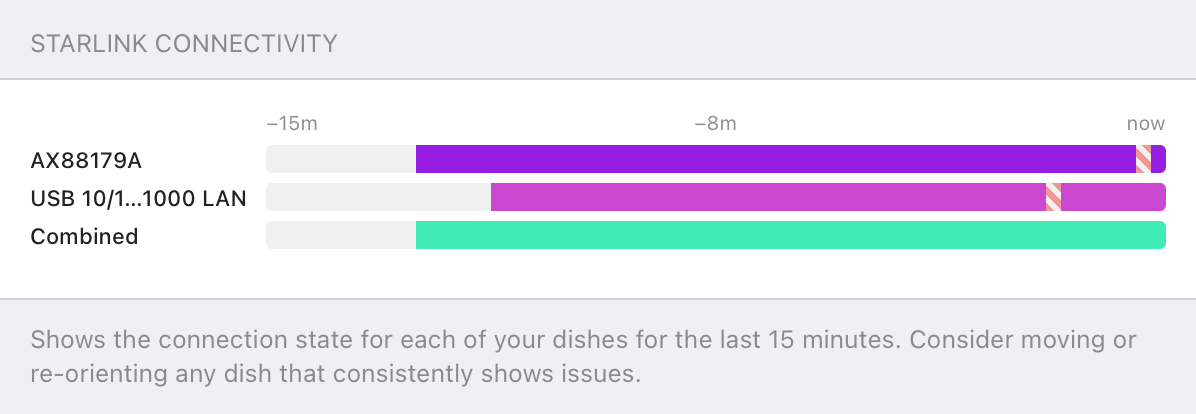
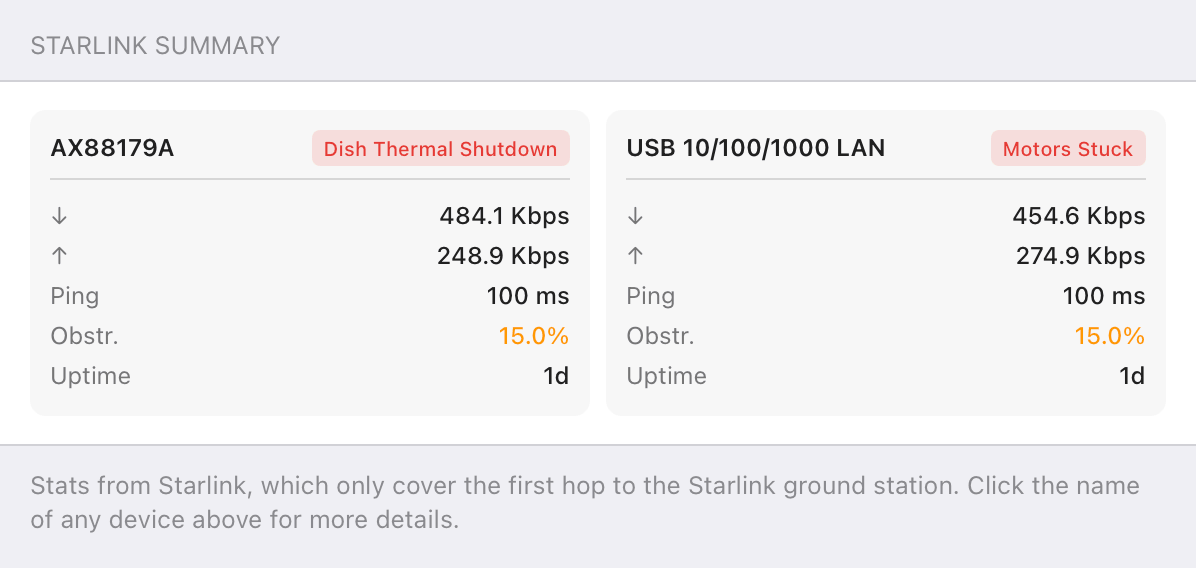
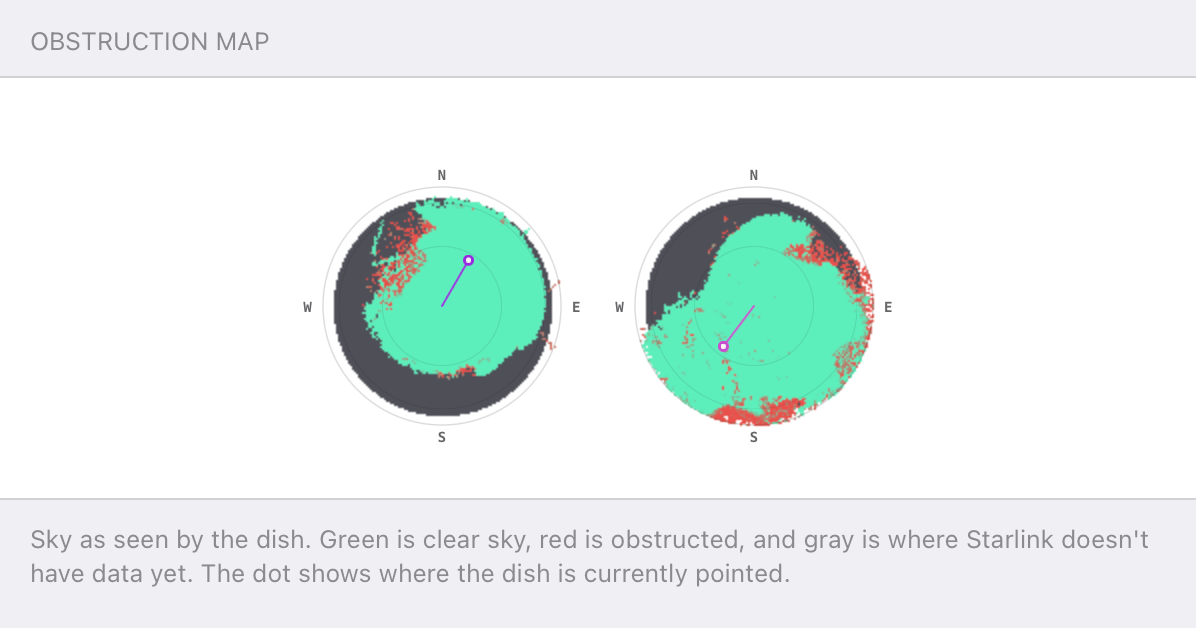
Speedify alerts you about your Starlink dish status
Speedify software alerts you about your Starlink dish status as soon as your dish experiences an issue - e.g. when your actuator motor is stuck, the mast is not vertical or there's a thermal throttle.
Speedify's Starlink Control Center helps you monitor all your Starlink dishes, read obstruction maps, and align multiple dishes all in the Speedify app. Get a real-time view of each dish's health and optimize the position of each Starlink dish, so you get the best possible performance out of your Starlink connections.
Speedify
Speedify gives you faster, steadier internet by combining Wi-Fi, cellular, and Starlink
Speedify bonds Wi-Fi, 4G/5G cellular, Ethernet, and Starlink into one connection at the same time, giving you more speed, automatic failover when one drops, and AES-256 encryption on every link.
Download Speedify ›More speed
Upload and download speeds combine across every active connection on your device.
Automatic failover
If a connection drops, Speedify moves your traffic to another in milliseconds. Calls stay connected.
Always encrypted
Every link runs through an encrypted tunnel, including public Wi-Fi, cellular, and Starlink.
Speedify Feature · Pair & Share
Speedify Pair & Share: share cellular between your devices, both ways
Most hotspots give. Speedify's Pair & Share gives and takes. Two devices running Speedify pair up and each uses the other's cellular connection simultaneously, so you both get faster uploads, faster downloads, and a steadier connection. No extra hardware, no new data plans, no setup beyond a tap.
Learn how Speedify's Pair & Share works ›More speed
Every device you pair with adds its cellular to yours, and yours to theirs.
Stays connected
If a paired device drops out, Speedify keeps you online on the remaining links.
Always private
Every shared connection runs through AES-256 encryption. Your traffic is yours.
No new gear
Runs on devices already running Speedify, over your local network. Pair once, reconnects automatically.


Kann man mehrere Starlink-Antennen auf einem Account betreiben?
Ja. Starlink erlaubt es, mehrere Subscriptions unter einem Account zu führen. Jede Antenne benötigt dabei eine eigene Hardware und ein eigenes monatliches Abonnement.
Methode 1: Neue Subscription bestellen
- Bei starlink.com einloggen.
- Den Tab Abonnements öffnen.
- Oben rechts auf Add Subscription klicken.
- Tarif auswählen und Bestellung abschliessen.
Methode 2: Vorhandene Hardware aktivieren
- starlink.com/activate aufrufen.
- Existing Account wählen.
- Aktivierungsschritte für die zusätzliche Antenne durchführen.
Warum Starlink in Deutschland häufig schwankt
Starlink ist in Deutschland seit 2021 verfügbar und hat sich besonders in ländlichen Regionen als Alternative zu langsamem DSL etabliert. Typische Geschwindigkeiten liegen bei 50-200 Mbps Download und 10-20 Mbps Upload. Die häufigsten Ursachen für Einbrüche:
- Satelliten-Congestion: Abends teilen sich mehr Nutzer die Satellitenkapazität. Ein einzelner Anschluss bekommt dann weniger Bandbreite zugeteilt.
- Wetter: Starkregen, dichte Bewölkung und Schnee auf der Antenne dämpfen das Signal erheblich.
- Satellitenwechsel: Die Konstellation wechselt alle paar Minuten den aktiven Satelliten – für VoIP und Videokonferenzen spürbar.
- Hardware-Kapazitätsgrenzen: Eine einzelne Antenne hat physikalische Bandbreitenlimits, die kein Troubleshooting überwindet.
Kosten für einen zweiten Starlink in Deutschland (Stand 2026)
| Kostenposition | Einmalig | Monatlich |
|---|---|---|
| Starlink Standard Hardware | ~349 EUR | – |
| Starlink Standard Subscription | – | ~50 EUR |
| Starlink Priority (Business) | – | ab ~250 EUR |
| Montagehalterung (optional) | 30-80 EUR | – |
| Speedify (Bonding-Software) | – | ab ~14 EUR |
Alle Preise verstehen sich inkl. 19% MwSt. Aktuelle Preise immer auf starlink.com prüfen.
Warum zwei Antennen allein nicht genügen – und was Speedify beiträgt
Ohne spezielle Software wählt das Betriebssystem immer nur eine aktive Verbindung aus. Die zweite Antenne liegt brach. Speedify löst das durch Channel Bonding: Beide Starlink-Verbindungen laufen gleichzeitig, Traffic wird in Echtzeit aufgeteilt.
- Automatische Erkennung: Speedify erkennt beide Interfaces ohne manuelle Konfiguration.
- Bandbreiten-Aggregation: Zwei Anschlüsse mit je 120 Mbps ergeben kombiniert rund 200-220 Mbps.
- Failover ohne Abbruch: Fällt eine Verbindung aus, übernimmt die zweite sofort – laufende Anrufe und Downloads werden nicht unterbrochen.
- Verschlüsselung: Sämtlicher Traffic läuft verschlüsselt – relevant für Homeoffice und datenschutzsensible Anwendungen.
Reale Geschwindigkeitswerte: Zwei Starlinks mit Speedify
| Szenario | Ohne Speedify | Mit Speedify |
|---|---|---|
| 2x Starlink Standard (je 120/15 Mbps) | 120 Mbps Down / 15 Up | ~220 Mbps Down / ~28 Up |
| Satellitenwechsel | Videoanruf friert ein | Kein Abbruch – zweite Leitung übernimmt |
| Abend-Congestion (30 Mbps) | Alle Apps verlangsamen sich | Traffic auf beide Anschlüsse verteilt |
| Wetterbedingte Dämpfung | Verbindungsabbruch möglich | Zweite Antenne übernimmt nahtlos |
Für wen lohnt sich ein zweiter Starlink in Deutschland?
Homeoffice und Remote-Arbeit: Wer beruflich auf stabile Verbindungen angewiesen ist und ausserhalb der Glasfaserversorgung lebt, profitiert direkt. Ein Verbindungsabbruch während einer Videokonferenz ist mit zwei gebondeten Anschlüssen praktisch ausgeschlossen.
Landwirtschaftliche Betriebe und Gewerbe im ländlichen Raum: Viele Betriebe in Deutschland liegen ausserhalb jeder Glasfaserversorgung. Zwei gebondete Starlink-Anschlüsse bringen die Verbindungsqualität eines Bürostandorts in die Fläche.
Content Creator und Livestreamer: Upload-Geschwindigkeit ist der limitierende Faktor. Zwei gebondete Anschlüsse verdoppeln die Upload-Bandbreite und reduzieren übertragungszeiten proportional.
Mehrpersonenhaushalte: Wenn mehrere Personen gleichzeitig im Homeoffice arbeiten oder streamen, wird ein einzelner Anschluss schnell zum Engpass. Zwei Anschlüsse verteilen die Last gleichmässig.
Mobil mit Starlink Roam: Wer in Deutschland und Europa mobil unterwegs ist, kann Starlink Roam mit einem LTE/5G-Modem bonden und lückenlos verbunden bleiben.
Einrichtung Schritt für Schritt
- Zweiten Starlink-Anschluss zum Account hinzufügen – per Bestellung auf starlink.com oder Aktivierung vorhandener Hardware auf starlink.com/activate.
- Zweite Antenne montieren – mit freiem Blick zum Himmel. Die Starlink-App zeigt Hindernisse per Obstruction Map an.
- Beide Verbindungen mit dem Gerät verbinden – über zwei WLAN-Netze, zwei Ethernet-Anschlüsse, oder einen bonding-fähigen Router wie den Miri X510.
- Speedify herunterladen – verfügbar für Windows, macOS, iOS, Android, Linux und OpenWrt.
- Speedify öffnen und verbinden. Beide Verbindungen werden automatisch erkannt und gebondet. Das Dashboard zeigt Echtzeit-Werte für jede Verbindung.
Häufige Fragen
Muss ich zwei verschiedene Starlink-Tarife buchen?
Nein. Beide Anschlüsse können denselben Tarif nutzen. Es ist auch möglich, einen Standard- und einen Priority-Anschluss zu kombinieren.
Funktioniert Speedify auch mit Starlink und LTE/5G kombiniert?
Ja. Speedify bondet beliebige Verbindungstypen – Starlink mit LTE, Starlink mit DSL oder zwei Starlinks. Die Kombination aus Starlink und einem deutschen Mobilfunkanschluss (Telekom, Vodafone, o2) ist eine kostengünstigere Alternative zu zwei Starlink-Subscriptions.
Wie hoch ist der Stromverbrauch einer zweiten Antenne?
Eine Starlink Gen3-Antenne verbraucht durchschnittlich 50-75 Watt. Bei deutschen Strompreisen von rund 0,30-0,35 EUR/kWh entstehen monatliche Zusatzkosten von etwa 11-17 EUR.
Gilt in Deutschland das Widerrufsrecht für Starlink-Hardware?
Ja. Als Verbraucher hast du gemäss EU-Recht ein 14-tägiges Widerrufsrecht für online bestellte Hardware.
Wie viele Geräte kann Speedify gleichzeitig bonden?
Eine Speedify-Subscription läuft auf bis zu 5 Geräten gleichzeitig. Für netzwerkweites Bonding empfiehlt sich ein Router mit OpenWrt oder ein dediziertes Bonding-Gerät.
Zwei Starlink-Anschlüsse lösen die Einschränkungen einer einzelnen Satellitenverbindung. Speedify stellt sicher, dass beide tatsächlich gleichzeitig genutzt werden – für höheren Durchsatz, lückenlosen Failover und verschlüsselten Traffic.
Speedify herunterladen und beide Starlink-Verbindungen ab heute kombinieren.

Get started with Speedify today!
With Speedify you can combine Wi-Fi, 4G / 5G cellular, Ethernet, Starlink and other satellites into one bonded super-connection to improve livestreaming, video calling, gaming, web browsing, and everything else you do online.




Speed
Stability
Security
Speedify engineers love talking tech on YouTube, Tiktok, and Instagram!
Alex Gizis and the Speedify engineers discuss and explain technology including Starlink satellites, Wi-Fi 7 routers, Apple networking features, fiber optics, broadband internet, 5G mobile networks, AI, networking protocols, and much more. Follow Speedify on YouTube, TikTok, Instagram, and LinkedIn!
Alex and the Speedify team are always exploring the latest in networking and security technology—like 5G, 6G, WiFi 7, laser and satellite internet—and sharing it in new discussion content across YouTube, TikTok, Instagram, and LinkedIn every week.
Got a tech question? Let's go deeper! Pop into Speedify Office Hours live every Wednesday at 10 AM Eastern. Speedify CEO Alex Gizis and our network engineers are standing by to break down your questions about networks, tech updates, and Speedify features.
