

How to Stay Connected to the Internet during Bad Weather
Quick answer
Should you get a backup connection for Starlink?
Yes. Starlink goes down every day — an always-on dish averages about 34 minutes of downtime daily from routine satellite handoffs. A second connection keeps you online when Starlink drops.
What’s the best backup connection for Starlink?
A 4G/5G cellular hotspot or SIM is the most practical backup for most Starlink users — it works anywhere Starlink works, requires no installation, and uses a different network so outages rarely overlap. Cable or DSL broadband is a strong option if you have it at a fixed location. A second Starlink dish is also possible if you need maximum throughput.
How do you use two internet connections at once with Starlink?
Speedify combines Starlink with any other connection — cellular, cable, Wi-Fi, or a second dish — into one bonded connection. Speedify runs on your phone, laptop, or router. When Starlink drops, Speedify moves your traffic to the backup instantly, so calls don’t cut out and downloads don’t stall. Speedify is free to try.
71% of Speedify’s Starlink users already run a second connection. The data below shows why.
Try Speedify free →Speedify Starlink Index — real-world performance from 6,209 Starlink users: 2.4% downtime, about 34 minutes a day for always-on connections
Starlink goes down every day.
Here’s what that actually looks like.
Speedify passively monitors every connection it bonds. These figures come from 6,209 Starlink users over 14 days — compared in real time against the other connections on the same devices. No speed tests, no lab conditions.
Daily downtime
~34 min
2.4% of connected time unreachable
Median latency
60 ms
p90 spikes to 257 ms
Avg packet loss
0.17%
vs 0.08% on T-Mobile
71% ran at least one other connection simultaneously — 4,381 of 6,209 users. Cellular is the most common backup.
Use Speedify to stay online during satellite handoffs every 15 seconds
Research confirms Starlink switches between satellites every 15 seconds on a fixed schedule. Each satellite handoff is a potential dropout, and on a congested network or with any obstruction, those Starlink dropouts become real interruptions.
Speedify fixes Starlink connection drops by combining your Starlink internet connection with another satellite dish, Wi-Fi, 4G/5G cellular, or wired Ethernet at the same time. When Starlink drops, Speedify keeps your traffic moving on the backup internet connection instantly.

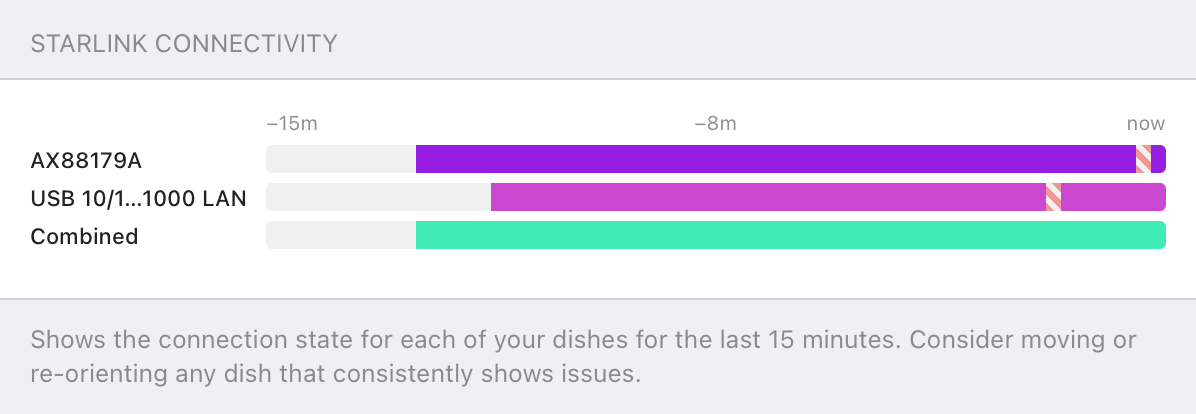
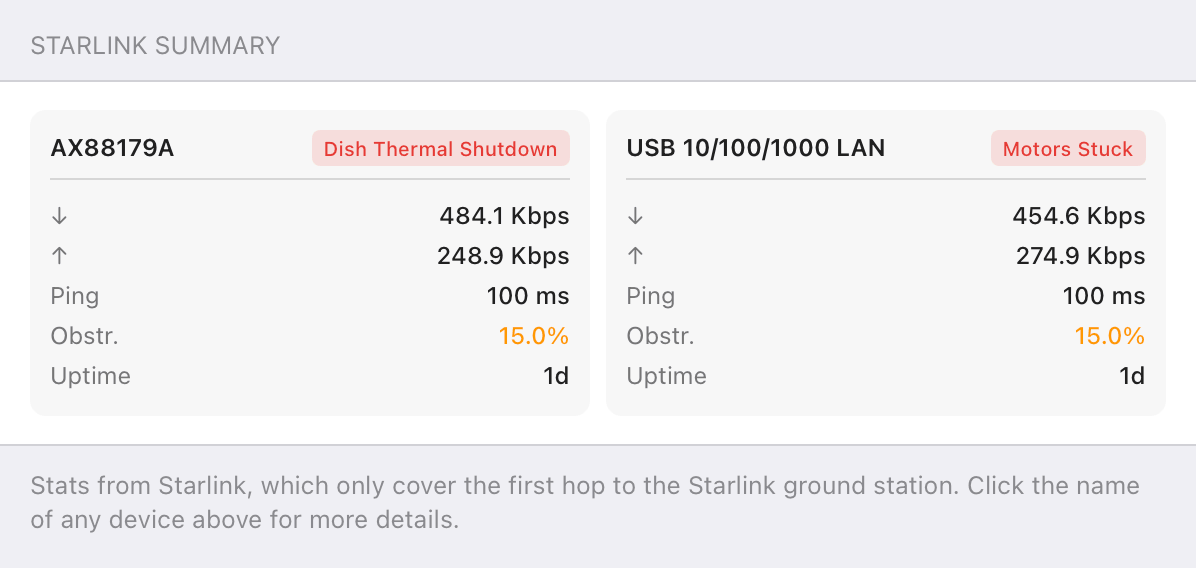
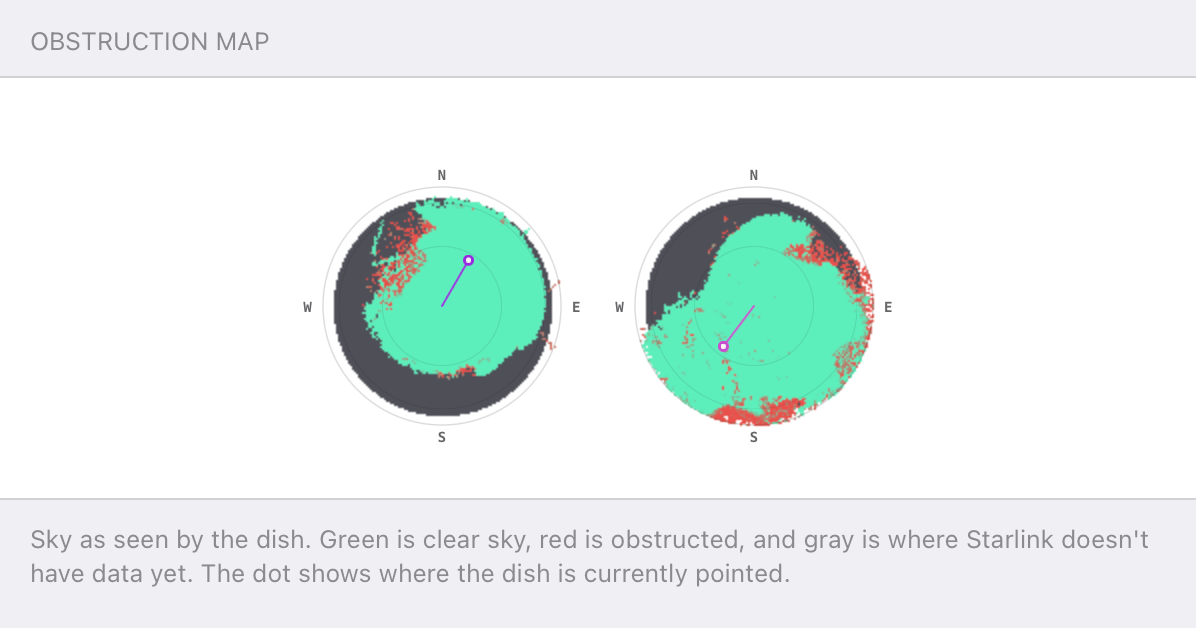
Speedify alerts you about your Starlink dish status
Speedify software alerts you about your Starlink dish status as soon as your dish experiences an issue - e.g. when your actuator motor is stuck, the mast is not vertical or there's a thermal throttle.
Speedify's Starlink Control Center helps you monitor all your Starlink dishes, read obstruction maps, and align multiple dishes all in the Speedify app. Get a real-time view of each dish's health and optimize the position of each Starlink dish, so you get the best possible performance out of your Starlink connections.
Speedify
Speedify gives you faster, steadier internet by combining Wi-Fi, cellular, and Starlink
Speedify bonds Wi-Fi, 4G/5G cellular, Ethernet, and Starlink into one connection at the same time, giving you more speed, automatic failover when one drops, and AES-256 encryption on every link.
Download Speedify ›More speed
Upload and download speeds combine across every active connection on your device.
Automatic failover
If a connection drops, Speedify moves your traffic to another in milliseconds. Calls stay connected.
Always encrypted
Every link runs through an encrypted tunnel, including public Wi-Fi, cellular, and Starlink.
Speedify Feature · Pair & Share
Speedify Pair & Share: share cellular between your devices, both ways
Most hotspots give. Speedify's Pair & Share gives and takes. Two devices running Speedify pair up and each uses the other's cellular connection simultaneously, so you both get faster uploads, faster downloads, and a steadier connection. No extra hardware, no new data plans, no setup beyond a tap.
Learn how Speedify's Pair & Share works ›More speed
Every device you pair with adds its cellular to yours, and yours to theirs.
Stays connected
If a paired device drops out, Speedify keeps you online on the remaining links.
Always private
Every shared connection runs through AES-256 encryption. Your traffic is yours.
No new gear
Runs on devices already running Speedify, over your local network. Pair once, reconnects automatically.


Backup Power - Essential to Have a Running Internet Connection during Extreme Weather
Ryan: So, how do you stay connected in a disaster scenario?
Alex Gizis: I've got two pieces of advice: Diversity and batteries. So, let's talk about batteries first. If power goes out, even if you still have internet, you don't have internet. If your router is not on a battery backup, and the modem is on a battery backup, and if you've got an Ethernet switch, you need all the stuff between you and the internet connection to be on batteries. Cell phones are nice. They have their own battery in them. You've got to assume power goes out. It probably goes out before the internet, so you need battery backups, UPSs.
Second is diversity. If the landlines go out because of a fire, There is a good chance that the cellular will keep working. So being able to switch quickly to 4G, 5G. If they're out, now we're talking satellite. A lot of satellite services, Starlink is a good one. There's a very good chance that things can go very wrong in your area and cost you power and the internet. The Starlinks, they can space laser to other satellites to come back down in another region. There's a very good chance that them or any KA-band satellites will still be online.
After that, they're out too. Now we're in disaster scenarios, now we're talking, ham radios, AM radios, just trying to get a little bit of news. Build your own intranet, yeah, there's mesh radios and things, but I think for most of us, that stuff is a step beyond.
Ryan: You mentioned battery backups. Do we have a battery backup for the internet here?
Alex Gizis: We do. We have a UPS in the closet and interestingly the routers are on it, but to be honest, the Mac that we stream from is not on it. So if power goes out, our live stream actually does end. Because we have actually run into that problem before.
We did lose power once during a live stream. They were building a grocery store next door and they cut power to the block. Man made disaster. On a small scale, right? I don't think the mayor of Philadelphia would admit it was a disaster. For us, in the middle of our livestream, that was a disaster.
Access to Multiple Internet Connections: Your Backup Plan for Extreme Weather
Ryan: So I guess this stuff doesn't just apply to disasters, it also applies if you're trying to use internet in an RV, or like at a trade show, or a conference, or...
Alex Gizis: Yeah, absolutely. I mean, from a technology point of view, it's the same thing. I mean, a lot of the problems, if there's some disaster, everyone jumps on the phone the internet at the same time and overwhelms things.
At a conference, you just recreate that every day. Towers going out and stuff. That's not much different than getting an RV and driving until you reach the end range. You want one solution. And so this is where, honestly, we have Speedify. We're building this software to juggle all these internet connections.
And you can tell it, hey, look, don't use the 4G or 5G if the main internet's good enough. Or, don't use any satellite if the 4G is still working, right? Or vice versa, you can sort of set up a few rules and, we'll juggle all those connections for you, which is nice because we can even juggle if all the connections are sort of bad, we can spread traffic across multiple Speedify and try to give you the best we can by putting some things on one and some on the other.
Advanced Internet Connectivity Solutions for Emergencies
Alex Gizis: One thing I've been thinking about a lot with this disaster recovery is that, when these networks get completely overwhelmed, everyone trying to check at the same time. So if the internet protocols were thing missing. And a couple people have made efforts to add this before, and Apple has done some work. We've done some stuff, but none of it's really taken off. To mark different traffic, it's different priorities. From our measurements, we're seeing about 55% of most people's internet traffic is ads. I think if there was an emergency, if they could just come down and stop the ads, everyone's internet speeds would instantly double, the load on the network would come down.
But it's tricky, because, People would play games. And download games. Yeah, people would actually be rooting for the tsunami to get a break from the ads, right? And or trying to figure out how to fake tsunami announcements so they can get the ads to temporarily stop, right? I mean, this stuff would happen.
I think that's why none of these standards are taken off. But it would be nice. It would be very easy to like Webpages stop loading pictures by default, unless you actually click on them during an emergency. It would reduce the bandwidth so much, and the network loads would come down, that I think a lot of bad things could sort of be skated through without the internet actually going out.
Ryan: Well, not to be devil's advocate, but I think There's a reason all these websites are covered in ads, right?
Alex Gizis: We can't block it all the time. I get that. But we're talking about emergencies, right? The internet's overwhelmed that, the rescue workers can't get their messages through.
Although for the rescue workers, there is FirstNet. It's a high priority cellular network and they go through first. If there's an emergency in particular, they're prioritized.
Ryan: Is that only a cellular network or is that on satellite too?
Alex Gizis: That's on cellular.
Ryan: If for some reason all the cell towers go down, that's still not going to work.
Alex Gizis: I think that's right. We'll be just lumped onto Starlink. And Apple satellite.

NEW!
Miri X510 Bonding Router
POWERED BY SPEEDIFY
Bond up to 7 Links Simultaneously
Combine wired, Wi-Fi, 5G, and LTE connections plus Pair & Share with other Speedify users.
Battery-powered Portability
How to Create Your Weather-Proof Internet Connectivity Strategy
Ryan: So how do I get my router on battery?
Alex Gizis: One thing you can do is get what's called a UPS, Uninterrupted Power Supply. Another thing you can do, I just love this thing. I bring it with me, right? You can get like it's one of these myriad routers.
It's backpack sized, right? You can pop into this thing NPF batteries, right? And so it can support two. And so I just leave it plugged in my desk, one of these batteries here, and if power goes out, it switches to battery. I yanked the plug out before walking over here, and I don't know if you can see, it's still running.
And these things are actually great for these sort of big projects. These disaster type scenarios. It's got a 5G radio. It's got a 4G radio. It's got Wi-Fi. It's got the multiple WAN ports. Connect to your Comcast and to a Starlink, right? And so if Comcast works or Starlink works, or 5G or 4G, if you have the SIMs in for them. It's got SIM slots, yeah, so you got to pop in a SIM card to use them. Even if power goes out, half those internet sources go out, they're just still online. So this gets used a lot, obviously it can be used for disasters, but mostly I think it's used by a lot of like professional reporters these days. They drive into disasters with this.
Ryan: Right, there are a lot of broadcasters broadcasting from disasters.
Alex Gizis: Hurricanes, wildfires. That's the end of the dock when a hurricane is hitting, right? Or standing in like a three foot deep puddle. It's a rough job, but I guess someone has to do it.
Ryan: So if you were using this with Starlink, you would still need a battery for the Starlink, right?
Alex Gizis: That is correct. Interestingly, the Starlink Mini SRT can be powered off USB-C, which means you can just get a battery pack like you would use to, recharge your phone and use that to power your Starlink. A generator is also an option, all those give you full blown, 120 V power. Outlets, need to plug into that.
Ryan: That's what Mr. Beast used for his Kai Cenat house explosion video. Starlink's on a generator. And a Miri.
Alex Gizis: Right, on the same generator that he also had the battery packs to back him up.
Ryan: So it's another kind of disaster. "Oh no, my, my fake house blew up in the middle of the street!"
Alex Gizis: That was amazing, because he actually put the PC right next to the hundreds of pounds of fireworks. When the computer was destroyed in the explosion, but luckily the internet didn't go out, didn't lose a single packet.

Connectivity Tech Discussions
Our Connectivity Tech Discussions Between Two Palms video series shines the spotlight on Alex and technical guests, diving deep into caonversations about the latest Internet technology, including Starlink satellite, WiFi 7, Apple, fiber optics, new routers, remote connectivity, and networking protocols.
Join us and let's talk tech!