
Slow Internet Connection? Try These Tips to Pin the Cause
“Why is my internet so slow?” usually has a findable answer – the plan you are paying for, the modem, the wiring, or the provider – and it is worth knowing which before you spend money on it. If it is only your phone, see why internet is so slow on a phone.
Speedify is an app that helps once you have found the answer and it is not something you can fix: it runs your traffic over more than one internet connection at once, so a slow line is not the only one you have. If uploads are the problem, see how to fix slow upload speeds.
This guide covers a step-by-step check – speed test against your plan, restart the modem and router, inspect the wires, contact your provider – and what to do when none of it helps.
- stream video from YouTube,
- get on a Facetime call or
- upload photos on Instagram to share with family and friends.
Before engaging in this troubleshooting guide, have your ISP contract and contact info handy. Also make sure you have at least another device available for tests.
Let’s dive in to fixing slow Internet connection. We’ll guide you through the most common steps. Toward the end of this article, we’ll unveil an easy solution for faster, more reliable Internet.
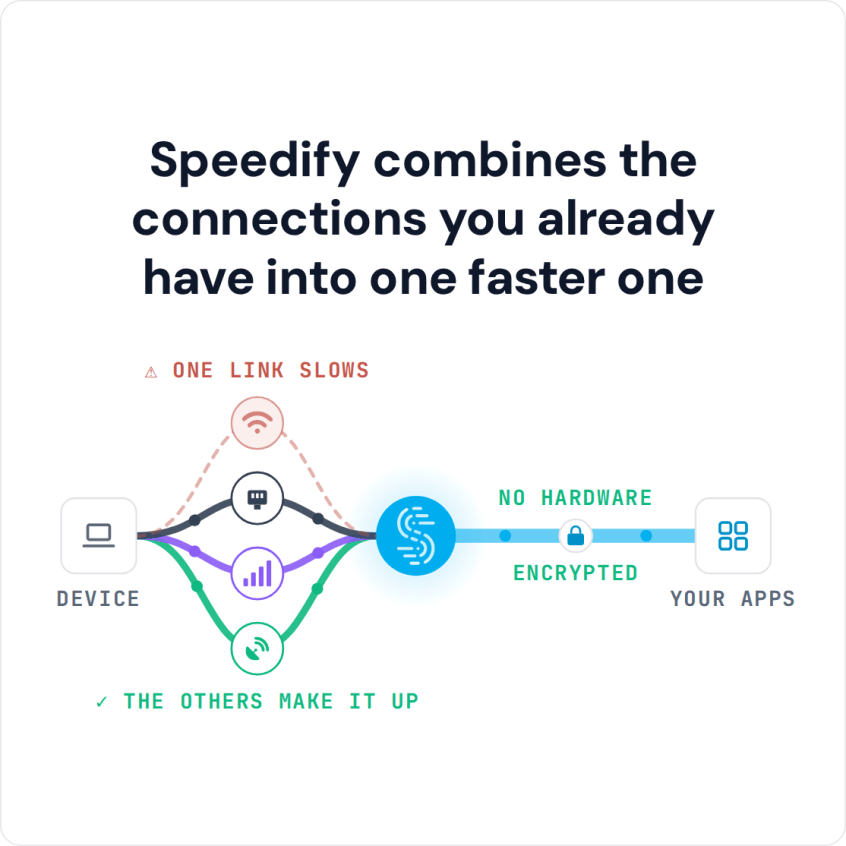
Speedify combines the connections you already have into one faster one
Why Is My Internet so Slow Troubleshooting – Step 1: Run an Online Speed Test and Compare It to Your Plan
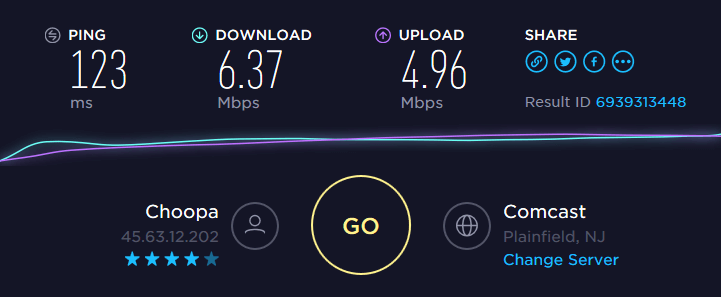
Just go to speedtest.net and run an online test. Use a computer connected to the router via wired Ethernet for most relevant results.
We recommend you do this with another device as well, if available – e.g. a smartphone. When connecting via WiFi, conduct the test near the wireless router, with no walls or objects between.
What to do
- Are the download and upload speeds close to what’s in the ISP contract? If so, you need to upgrade your plan. Contact your ISP for that.
- Test speeds significantly under what your service provider committed to in the contract? Try the following steps before contacting your ISP.
Getting slow speeds when connecting via WiFi from a location that is far from the wireless router? Time to improve your WiFi signal: either put the router in a more central location or get a WiFi range extender. You can also use your PC as a WiFi repeater.
Why Is My Internet so Slow Troubleshooting – Step 2: Restart Your Modem and Router
Believe it or not, this procedure can do wonders for your slow Internet connection. That’s because your router is actually a mini-computer that has a CPU, memory, local storage and operating system. Any of those can have an issue at some point: high CPU temperature, memory or operating system error (!), etc. So, as you fix a computer when it’s acting up by rebooting it, you can do the same with your router.
What to do
The simplest way to restart your modem / router is to:
- remove the power cord,
- wait about 10 seconds,
- connect the power cord back into the modem / router and
- wait for about one minute for the equipment to initialize.
Then, you can check your Internet speed again. Did this solve your slow Internet issue? If not, go to the next step.
Why Is My Internet so Slow Troubleshooting – Step 3: Check the Wires that Go into Your Modem or Router
Your Internet can get really slow if you have loose connectors or punched wires going in and out of your modem or router. Also – poor quality coaxial splitters can have an impact on your cable Internet speed.
What to do
- Start from your computer. Inspect the Ethernet cable that goes into the router – is it in good shape? Try to swap it and test speed with another one, if possible.
- Go to the router and modem – are all connectors plugged in firmly?
- If you have coaxial splitters, try to disconnect them and test your Internet speed.
Still no improvement? Go further!
Dealing with a Slow Internet Connection – Step 4: Contact Your Internet Service Provider
Sooner or later you’re going to have to face them. Your ISP may change its network configuration or encounter technical difficulties. These are usually communicated on a status page. If your ISP doesn’t have that, it’s best to contact them.
What to do
Call your ISP or contact them through instant messaging apps or social media. After all, you do want a quick response.
Still experiencing slow Internet? Time to bring out the heavy artillery: Speedify fast bonding VPN!
Proven Solution to Fix Slow Internet – Step 5: Use Speedify Fast Bonding VPN
Unless you’re living in a very remote area, you have multiple Internet connections available from different upstream networks. Examples include:
- your own smartphone through its cellular connection,
- nearby public WiFi networks,
- USB cellular adapters for computers,
- a second Internet connection you use for backup.
We’re not recommending switching to these connections. Rather, you can combine them together at once to get more speed with… Speedify!
Speedify’s channel bonding technology allows using two or more Internet connections. You’ll get a faster and more stable Internet connection.
Here’s what you have to do:
- Get Speedify on your computer or mobile device. It works on iOS, Android, macOS and Windows.
- Leave all your Internet connections active. For iPhones and Android smartphones – enable both WiFi and cellular data. Don’t worry – you can set data caps from within the Speedify app. This way, you won’t exceed it and pay extra.
For computers and laptops you can use:
- the wired Ethernet connection,
- multiple WiFi,
- additional 4G/LTE dongles or integrated cards.
- any type of USB network adapters – WiFi, Bluetooth, Ethernet
- Enjoy faster, more reliable Internet. Speedify will automatically detect any new active Internet connections and toss them into the mix. This will create a faster and dependable Internet connection. Its smart algorithms can detect if one of your connections has performance issues (e.g. bad WiFi hotspot). Speedify will fix it so you’ll always be connected.
Tired of troubleshooting slow Internet? Still wondering why your Internet is slow and what you can do about it? The answer is simple: get Speedify and start combining available connections for more speed and stability.
Not Enough Bandwidth Anywhere? Use Speedify’s Cellular Sharing Feature to Pool Several Phones
One of Speedify’s standout features is its Pair & Share functionality. It allows you to easily share and combine cellular connections back and forth between multiple Speedify users on the same local network to create a faster, more reliable connection for everyone.
Imagine pooling the internet resources of your entire family to create a supercharged connection that’s faster and more reliable than anything you’ve experienced before.
It’s very simple to get started with Pair & Share:
- Pair Devices: If you have Speedify for Families, the devices on the same network will automatically be paired. If not, you can easily link multiple devices running Speedify on the same local network.
- Share Connections: Each device can share and receive cellular connections, boosting your bandwidth by up to 10 Mbps per shared connection. You have full control over which devices can share connections, with all traffic between devices fully encrypted for security.
Speedify
Get started with Speedify today.
Combine Wi-Fi, 4G/5G cellular, Ethernet, Starlink, and more into one faster, steadier connection. Free to try — no credit card required.
🚀 Speed
Faster uploads and downloads by bonding all your connections at once.
📶 Stability
Automatic failover in under a second when any connection drops.
🔒 Security
AES-256 encryption on every connection, on every network you join.



15M+ downloads worldwide. 75K+ five-star reviews on iOS and Android.