
You Can Combine Multiple Internet Connections Together – Like Starlink, Wi-Fi, 4G, 5G, and DSL – with Speedify, to Fix Slow TikTok
TikTok lagging shows up in two places: videos that stall or stutter while you scroll, and the one you just filmed sitting at 90% for minutes when you try to post it. Sometimes the app is to blame, and often it is a weak internet connection.
Speedify is an app that runs your phone on Wi-Fi and 4G/5G cellular at the same time, so there is more room in both directions, for scrolling and posting. The speed gain needs both connections. On a single connection, Speedify works as an encrypted VPN and can be a little slower.
Find out why TikTok lags, why uploads stop part-way, and what changes once two internet connections are carrying the app together.
Why TikTok Is So Slow on a Phone
It is common to experience problems with TikTok, and TikTok lagging has two kinds of causes. Some are in the app or the phone: an old TikTok version, a large cache, a phone that is low on storage, or an outage on TikTok’s side. The rest come from a poor internet connection.
When you stream a video, your device is asking for data to be sent from TikTok’s servers. Unfortunately, if your internet signal fluctuates or suddenly cuts out, the data is never delivered to your device, and you experience a lagging video.
TikTok Lagging Even with Good Internet: Fixes on the Phone
If other apps load fine and TikTok still lags, start with the app: update TikTok, clear its cache (Profile > menu > Settings and privacy > Free up space > Clear cache), close apps running in the background, and restart the phone. Free up storage if the phone is nearly full. On a Chromebook or computer, close other browser tabs or try TikTok in another browser.
Why a TikTok Video Won’t Upload
You’ve just spent an hour practicing and recording your latest routine. When you upload it to TikTok, it stops halfway through. Again, your internet connection is probably to blame: when your connection is weak, small pieces of data called packets are lost, and the upload fails. The same goes for TikTok Live lagging while you broadcast, since a live stream needs a steady upload.
How Speedify Fixes the Connection Side of TikTok Lagging
Speedify combines multiple internet connections into one connection for more stable and secure live streaming, video calling and browsing. That solves the connection side of TikTok lagging: by default, iOS and Android devices connect to the internet through one connection at a time, either cellular or Wi-Fi.
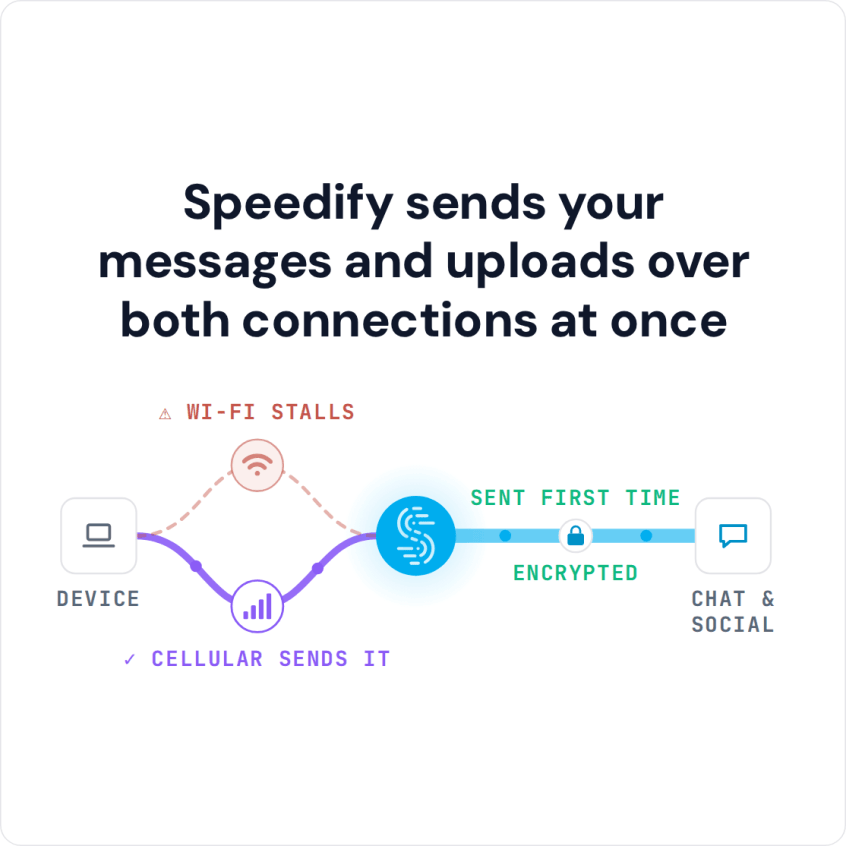
Speedify allows your device to connect to the internet using a Wi-Fi and a cell signal simultaneously. It increases the bandwidth you have available to upload videos and stream content.
The Speedify app works on iOS and Android devices, and it doesn’t require any technical skill to install or use. Once you have it set up, Speedify runs in the background, monitoring your internet connections. It also routes your data with two goals in mind. First, it tries to use Wi-Fi whenever possible instead of expensive cellular bandwidth. Second, it routes data to ensure the fastest internet connection possible.
Speedify also has auto failover: when Speedify detects that a signal is weak or spotty, it moves the data to the other connection so the video keeps playing. Once the first connection is available again, Speedify starts using it again automatically.
How to Fix TikTok Lagging with Speedify
- Download Speedify on your iPhone or Android phone.
- Open Speedify and create a free account (the free tier includes 5 GB per month), or sign in.
- Keep Wi-Fi on and turn on cellular data too, so Speedify has a second internet connection to work with.
- Connect. Speedify sends traffic over both connections at once and moves it to the working one when one weakens.
- Open TikTok and scroll, post or go live as usual.
If TikTok keeps lagging on a weak connection, download Speedify and let Wi-Fi and 4G/5G cellular carry the app together.
Speedify
Get started with Speedify today.
Speedify combines Wi-Fi, 4G/5G cellular, Ethernet, Starlink and satellite into one faster, more reliable internet connection. Free to try: 5 GB a month with a free account. No credit card required.
🚀 Speed
Faster uploads and downloads, because Speedify uses all your internet connections at once.
📶 Stability
If one internet connection drops, Speedify moves your traffic to the others in milliseconds.
🔒 Security
AES-256 encryption on every internet connection, on any network you join.



15M+ downloads worldwide. 75K+ five-star reviews on iOS and Android.