
TikTok Not Working? Fix It: Combine Multiple Internet Connections Together – Like Starlink, Wi-Fi, 4G, 5G, and DSL – with Speedify
TikTok opening to a blank feed, or videos that buffer instead of playing, comes down to two causes: an internet connection too slow and unsteady to keep the videos loading, or a network that blocks TikTok outright, as many school and office networks do.
Speedify gets your phone online through Wi-Fi and 4G/5G cellular data at once, and encrypts what it carries, so the videos keep loading and a blocking network stops getting in the way. The sections that follow cover the slow internet connection and the blocked network, and what changes on your iPhone or Android phone once you are using Speedify. Keeping videos loading through a drop needs both connections turned on: on Wi-Fi alone, Speedify works as an encrypted VPN and cannot stop that connection from dropping.
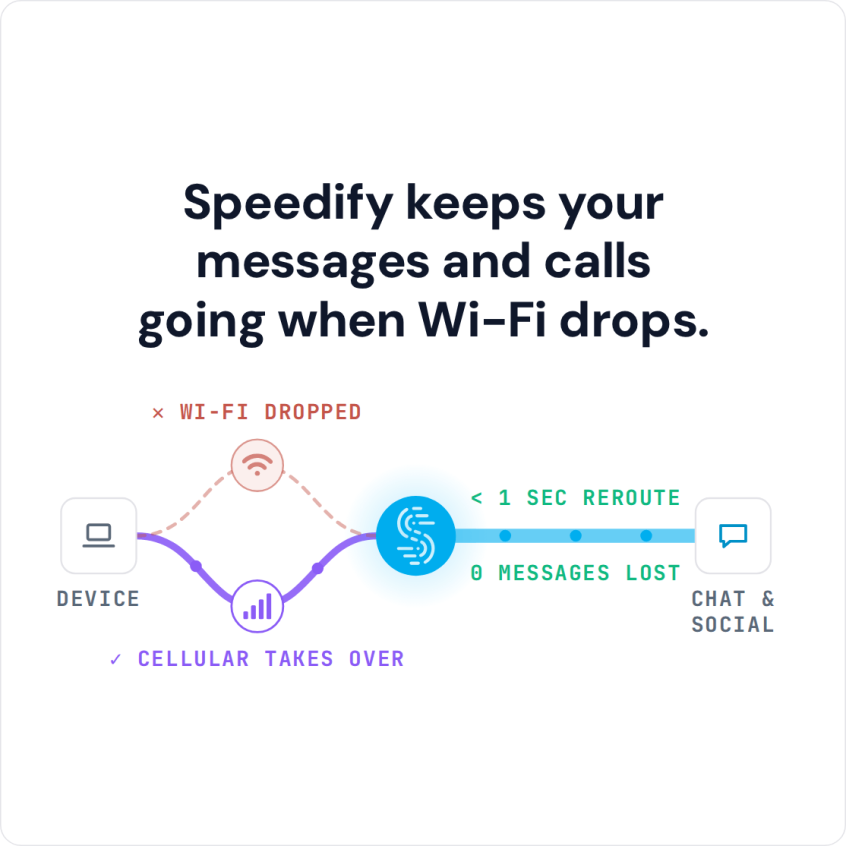
Speedify keeps your messages and calls going when Wi-Fi drops.
TikTok Not Working Because of Slow and Unstable Internet
Experiencing problems with TikTok? Is it slow, lagging, buffering or disconnecting from time to time? You might want to check their social media accounts and see if they report any issues with their servers.
However, these kind of problems are not usually the fault of the TikTok app or their servers. It is more likely that these problems are occurring because of a poor internet connection.
When you stream a video, your device is asking for data to be sent from TikTok’s servers. Unfortunately, if your internet signal fluctuates or suddenly cuts out, the data is never delivered to your device, and you experience a lagging video.
Here’s a recent use case from a TikTok user: they spent an hour practicing and recording their latest routine. When uploading it to TikTok, it stopped halfway through. In their case, the internet connection was the culprit. When the connection is weak, little bits of information–called packets–are lost, leading to failed upload attempts.
Bottom line: you need a way to get fast and stable Internet.
TikTok Not Working Because of Restrictions
Other times, the Internet connection may be fine in terms of speed, but not in terms of access. Recently, India banned TikTok for about a week or so. But this doesn’t have to be at a country level. If you’re using TikTok at school or at work, network admins can choose to restrict access to that app. Lots of such cases already happen with other apps, like YouTube, Snapchat or Facebook.
In such cases, you need a VPN service to help you unblock network restrictions. Further more, the VPN has to provide a fast and stable Internet connection. Meet Speedify bonding VPN!
The Easy Way to Fix TikTok Issues
Speedify solves the problem of slow, unreliable internet that causes TikTok not working issues. How? By unleashing the full capabilities of your mobile device! By default, iOS and Android devices only connect to the internet through one connection at a time. You are either connected through a cellular signal or through Wi-Fi.
Speedify allows your device to connect to the internet using a Wi-Fi and a cell signal simultaneously. It increases the bandwidth you have available to upload videos and stream content.
The Speedify app works on iOS and Android devices, and it doesn’t require any technical skill to install or use. Once you have it set up, Speedify runs in the background, monitoring the quality of your internet connections. It also routes your data with two goals in mind. First, it tries to use Wi-Fi whenever possible instead of expensive cellular data. Second, it routes data to ensure the fastest internet connection possible.
Speedify also has automatic failover. This means that when Speedify detects a signal is weak or spotty, it reroutes all the data through the remaining connection to give you a smooth, uninterrupted flow of video. Once the other connection is available again, Speedify automatically reconnects.
If you want to level-up your TikTok game, download Speedify and enjoy a faster, smoother uninterrupted experience.
Speedify
Get started with Speedify today.
Speedify combines Wi-Fi, 4G/5G cellular, Ethernet, Starlink and satellite into one faster, more reliable internet connection. Free to try: 5 GB a month with a free account. No credit card required.
🚀 Speed
Faster uploads and downloads, because Speedify uses all your internet connections at once.
📶 Stability
If one internet connection drops, Speedify moves your traffic to the others in milliseconds.
🔒 Security
AES-256 encryption on every internet connection, on any network you join.



15M+ downloads worldwide. 75K+ five-star reviews on iOS and Android.