
Having Zoom Problems? Fix Them: Combine Multiple Internet Connections Together – Like Starlink, Wi-Fi, 4G, 5G, and DSL – with Speedify
When Zoom shows “Your internet connection is unstable” or drops out every few minutes, the timing is the clue. One home internet connection is wobbling, and each wobble lasts long enough for Zoom to give up and start reconnecting. If Zoom will not connect at all, see what to do when Zoom won’t connect.
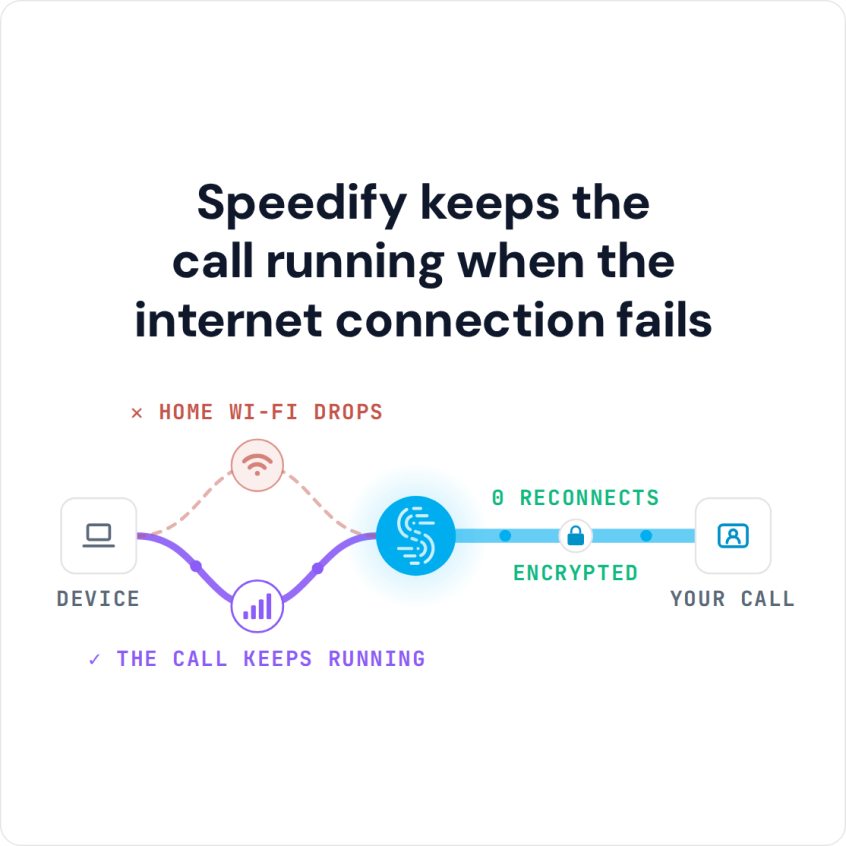
Speedify is an app that runs your internet over two or more internet connections at the same time (Wi-Fi, 4G/5G cellular, Ethernet, Starlink and others), so the call keeps moving on one while another recovers. On a single connection, Speedify works as an encrypted VPN and cannot stop that connection from dropping.
Speedify keeps the call running when the internet connection fails
Read on for the usual causes of these repeat drop-outs, the Zoom problems worth ruling out first, and what changes once Speedify is carrying the meeting over two internet connections instead of one.
What Zoom’s “Your Internet Connection Is Unstable” Message Means
Zoom shows “Your internet connection is unstable” when your connection is losing data or slowing down too much for the call. A bad connection is behind most Zoom problems: the spinning buffering wheel, disconnects and ‘can you hear me now’ moments. Here is why it happens and what you can do.
How to Fix Common Zoom Problems
First, test your online speed. Is it fast enough for Zoom video conferencing? You’ll need at least 2 Mbps upload and 2 Mbps download.
Assuming that nothing is wrong with the Zoom service itself, here’s the quickest way to troubleshoot and fix Zoom not connecting errors:
- Move closer to the Wi-Fi router or, better yet, use a wired Ethernet connection if possible.
- Move around till you get better cellular coverage, if no other connections are available.
- Restart your modem, router and the device you’re running Zoom on (computer or smartphone). You may also update your router’s firmware, if an update is available.
- Check if your ISP is having temporary issues. They should have a status page or at least a social media account to communicate that.
- If you have 2 or more internet connections available, use them at once. Most likely, you have 4G/5G cellular on your smartphone, so you can combine that with your home internet. You’ll need an app that combines internet connections, like Speedify, for that.
How Speedify Keeps Zoom Calls Going on an Unstable Connection
Speedify’s team tested Zoom on a laptop and on a smartphone while running Speedify, simulating bad internet conditions. The results showed that Speedify kept the average Zoom video call bandwidth on both devices near the target, both when the connections were good and when one of them went bad.
So how does Speedify achieve that? Speedify combines internet connections, which lets you use multiple Internet connections at once. On your smartphone, Speedify combines Wi-Fi and 4G/5G cellular. On a computer, there’s more flexibility about the number and type of connections.
Speedify also reroutes data when something happens to one of your connections. When you stumble upon a bad Wi-Fi hotspot, or your connection suddenly goes out, you stay connected: Speedify intelligently and automatically reroutes your data through the other available connection(s) until both networks are back.
The beauty of it is that Speedify does more than just manage your internet connections. Speedify is also a VPN that combines connections: Speedify encrypts all of the data you send and receive from your device, which helps keep your private information and conversations secure from digital eavesdroppers and cyber thieves.
Speedify doesn’t just help you avoid Zoom connectivity issues: with two or more connections, everything else you do online runs over the same combined connection.
Speedify
Get started with Speedify today.
Speedify combines Wi-Fi, 4G/5G cellular, Ethernet, Starlink and satellite into one faster, more reliable internet connection. Free to try: 5 GB a month with a free account. No credit card required.
🚀 Speed
Faster uploads and downloads, because Speedify uses all your internet connections at once.
📶 Stability
If one internet connection drops, Speedify moves your traffic to the others in milliseconds.
🔒 Security
AES-256 encryption on every internet connection, on any network you join.



15M+ downloads worldwide. 75K+ five-star reviews on iOS and Android.