
Run Speedify on a GL.iNet Router to Bond Every Connection
Installing Speedify on one device protects that device. Installing Speedify on your router protects the whole network. GL.iNet routers run OpenWrt under the hood, and Speedify installs on routers running OpenWrt or GL.iNet firmware, so a single setup gives every phone, laptop, TV, and smart device behind the router faster, more reliable, and more secure internet, with no per-device install.
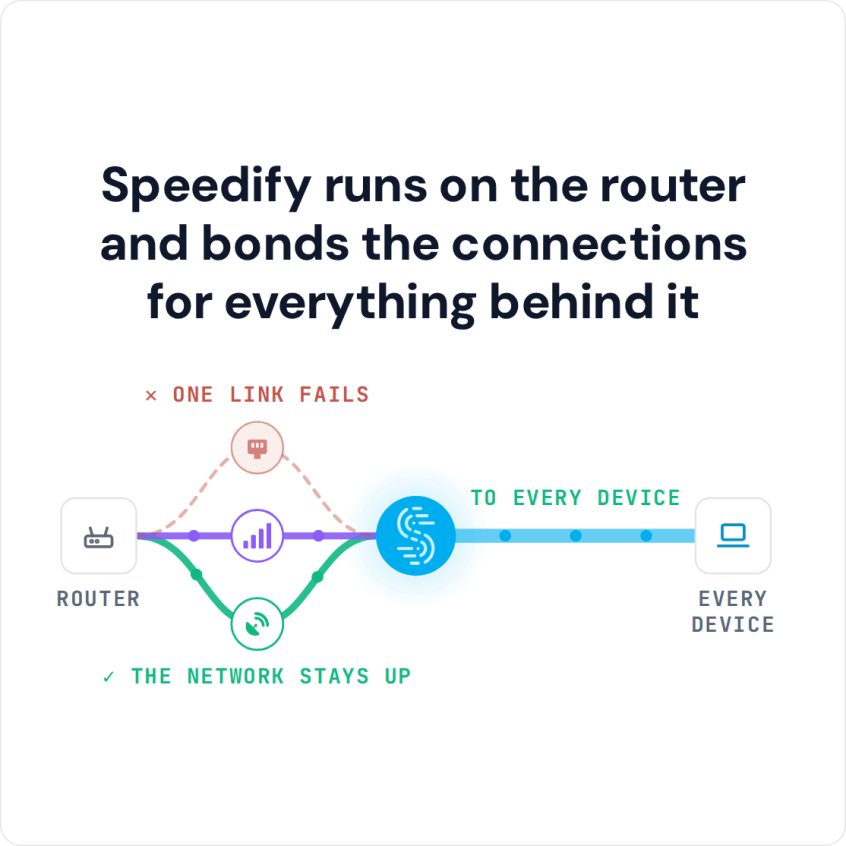
Once Speedify is on the router, Speedify combines Wi-Fi, 4G/5G cellular, Ethernet, Starlink and satellite internet connections into one connection for the entire LAN. Speedify’s technology for combining internet connections sends traffic over all of them at once for faster downloads and uploads, and if one connection drops, traffic moves to the others without dropping calls or streams.
Speedify runs on the router and bonds the connections for everything behind it
How do I use WiFi and 4G/5G cellular at the same time with Speedify?

Pick your two internet connections and your device below and we'll take you to the step-by-step setup guide.


What You Need Before You Start
Speedify on a router has a few requirements. Confirm these first so the install goes smoothly.
- A Speedify Router License. Running Speedify on a router uses a dedicated Router License, separate from a personal subscription.
- A supported router. The router needs to run OpenWrt 23.05 or newer, or GL.iNet firmware, on an x86_64 (Intel or AMD) or aarch64 (Cortex A53 or A72) CPU. Check the current list in Speedify’s supported routers article.
- An active internet connection on the router so it can download Speedify during setup.
Many GL.iNet models qualify out of the box. One exception: Speedify does not support GL.iNet firmware on mipsel devices such as the Beryl MT1300. Speedify’s supported routers list shows the Beryl running Speedify after you flash mainline OpenWrt from the OpenWrt firmware selector; other MIPS routers are not supported.
Why Install Speedify on the Router Instead of Each Device
A router-level install means combining and failover happen once, for everything on the network. A smart TV or a games console cannot run the Speedify app on its own, but behind a Speedify-powered router it still gets the combined, encrypted connection. If you want the background on the hardware itself, see Speedify’s guide to what a router is and how it works.
How to Install Speedify on a GL.iNet Router
- Activate your Speedify Router License on the Speedify account you will sign in with.
- Connect to the router over SSH as root. On GL.iNet firmware the router’s address is usually 192.168.8.1; on mainline OpenWrt it is usually 192.168.1.1.
- Run the official install script. Speedify provides a one-line script that installs both the Speedify package and the LuCI plugin. Use the exact, current command from Speedify’s OpenWrt and GL.iNet setup guide rather than copying it from anywhere else, since the command is updated over time.
- Open the LuCI web panel. After the install, a new Speedify tab appears. On OpenWrt it sits in the top navigation; on GL.iNet it sits on the left, under the VPN section. Log out and back in if you do not see it.
- Sign in to Speedify. Click the Speedify tab and sign in with your Speedify account to activate the connection.
Speedify is now active, and every device on the router’s network gets the combined, encrypted connection automatically.
Combine Two or More Internet Connections on a GL.iNet Router with Speedify
To combine more than one internet connection, the router needs at least two WAN interfaces, for example a wired uplink plus a 4G/5G cellular connection. OpenWrt usually bridges WANs by default and GL.iNet does not, so each connection has to be individually addressable for Speedify to combine it.
A USB-tethered Android phone or iPhone can serve as an extra WAN. The exact interface configuration is covered in Speedify’s guide to combining connections on OpenWrt. Once the WANs are configured, they appear in the Speedify interface and Speedify starts combining them.
For a do-it-yourself take on the same idea using a single-board computer, see Speedify’s guide to building your own Raspberry Pi router that combines connections.
Two GL.iNet Gotchas Worth Knowing
Keep two things in mind. First, GL.iNet’s Network Acceleration feature can conflict with Speedify’s Performance Enhancing Proxy and cause connection issues; if you see problems, that setting is the first thing to check.
Second, upgrading the router’s OpenWrt operating system usually wipes manually installed packages, so you will need to reinstall Speedify after a firmware update.
GL.iNet and Speedify: FAQ
Which GL.iNet routers can run Speedify?
GL.iNet routers with an x86_64 or aarch64 CPU running OpenWrt 23.05 or newer, or GL.iNet firmware, are supported. MIPS devices are not supported; the one exception on Speedify’s list is the Beryl MT1300 after flashing mainline OpenWrt. Always check the current supported routers list.
Do I need a special license for a router?
Yes. Speedify on a router uses a Speedify Router License, which is separate from a personal Speedify subscription. Each Router License is priced by monthly data and includes a complimentary Speedify for Individuals account for up to 5 other devices. The free tier is not available on routers.
Does every device on the network get the combined connection?
Yes. Once Speedify runs on the router, every connected device gets the combined, encrypted connection, including devices that cannot run the Speedify app themselves.
Can the router still work normally if Speedify is off?
Yes. With Speedify disconnected, the router uses its connections as usual. With Speedify connected, those connections are combined into one.
Speedify
Get started with Speedify today.
Combine Wi-Fi, 4G/5G cellular, Ethernet, Starlink, and more into one faster, steadier connection. Free to try — no credit card required.
🚀 Speed
Faster uploads and downloads by bonding all your connections at once.
📶 Stability
Automatic failover in under a second when any connection drops.
🔒 Security
AES-256 encryption on every connection, on every network you join.



15M+ downloads worldwide. 75K+ five-star reviews on iOS and Android.