
How to Watch UFC Online and Keep the Live Stream Stable with Speedify
The free ways to watch UFC online depend on where you live. In some countries a free-to-air channel shows UFC events, and in the United States select numbered events air free on CBS, with every event streaming on Paramount+.
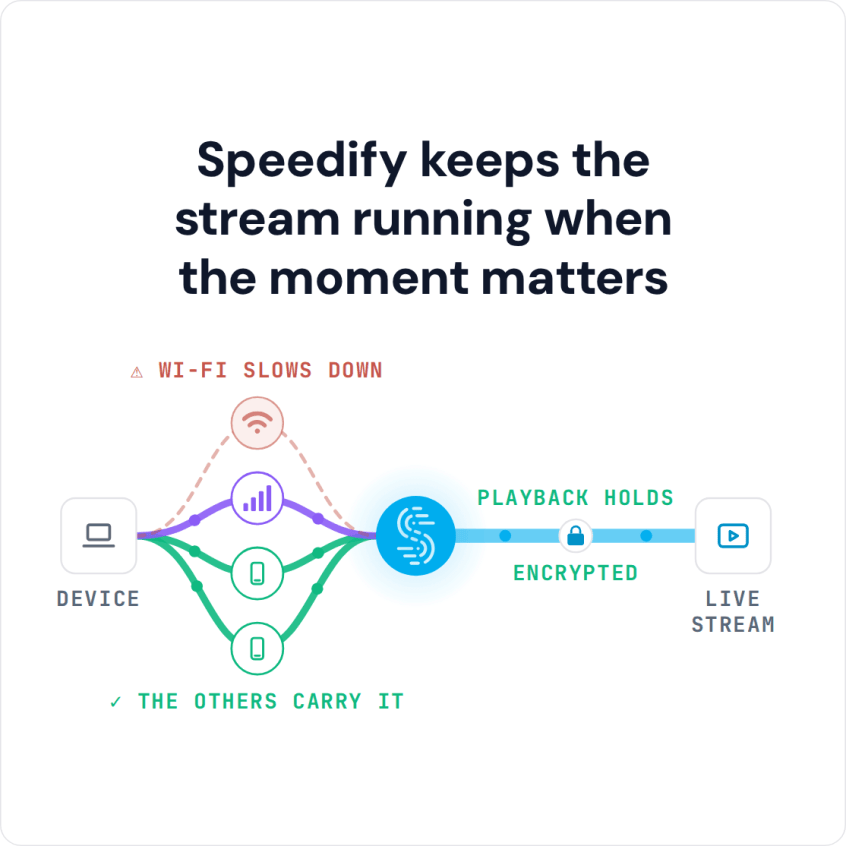
Speedify is an app that keeps that stream from stalling: it encrypts your traffic like a VPN and carries it over Wi-Fi, 4G/5G cellular, wired Ethernet, Starlink and other internet connections at the same time, instead of leaning on one internet connection, so a title fight does not freeze between rounds.
Speedify keeps the stream running when the moment matters
This guide covers where to watch UFC for free or at the lowest cost in your country, and four steps to set Speedify up before a fight card. Speedify’s gains need two or more internet connections, such as home Wi-Fi plus your phone’s 4G/5G cellular; on a single connection, Speedify works as an encrypted VPN and can be a little slower.
Where to Watch UFC Online without Cable TV
UFC events air on TV stations and streaming services that differ by country. If your TV subscription includes one of the TV stations that carries UFC, you are set. If not, you can watch UFC online without a cable TV contract.
In the United States, UFC moved off pay-per-view in 2026: every numbered event and Fight Night streams on Paramount+, and select numbered events also air on CBS, which you can watch free with a TV antenna. In other countries, UFC.com lists the TV station or streaming service for your country, and UFC Fight Pass streams past fights and some live events. Those services’ apps also run on game consoles, Apple TV and smart TVs.
Pay-per-view and subscription prices differ from country to country. Speedify does not change which broadcasts you are entitled to watch: broadcasters and streaming services set their own regional rules in their terms. When you travel, Speedify lets you reach the services and subscriptions you already use at home, and on any network it keeps the stream steady.
Paramount+ Buffering or Not Working During a UFC Fight
Since UFC moved to Paramount+ in the United States in 2026, viewers have reported buffering, freezes and black screens on Paramount+ during busy fight cards, including UFC 329 and UFC 330. Before you change anything at home, find out whether the problem is Paramount+ or your own internet connection:
- Check Downdetector for Paramount+. If many people report problems at the same moment, the fault is on the Paramount+ side and nothing on your end will fix it. Wait a few minutes, then restart the stream.
- Run a speed test or open another video on the same device. If those stall too, your internet connection is the weak link.
- Close and reopen the Paramount+ app, and connect your TV or streaming device to the router with an Ethernet cable if you can, or move it closer to the Wi-Fi router.
When your own internet connection is the problem, Speedify keeps the fight playing. Speedify sends the Paramount+ stream over your home Wi-Fi and your phone’s 4G/5G cellular connection at the same time, so a slow or dropped Wi-Fi connection does not stop the stream. Speedify cannot fix an outage on the Paramount+ side.
4 Steps to Set Up Speedify Before a UFC Fight
Speedify was built for speed. Unlike a single-connection VPN, Speedify works by combining internet connections: home Wi-Fi and your phone’s 4G/5G cellular, for example. When you combine multiple connections at once, buffering and frozen frames during a UFC fight drop off, and if one connection fails, the stream carries on over the other. Read how combining differs from load balancing.
Set Speedify up in 4 steps before the fight starts:
- Get Speedify for your computer, smartphone or tablet and sign in (a free account includes 5 GB per month). If you’re watching from a game console, see this article on sharing a VPN connection over Wi-Fi.
- Turn Speedify on. Speedify connects to a server near you automatically; when you travel, you can pick a server in your home country (paid plans include servers in more than 50 locations) to reach the UFC service you already pay for at home. Here’s how to connect to a Speedify server.
- Connect a second internet connection if you have one, such as your phone’s 4G/5G cellular next to home Wi-Fi, so Speedify can use both during the fight.
- Open your UFC broadcaster’s app or website (Paramount+ or CBS in the United States, or the broadcaster UFC.com lists for your country) and watch the fight.
Some streaming services block VPN connections. If yours does, check the service’s rules, or add it in Speedify under Settings > Bypass so its traffic goes directly from your device. Bypassed traffic does not travel through Speedify, so it does not get the combined connection.
Where to Get More Information about Upcoming UFC Events
Go to UFC.com and check out updated information on next matches and the fighters. If you change your territory from the drop-down menu in the top right, you will also be able to see what TV station to tune in for the next match.
Whichever service you watch on, Speedify helps keep the stream steady through the whole card. Get Speedify before the next fight.
Speedify
Get started with Speedify today.
Speedify combines Wi-Fi, 4G/5G cellular, Ethernet, Starlink and satellite into one faster, more reliable internet connection. Free to try: 5 GB a month with a free account. No credit card required.
🚀 Speed
Faster uploads and downloads, because Speedify uses all your internet connections at once.
📶 Stability
If one internet connection drops, Speedify moves your traffic to the others in milliseconds.
🔒 Security
AES-256 encryption on every internet connection, on any network you join.



15M+ downloads worldwide. 75K+ five-star reviews on iOS and Android.