
How to Get Reliable Internet in a Rural Area
To get internet in a rural area, your options are usually DSL over the phone line, fixed wireless from a nearby tower, cellular home internet and Starlink. Cable and fiber rarely reach rural roads. Each option has a weak spot: DSL is slow, fixed wireless drops when the trees leaf out, cellular home internet slows down in the evening, and you’re often stuck with one local provider.
Speedify is an app that uses more than one of these at once, for example DSL or fixed wireless plus a cellular hotspot or Starlink. When one internet connection has a weak moment, Speedify moves your traffic to the other, so you get faster downloads and uploads and stay online when one internet connection fails.
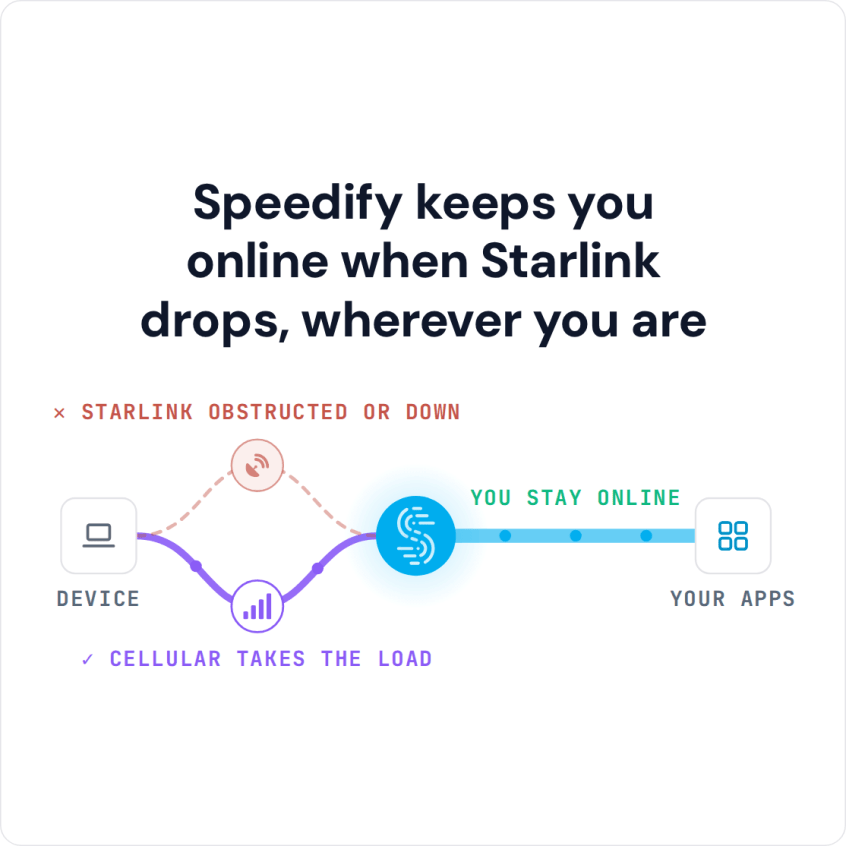
Speedify keeps you online when Starlink drops, wherever you are
Watch now
How Speedify's channel bonding technology works on any hardware
Get started with Speedify for your business
Speedify offers three commercial paths. They're not exclusive — most enterprise customers combine two or more.
01
Speedify Teams
Speedify on every supported OS for every team member
Centralized dashboard for billing, user provisioning, and usage analytics
CSV import/export and a RESTful management API
02
Speedify for Routers
License for supported OpenWrt routers
Powered by Speedify hardware lineup ready to deploy out of the box
Miri, GL.iNET, and other partner models
Whole-LAN bonding without per-device install
03
Embed Speedify into your product
A · DIY
Build it yourself with the Speedify SDK.
Integrate Speedify into your iOS, Android, Windows, macOS, Linux, or QNX product. Full developer documentation, sample code, and supported integration paths. You own the build, we provide the bonding stack.
B · CUSTOM ENGINEERING
Have us build it for you.
Rural Internet Options: Fixed Wireless, Cellular, Starlink and DSL
Cable and fiber companies rarely wire rural roads. Ask the ones near you whether they serve your address. If they don’t, these four are what’s left:
- Fixed wireless sends internet by radio from a tower to an antenna on your house. The speed is decent when nothing stands between the antenna and the tower, but it drops as trees grow in or as more neighbors join the same tower.
- Cellular home internet works well close to a cell tower, and everyone on that tower shares it, so it slows down in the evening. If it also keeps dropping out, see what to do when 5G home internet drops.
- Starlink reaches almost anywhere with a clear view of the sky. Starlink lists download speeds of 45 to 280 Mbps, but it costs more than the others and reacts to weather and to trees or buildings in the Starlink dish’s view.
- DSL is often the cheapest option and the best at simply staying up, but its speeds haven’t kept up with how people use the internet today.
Why a Single Rural Internet Connection Keeps Failing
Every type of rural internet connection has a predictable weak point, and most rural homes have exactly one internet connection to cover for all of them. When a storm knocks a fixed wireless tower offline, there’s no second internet connection to use while you wait for a technician. The way to avoid internet outages in a rural area is to have two internet connections and use them together.
If one shaky internet connection is all you have, you are not the only one. Other rural households solve the same problem by using Starlink and 5G home internet together, and the same fix gives remote workers reliable internet while working from anywhere.
How Speedify Combines Your Rural Internet Connections into One
Speedify uses whatever rural internet connections you actually have, DSL, fixed wireless, cellular and Starlink, in any combination, and gives you nearly their full combined speed. A DSL line that tops out at 15 Mbps stops being your limit once Speedify uses it together with a cellular connection, and video calls and big downloads draw on both at the same time instead of picking one.
How Speedify Keeps Rural Internet Online Through Storms and Busy Evenings
Weather causes many rural outages: a storm takes down a fixed wireless tower, or heavy cloud and rain weaken a satellite dish’s signal. When one internet connection weakens or drops, Speedify switches your traffic to the one that still works, so your work call or video stream doesn’t freeze while the other recovers.
Busy evenings work the same way. When a shared tower slows to a crawl because the whole neighborhood is online, Speedify sends more of your traffic over the internet connection that isn’t busy.
How to Set Up Speedify for Rural Internet at Home
- List every internet connection you can actually get at your address: your current provider, cellular signal from each carrier, and whether a Starlink dish would have a clear view of the sky.
- Download Speedify on your router or on the computer you work on.
- Connect each internet connection. In the Speedify app, set each one to Primary, so Speedify uses them together. If a cellular plan has a data cap, set it to Backup instead, so Speedify uses it only when your other internet connection drops.
- Test it by unplugging your main internet line at a quiet moment, not during a live call.
Sample Rural Internet Setups by Budget
A budget setup pairs your existing DSL line with a cellular hotspot on a second carrier. A mid-range setup adds Starlink, for homes where someone needs to work from home reliably.
Speedify works alongside your current rural provider rather than replacing it, and it needs at least two working internet connections to help. If you have only one option today, add a second one first, usually cellular. Speedify also can’t add speed a DSL line doesn’t have: it only helps as much as the internet connections underneath allow.
Speedify Is Used on Millions of Devices Worldwide
Speedify has made internet connections faster and more reliable for businesses and individuals since 2014.
15M+
Speedify downloads worldwide75K+
5-star reviews for Speedify on iOS and Android82
Speedify server points of presence in 50+ cities on 6 continents500TB+
Of internet traffic carried by Speedify every weekSpeedify Partners
Speedify works with these companies to bring faster, more reliable internet and networking technology to their customers and employees.


For farms and rural businesses: Speedify can combine every internet connection at your site so card payments, calls and cloud apps stay online. Contact Us to plan the setup.
For rural households: Download Speedify to use your DSL, fixed wireless, cellular or Starlink internet connections together.
Speedify Business Solutions
Speedify Teams
Speedify for Routers

Speedify Embedded Solutions and Integrations
Embed Speedify software into your app or hardware products and leverage the core channel bonding technology of Speedify in new and interesting ways.