
How to Find Cheap Internet and Lower Your Bill
To improve internet speed without paying more, start by matching your plan to how you actually use the internet. In 2016, the United Nations declared internet access a basic human right, but that doesn’t stop internet companies from raising their rates every year. These five tips help you reduce your bill while keeping or improving your connection speed. One tip uses Speedify, an app that combines internet connections: its speed gain needs two or more connections, such as home Wi-Fi plus a phone’s 4G/5G cellular, and on one connection Speedify works as an encrypted VPN that can be a little slower.
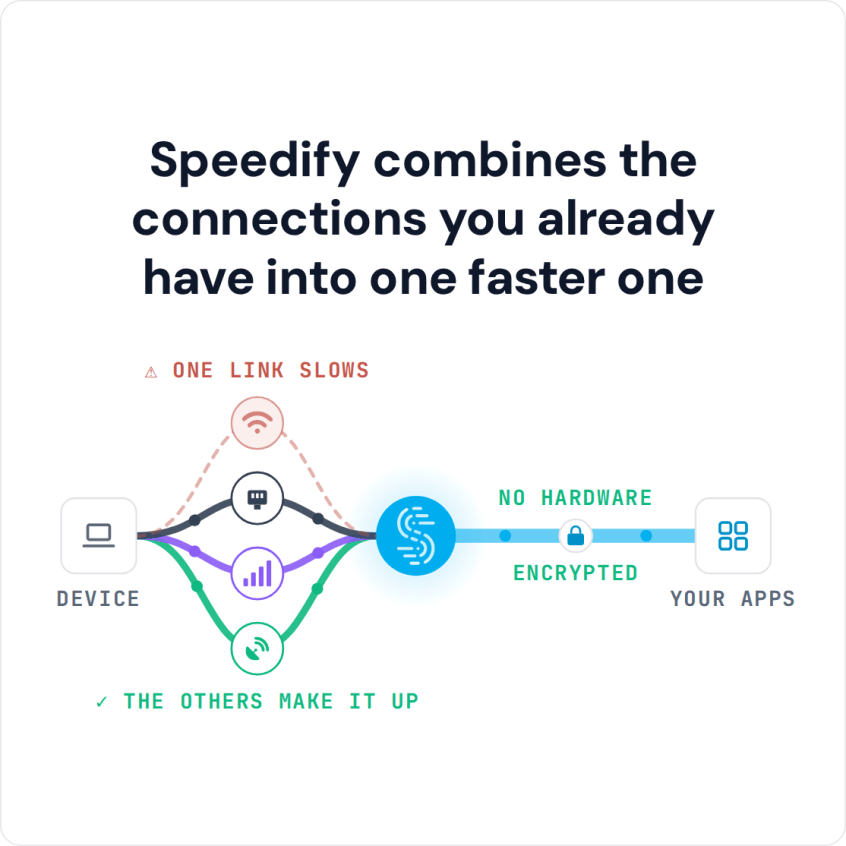
Speedify combines the connections you already have into one faster one
Tip #1: Choose the Right Internet Plan
All internet service plans are not created equally. There are several broadband connection types, and the service you’re paying for may not necessarily be the best fit for your usage habits. Understanding your internet connection is the first step toward picking the service and speed that work best for you.
Broadband Connection Types
Internet service providers (ISPs) use several different broadband connection types. These connection types vary in availability and cost, depending on where you live. Each connection has a different maximum bandwidth (the amount of data that can be transferred between you and the web). Here’s a quick rundown:
- Asymmetric Direct Subscriber Line, or ADSL, connections use your copper phone lines to transmit data in both directions. This connection type is asymmetric because it has a faster download speed than upload speed, so it’s not ideal for anyone who creates and uploads large amounts of web content. ADSL2+ download speeds top out around 24 Mbps; newer VDSL lines reach about 100 Mbps.
- Cable connections work over a coaxial cable and are faster than the copper wires used in an ADSL connection. Cable networks are shared across neighborhoods, and speeds will be throttled based on the number of users on at a given time. Most cable connections are in the ballpark of 300 Mbps. If you use a lot of devices in your home, this plan is a good pick price-wise.
- Fiber Optic connections offer the fastest download and upload speeds, commonly 1,000 Mbps or more. This makes it the best connection for data-hungry users. Fiber optic cables are installed regionally by ISPs, but many rural areas still don’t have access to the technology. This connection type generally isn’t cheap, so it’s best for people who use lots of smart devices or prefer the highest-quality video streaming and are fine cutting down their costs in other ways.
Tip #2: Measure Your Internet Usage and Speed
Once you understand the service options available to you, you’ll want to measure your current internet speed and see if it’s a good match for your usage. By running a speed test, you can get a snapshot of your connection speed right from your browser.
Once you’ve measured your connection speed, it’s time to estimate your usage. Most ISPs have usage trackers available through your account page (especially if they’re capping your data). If your ISP won’t provide you with a usage estimate, you can track your own data use with a program like GlassWire. This bandwidth monitor tracks how much data you use and can identify malicious software that might be inflating your usage.
If your data usage is well below your limit, you could drop down to a cheaper plan to save some money without running into any problems.
Or if your plan is too slow but you don’t want to pay for a faster tier, try Speedify, an app that combines Wi-Fi, 4G/5G cellular, Ethernet, Starlink and satellite internet connections at the same time. With two connections, such as your home line and your phone’s 4G/5G cellular, Speedify adds up their speed and keeps you connected if one goes down. Traffic sent over cellular counts against your data plan.
Tip #3: Bundle Your Internet or Cut the Cord
If you’re paying separately for your mobile plan, cable TV, and internet plan, bundling could save you a small fortune. A bundled plan provides a discount since you get all your services from a single provider, and most providers love offering incentives to encourage you to bundle with them.
Another option is dropping your satellite or cable TV plan altogether. Streaming services like Netflix, Hulu, Google Play, and Amazon Prime offer enough variety and programming to satisfy almost everyone’s entertainment needs, driving more people to cut the cord on their TV service in favor of an internet-only plan. Here is a rundown of streaming services for cord cutters.
Tip #4: Use Less Cellular Data
Your phone’s data plan and your internet plan might be redundant. If you mostly use your phone on the living room couch, 4G/5G cellular isn’t the best way to connect. Switching your phone to Wi-Fi at home cuts your cellular data use, which can let you move to a cheaper data plan.
Wi-Fi is also a great option when you’re on the go. It’s worth taking a few minutes to connect to the free Wi-Fi at your job, your local coffee shop, or your favorite bar. You can also limit your data needs by downloading your favorite podcasts and playlists over Wi-Fi before you leave the house.
Tip #5: Upgrade Your Router
Your sluggish internet connection may have nothing to do with your plan. An old router often struggles to deliver the speed you pay your ISP for: older single-band routers can’t send an 802.11ac signal, let alone Wi-Fi 6. Upgrading your router can increase your Wi-Fi speed and range, and buying your own saves you a hefty monthly router fee on top of your service costs.
Lower the Internet Bill Without Losing Speed: Review It Every Year or Two
Data usage and connection speeds are moving targets, so plan on assessing your internet package at least once every year or two. High-quality video, interactive website designs, and increasing graphic resolution are quickly making the internet less forgiving of a slow connection. With these tips, you can stay ahead of the technology curve without breaking your bank.
About the author: this guest blog post is brought to you by highspeedinternet.com, helping you find the best internet options in your area within the US.
Speedify
Get started with Speedify today.
Combine Wi-Fi, 4G/5G cellular, Ethernet, Starlink, and more into one faster, steadier connection. Free to try — no credit card required.
🚀 Speed
Faster uploads and downloads by bonding all your connections at once.
📶 Stability
Automatic failover in under a second when any connection drops.
🔒 Security
AES-256 encryption on every connection, on every network you join.



15M+ downloads worldwide. 75K+ five-star reviews on iOS and Android.