

Starlink dish alerts tell you what’s wrong with your Starlink dish, like a stuck motor, overheating, a waiting software update or something blocking its view of the sky, often before you notice the internet is acting up. Most people only find out when a video call freezes.
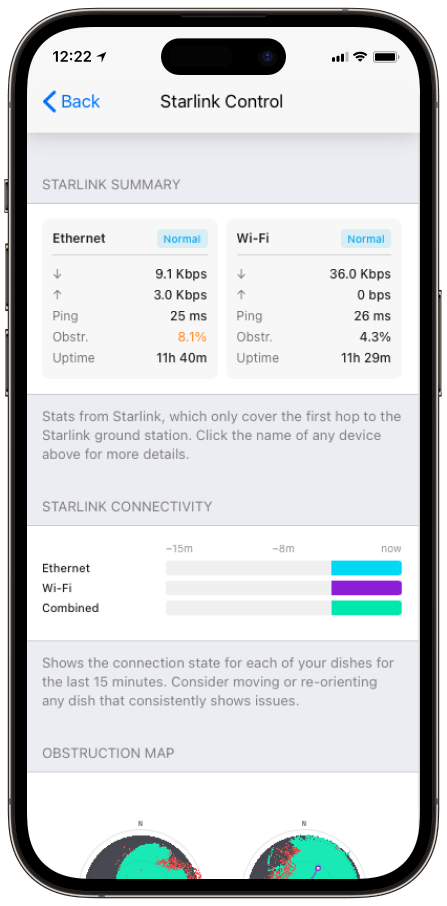
Speedify, an app that uses all of your internet connections at the same time, including one or more Starlink dishes, shows these Starlink dish alerts in its Starlink Control Center on your computer or phone, within about 15 seconds of a problem starting. Below: what each kind of alert means, and what to do about it.
Monitor your Starlink dish performance inside Speedify.
Starlink Internet Connection Dropouts Happen to Everyone
Speedify measures thousands of Starlink users in more than 150 countries. From 29 September to 12 October 2026, fixed Starlink dishes went offline for about 37 minutes a day on average, and Starlink dishes on RVs and boats for about 61 minutes a day.
Starlink also switches each dish to a new satellite every 15 seconds, and a switch can cause a short dropout. Even a perfectly installed Starlink dish goes offline, and about 7 in 10 Starlink users on Speedify use Starlink together with a second internet connection, like 4G/5G cellular.
Get Starlink Dish Alerts on Your Device and Stay Online with a Second Internet Connection
What Each Kind of Starlink Dish Alert Means
Speedify shows the alerts your Starlink dish reports, and clears each one when the problem is fixed. They fall into a few groups:
- Status alerts. Your Starlink dish is offline, starting up or searching for satellites. For what each Starlink status means, see how to check your Starlink status.
- Temperature alerts. Your Starlink dish is too hot and is running slower, or has shut off to cool down.
- Position and movement alerts. The motor that aims your Starlink dish is stuck, the pole it’s mounted on isn’t straight, or the Starlink dish is moving faster or farther than your plan allows.
- Connection alerts. Something blocks part of your Starlink dish’s view of the sky, or the cable between the Starlink dish and the Starlink router is running slower than it should.
- Maintenance alerts. Your Starlink dish is waiting to install a software update.
For the full list of Starlink dish alerts and what each one means, see Speedify’s Starlink dish alert article.
What to Do When You Get a Starlink Dish Alert
- Wait a few minutes before you act: some alerts are short and clear on their own. On a boat or RV, here is how to stop false Starlink alerts.
- Fix what’s around the Starlink dish when you can: clear snow or branches, give it shade, or straighten the pole.
- Deal with the serious alerts first, like overheating or a stuck motor, before the ones about speed.
- Restart your Starlink: unplug the power for 20 seconds, then plug it back in.
- Contact Starlink support if an alert is still there after 24 hours.
Here’s what one Speedify customer said about getting Starlink dish alerts in Speedify:
“Hey, just like to say the new reporting on a Starlink connection is great. Trying to debug Starlink issues when they have the Wi-Fi bypassed is a a real pain. First time today i saw the “waiting for sw update” on the link status. Godsend, as we turn our connectivity off at night and so it misses the 2-4am window to install. And doesn’t seem to install on reboot unless you go into the Starlink web portal and click the reboot button from there, so something that would have driven me around the houses for few hours fixed pronto!”
Stay Online While You Fix a Starlink Dish Alert, with Speedify
An alert tells you what’s wrong, but it doesn’t keep you online while you fix it. Speedify does, by using your Starlink internet connection together with a second internet connection, like 4G/5G cellular, cable or DSL, or another Starlink dish. Speedify sends your traffic over both at the same time, and if your Starlink dish drops, Speedify switches your traffic to the other internet connection automatically. With Starlink alone, Speedify still shows the alerts, but it can’t add speed or stop drops: it needs that second internet connection. See how Speedify combines internet connections.
Speedify
Get started with Speedify today.
Combine Wi-Fi, 4G/5G cellular, Ethernet, Starlink, and more into one faster, steadier connection. Free to try — no credit card required.
🚀 Speed
Faster uploads and downloads by bonding all your connections at once.
📶 Stability
Automatic failover in under a second when any connection drops.
🔒 Security
AES-256 encryption on every connection, on every network you join.



15M+ downloads worldwide. 75K+ five-star reviews on iOS and Android.