
Vehicle Platform in Speedify Stops False Misalignment Alerts on a Moving Starlink Dish
If your Starlink dish is on a boat, an RV or another vehicle, you can stop the constant “misaligned” alerts by turning on the Vehicle Platform setting in Speedify’s Starlink Control Center. A misalignment alert is useful on a fixed roof, but on something that moves, the Starlink dish is supposed to change direction, so the alert means nothing.
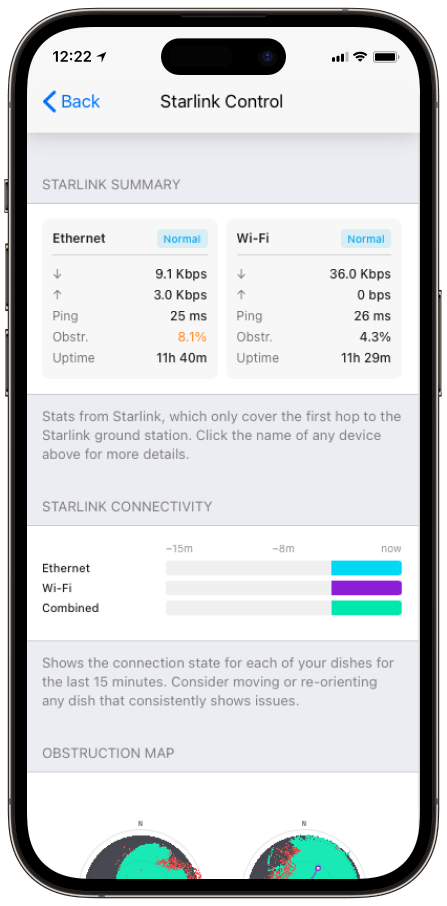
Speedify is an app that uses all of your internet connections at the same time, including Starlink plus 4G/5G cellular. Speedify’s Starlink Control Center is the screen that shows speed, obstructions, uptime and alerts for each Starlink dish. Below: what the Vehicle Platform setting does, when to turn it on, and how Speedify keeps a moving Starlink setup online.
Monitor your Starlink dish performance inside Speedify.
Starlink Internet Connection Dropouts Happen to Everyone
Speedify measures thousands of Starlink users in more than 150 countries. From 29 September to 12 October 2026, fixed Starlink dishes went offline for about 37 minutes a day on average, and Starlink dishes on RVs and boats for about 61 minutes a day.
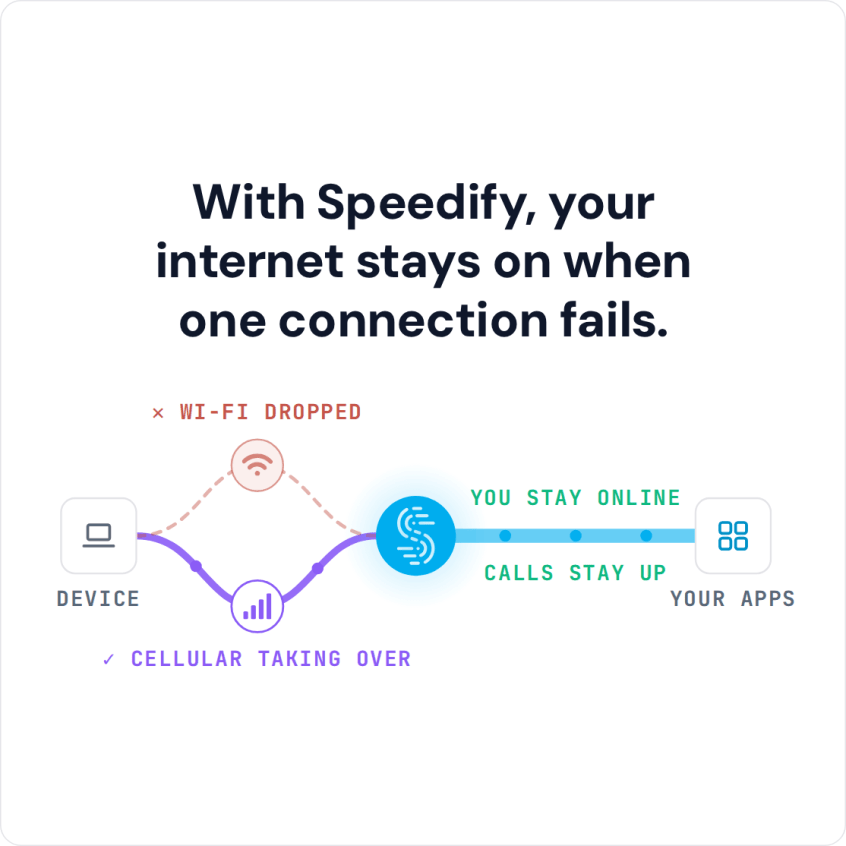
Starlink also switches each dish to a new satellite every 15 seconds, and a switch can cause a short dropout. Even a perfectly installed Starlink dish goes offline, and about 7 in 10 Starlink users on Speedify use Starlink together with a second internet connection, like 4G/5G cellular.
What the Vehicle Platform Setting in Speedify Changes
- Misalignment alerts stop. Speedify no longer flags the constant changes in direction that come with a moving boat or vehicle.
- Everything else in the Starlink Control Center keeps working. Speed, obstruction, uptime and the obstruction map still show as normal.
- The setting matches how you use your Starlink dish. On a vehicle, movement is expected, so Speedify stops treating it as a problem to fix.
Turn on Vehicle Platform in the Alignment section of Speedify’s Starlink Control Center whenever your Starlink dish is mounted on something that moves.
When to Turn On Vehicle Platform for a Starlink Dish
Vehicle Platform belongs on any Starlink dish that moves: on a boat, an RV on the road, a fleet of vehicles, or a drone. Starlink itself has hardware and plan rules for use on the move: Residential plans are for one fixed address, while Roam and Priority plans work on the move.
Starlink explains this in what Starlink for Mobility is, and lists the hardware approved for use in motion. Vehicle Platform takes care of the Speedify side, keeping the Starlink Control Center quiet about movement so that real problems still stand out.
How Speedify Keeps a Moving Starlink Dish Online
A Starlink dish on the move gets blocked more often than one on a roof, by bridges, trees, buildings and hills, and that’s exactly where using a second internet connection matters most.
Speedify uses Starlink together with 4G/5G cellular, Wi-Fi or a second Starlink dish. On the move, pair Starlink with 4G/5G cellular rather than a second dish: a bridge blocks every Starlink dish on the vehicle at once, and all Starlink dishes switch satellites on the same 15-second schedule. When the moving Starlink dish drops during a turn or under a bridge, Speedify switches your traffic to the other internet connection automatically, without dropping a call or a stream. With Starlink alone, Speedify can’t stop those drops: it needs that second internet connection. Vehicle Platform clears away the false alerts, so the ones you do see are worth reading.
Who Needs Vehicle Platform for a Moving Starlink Dish
- Boat owners and crews. A Starlink dish on a boat swings with it, and Vehicle Platform stops the flood of alerts.
- RV owners and overland travelers. Moving down the road no longer shows up as a constant problem.
- Vehicle fleet and drone operators. Starlink dishes on the move stay monitored for real problems, without false misalignment warnings.
Use Speedify with a Starlink Dish That Moves
Vehicle Platform tells Speedify your Starlink dish is meant to move, so the Starlink Control Center stops warning you about misalignment. Speedify does the rest, using your internet connections together and switching your traffic automatically as the Starlink dish finds new satellites. For more on staying online through drops, see how to monitor Starlink outages and uptime with Speedify.
Speedify
Get started with Speedify today.
Speedify combines Wi-Fi, 4G/5G cellular, Ethernet, Starlink and satellite into one faster, more reliable internet connection. Free to try: 5 GB a month with a free account. No credit card required.
🚀 Speed
Faster uploads and downloads, because Speedify uses all your internet connections at once.
📶 Stability
If one internet connection drops, Speedify moves your traffic to the others in milliseconds.
🔒 Security
AES-256 encryption on every internet connection, on any network you join.



15M+ downloads worldwide. 75K+ five-star reviews on iOS and Android.