
Speedify Helps Starlink Priority Data Last Longer by Routing Heavy Traffic Over Your Other Internet Connections
Starlink priority data is the data on your plan that runs at full speed. When it runs out on a Local Priority or Global Priority plan, Starlink slows you down to 1 Mbps for downloads and 0.5 Mbps for uploads. Streaming video, cloud backups, system updates and game downloads use up priority data the fastest.
Below: what uses the most Starlink data, how to cut it down, what happens when you run out, and how Speedify makes priority data last longer by moving heavy traffic to another internet connection, like an unlimited home line or 4G/5G cellular.
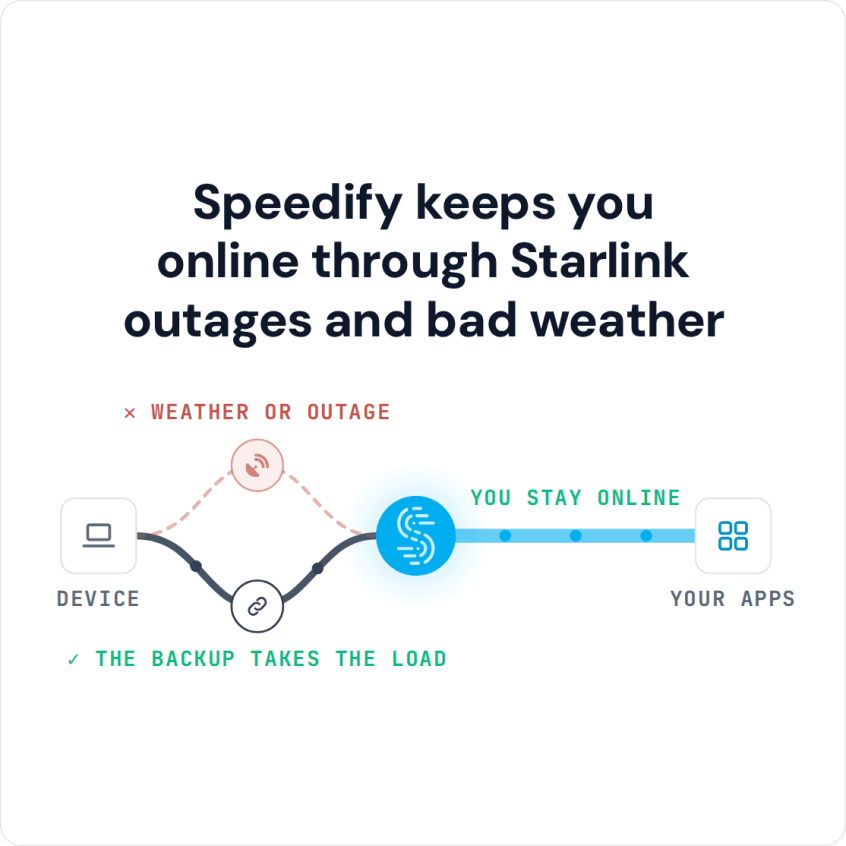
Speedify keeps you online through Starlink outages and bad weather
Starlink Internet Connection Dropouts Happen to Everyone
Speedify measures thousands of Starlink users in more than 150 countries. From 29 September to 12 October 2026, fixed Starlink dishes went offline for about 37 minutes a day on average, and Starlink dishes on RVs and boats for about 61 minutes a day.
Starlink also switches each dish to a new satellite every 15 seconds, and a switch can cause a short dropout. Even a perfectly installed Starlink dish goes offline, and about 7 in 10 Starlink users on Speedify use Starlink together with a second internet connection, like 4G/5G cellular.
What Uses the Most Starlink Data
- Streaming video. Netflix uses up to 1 GB per hour in standard definition, 3 GB per hour in HD and 7 GB per hour in Ultra HD (4K), and Starlink’s own help article on data use puts 4K video at about the same. On most plans, video is the biggest use of data by far.
- Cloud backups. Photo and file backups run in the background and can use up priority data without you noticing.
- System and app updates. Computer, phone and game console updates often come in downloads of several gigabytes.
- Game downloads. A single new game can use more data than a week of browsing.
How to Reduce Starlink Data Use
Set streaming apps to HD instead of Ultra HD: on Netflix that cuts an hour of video from 7 GB to 3 GB. Pause automatic cloud backups and large updates, or let them run over another internet connection, and turn off autoplay so videos don’t keep playing when nobody is watching.
These habits slow down how fast you use up priority data. They can’t move the heavy traffic off Starlink, and that’s where a second internet connection comes in.
What Happens When Your Starlink Priority Data Runs Out
On Local Priority and Global Priority plans, Starlink keeps you online after your priority data runs out, but at 1 Mbps for downloads and 0.5 Mbps for uploads. That’s enough for email and messages, not for video: Netflix in standard definition alone needs more than 1 Mbps. Rules differ on other plans, such as Roam 100GB and Roam 300GB, so check your plan’s details in the Starlink app.
Make Starlink Priority Data Last Longer with Speedify
Speedify is an app that uses Starlink together with an unlimited home line, 4G/5G cellular or Wi-Fi, and lets you choose how much each internet connection is used. In the Speedify app, set your unlimited internet connection to Primary and Starlink to Secondary, so Speedify only uses Starlink when the other internet connection needs help. Or set Starlink to Backup, so Speedify only uses it when your other internet connection drops. The heavy traffic that used to eat your Starlink priority data runs over the other internet connection instead, and Starlink is still there the moment you need it.
That matters most for people who work from home on a plan with limited priority data, and for Roam users who travel with a data allowance. Speedify needs that second internet connection: with Starlink alone, it can’t save you priority data. If your second internet connection is 5G home internet, see Starlink vs 5G home internet.
For the details, see how Speedify combines internet connections, then read whether a second internet connection is worth it.
Speedify
Get started with Speedify today.
Speedify combines Wi-Fi, 4G/5G cellular, Ethernet, Starlink and satellite into one faster, more reliable internet connection. Free to try: 5 GB a month with a free account. No credit card required.
🚀 Speed
Faster uploads and downloads, because Speedify uses all your internet connections at once.
📶 Stability
If one internet connection drops, Speedify moves your traffic to the others in milliseconds.
🔒 Security
AES-256 encryption on every internet connection, on any network you join.



15M+ downloads worldwide. 75K+ five-star reviews on iOS and Android.