

Internet on Cruise Ships Is Mostly Powered by Satellites
Quick answer
Should you get a backup connection for Starlink?
Yes. Starlink goes down every day — an always-on dish averages about 34 minutes of downtime daily from routine satellite handoffs. A second connection keeps you online when Starlink drops.
What’s the best backup connection for Starlink?
A 4G/5G cellular hotspot or SIM is the most practical backup for most Starlink users — it works anywhere Starlink works, requires no installation, and uses a different network so outages rarely overlap. Cable or DSL broadband is a strong option if you have it at a fixed location. A second Starlink dish is also possible if you need maximum throughput.
How do you use two internet connections at once with Starlink?
Speedify combines Starlink with any other connection — cellular, cable, Wi-Fi, or a second dish — into one bonded connection. Speedify runs on your phone, laptop, or router. When Starlink drops, Speedify moves your traffic to the backup instantly, so calls don’t cut out and downloads don’t stall. Speedify is free to try.
71% of Speedify’s Starlink users already run a second connection. The data below shows why.
Try Speedify free →Speedify Starlink Index — real-world performance from 6,209 Starlink users: 2.4% downtime, about 34 minutes a day for always-on connections
Starlink goes down every day.
Here’s what that actually looks like.
Speedify passively monitors every connection it bonds. These figures come from 6,209 Starlink users over 14 days — compared in real time against the other connections on the same devices. No speed tests, no lab conditions.
Daily downtime
~34 min
2.4% of connected time unreachable
Median latency
60 ms
p90 spikes to 257 ms
Avg packet loss
0.17%
vs 0.08% on T-Mobile
71% ran at least one other connection simultaneously — 4,381 of 6,209 users. Cellular is the most common backup.
Use Speedify to stay online during satellite handoffs every 15 seconds
Research confirms Starlink switches between satellites every 15 seconds on a fixed schedule. Each satellite handoff is a potential dropout, and on a congested network or with any obstruction, those Starlink dropouts become real interruptions.
Speedify fixes Starlink connection drops by combining your Starlink internet connection with another satellite dish, Wi-Fi, 4G/5G cellular, or wired Ethernet at the same time. When Starlink drops, Speedify keeps your traffic moving on the backup internet connection instantly.

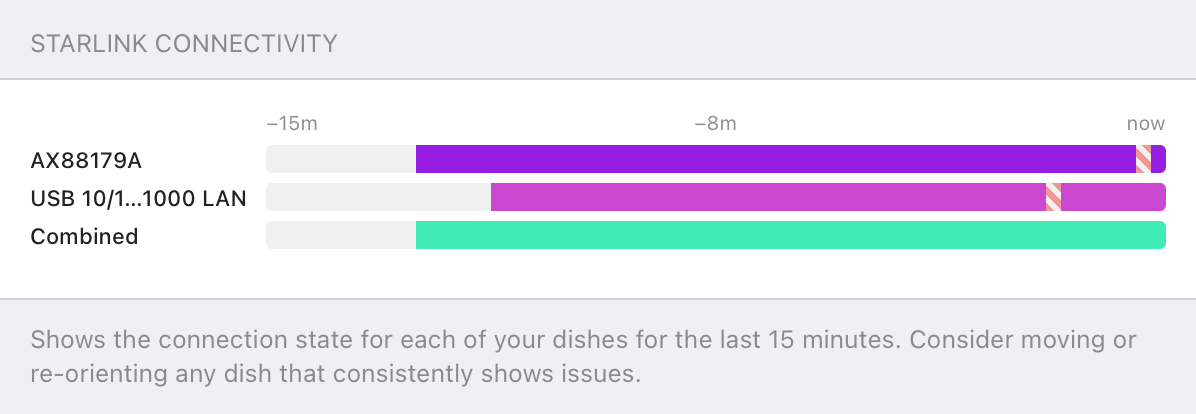
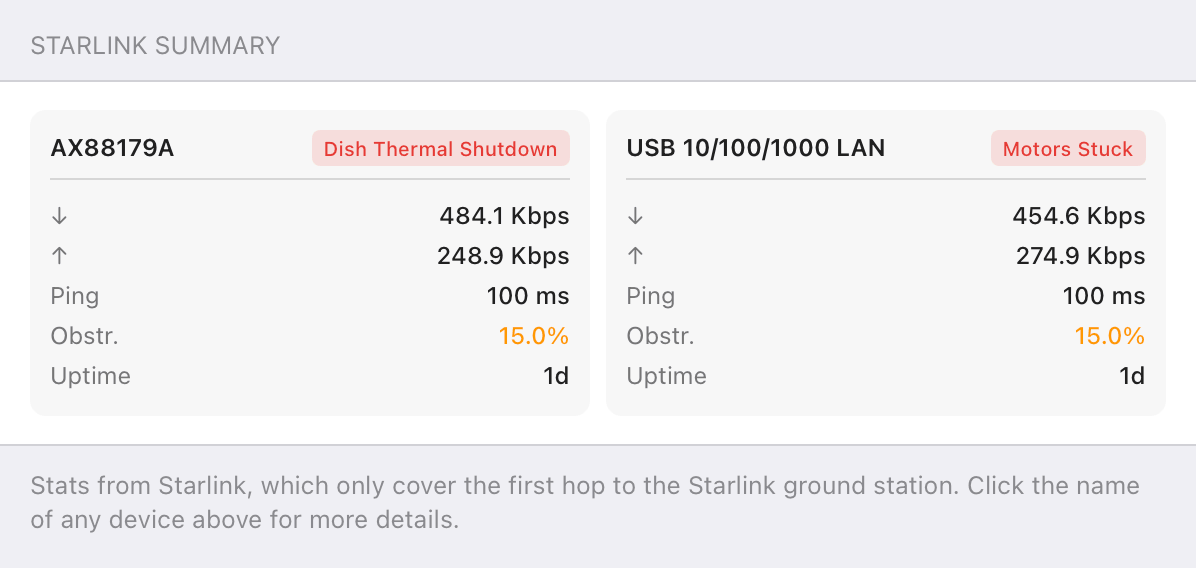
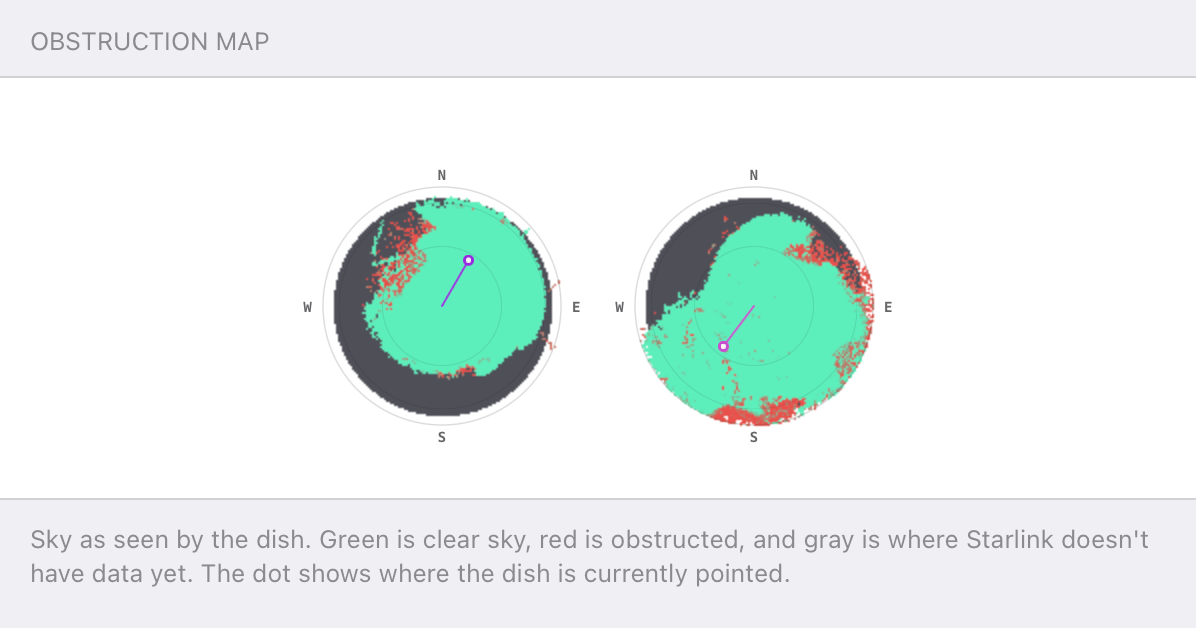
Speedify alerts you about your Starlink dish status
Speedify software alerts you about your Starlink dish status as soon as your dish experiences an issue - e.g. when your actuator motor is stuck, the mast is not vertical or there's a thermal throttle.
Speedify's Starlink Control Center helps you monitor all your Starlink dishes, read obstruction maps, and align multiple dishes all in the Speedify app. Get a real-time view of each dish's health and optimize the position of each Starlink dish, so you get the best possible performance out of your Starlink connections.
Speedify
Speedify gives you faster, steadier internet by combining Wi-Fi, cellular, and Starlink
Speedify bonds Wi-Fi, 4G/5G cellular, Ethernet, and Starlink into one connection at the same time, giving you more speed, automatic failover when one drops, and AES-256 encryption on every link.
Download Speedify ›More speed
Upload and download speeds combine across every active connection on your device.
Automatic failover
If a connection drops, Speedify moves your traffic to another in milliseconds. Calls stay connected.
Always encrypted
Every link runs through an encrypted tunnel, including public Wi-Fi, cellular, and Starlink.
Speedify Feature · Pair & Share
Speedify Pair & Share: share cellular between your devices, both ways
Most hotspots give. Speedify's Pair & Share gives and takes. Two devices running Speedify pair up and each uses the other's cellular connection simultaneously, so you both get faster uploads, faster downloads, and a steadier connection. No extra hardware, no new data plans, no setup beyond a tap.
Learn how Speedify's Pair & Share works ›More speed
Every device you pair with adds its cellular to yours, and yours to theirs.
Stays connected
If a paired device drops out, Speedify keeps you online on the remaining links.
Always private
Every shared connection runs through AES-256 encryption. Your traffic is yours.
No new gear
Runs on devices already running Speedify, over your local network. Pair once, reconnects automatically.


How Internet Works on Cruise Ships
Ryan: Alex, so how does internet work on cruise ships?
Alex Gizis: Well, obviously, cruise ships get pretty far from shore, so cellular to the towers on land is just not going to work, unless you're sitting in harbor. So it's pretty much all satellite, and there are a couple different services. The one that I think is growing in popularity the fastest is the new Starlink service, the SpaceX satellites whizzing by overhead in low Earth orbit.
Ryan: There's a lot more of them than there is the other satellites.
Alex Gizis: In fact, most satellites in orbit around Earth are Starlink satellites. So it's more than any other service. It's more than every other service put together.
What Starlink's Maritime Solution Provides in Terms of Technology
Ryan: So I know Starlink relies a lot on ground stations. How do cruise ships get Starlink when they're so far from a ground station?
Alex Gizis: Right, good point. So the way Starlink normally works you talk to the satellite overhead, and it beams down to the nearest station, which is usually within like 100 miles or something, right? But that doesn't work a ship, so now they've added lasers between the satellites.
So from your ship, you talk to the satellite overhead, and it uses a laser to talk a satellite that's somewhere over the land and it talks down to the internet. It works really well. Although the latencies are higher, right? On ships I'm hearing it can get up to 99 milliseconds.
Ryan: Not bad for the middle of the ocean.
Alex Gizis: That's fantastic for middle of the ocean.
Cruise Lines Restrictions: Why You Can't Bring Your Own Starlink Dish Onboard
Ryan: So there's a lot of debate in our comments about why exactly Carnival wanted to take away Richard from the NoPantsProfits YouTube channel's Starlink dish. So like, why don't cruisers like you to have your own satellite modem on board?
Alex Gizis: So I think there are are a lot of reasons. I think number one, and you can't underestimate this, they want to make money. People start bringing their own dishes, they don't get to charge extra for the Wi-Fi. And I've got to think that drives most of their behavior. But ships operate under this complicated legal environment, right? If they get within 50 miles ashore, they now have to operate under the laws of that country. If they get further away, they have to operate under the laws of the country that they were registered with. And there are just so many rules and there is complicated navigation and there are Starlink dishes they're using to provide internet to other people.
Ryan: Right, because there is some limit to the bandwidth in one cell.
Alex Gizis: Yes. I mean, it's normally pretty high. But there is some limit, and I bet when you're in the middle of the ocean, it's lower. And if ten people put out their Starlinks, maybe now we're running into it.
Ryan: Could there be interference on top of hogging some of the bandwidth?
Alex Gizis: There sure could be. Although that's less of an issue than it used to be. I mean, it was true on airplanes, in the 90s, when the cell phones were super powerful, any airplane that still had electronics from, like, 10 years earlier, the early 80s or whatever, the electronics weren't that shielded, so there was a moment when cell phones were new that they really could mess up an airplane in a dangerous way. And now, honestly, it's perfectly safe. There's no danger whatsoever.
Ryan: Yeah, so Carnival now prohibits Starlink dishes in addition to other satellite dishes and other internet devices, routers, satellite phones, but not ham radios. Why do you think that is?
Alex Gizis: So Princess Cruises does ban ham radios. Although, there are lots of people online who said they wrote a letter in saying "I would like to use my ham equipment on my cruise" and they got special permission. I think they just want things tight and tidy and it's so much easier just say no and not have to worry about if this weird radio going to interfere with the ship's equipment. If you say no, there's no problem.
Starlink for Cruise Ships Future: Direct-to-Cell Technology
Ryan: So I know Starlink is going to start rolling out direct to cell on cell phones, where regular mobile phones will be able to connect directly to Starlink satellites. Those will effectively be satellite phones, so do you think normal cell phones are going to start getting banned from cruises because of that?
Alex Gizis: No I mean they just can't. They just can't. They can't take your cell phones. That would be crazy. Could you imagine the chaos, if they said no cell phones on the cruise, people would just find another cruise line, right? That would be the end of that.
But, that said, you can make a call, but this is not a service that's going to replace Verizon, replace T-Mobile, probably won't even replace the on ship calling network. But if you find yourself in a life raft, that satellite LTE could be the greatest service in the history of the world, right?

NEW!
Miri X510 Bonding Router
POWERED BY SPEEDIFY
Bond up to 7 Links Simultaneously
Combine wired, Wi-Fi, 5G, and LTE connections plus Pair & Share with other Speedify users.
Battery-powered Portability
Starlink for Cruise Ships: Failover Connectivity Is Key
Ryan: Speaking of Starlink, a few people were asking how we were bonding to Starlinks our last video with this thing, so, you wanna talk a little more about that?
Alex Gizis: Yeah, yeah, yeah. The Miri router. This is just a fantastic new router. It has 5G, it has 4G, it has Wi-Fi, it has 4 Ethernet ports, 2 USB ports, and inside it, it runs Speedify.
So you can plug into multiple Starlinks, you can tether cell phones, you can put SIM cards in it, and either have it make a Wi-Fi hotspot or even join an existing Wi-Fi and maybe share to you out one of the Ethernet ports. And use Speedify to bond them all together to give you this just rock solid internet.
And it uses the same batteries as the Sony cameras, so you can either plug it in or you can just pop in a battery and run it off that.
So yeah, I had Verizon 5G, and then I had two Starlinks plugged in, and voila! I mean, the Starlinks, they're fantastic most of the time, but every once in a while, the performance dips so low, it's a disaster. And then, I pop over and use the 5G, and everything's totally cool. So this is the fun new toy from Miri.
Ryan: But you probably can't bring that on a cruise ship, right?
Alex Gizis: No, I mean the cruise ships, I'm hearing they're going through people's luggage looking for things with antennas things that look like routers and taking them. So, unfortunately, this is not going to work on your cruise ship because you're not going to manage to smuggle it on.
But for an RV, for a news crew, anything like that, you need something kind of rugged, you need something that can work on batteries if there's no power, Combining Starlink and cellular - this is kind of the ultimate solution.

Connectivity Tech Discussions
Our Connectivity Tech Discussions Between Two Palms video series shines the spotlight on Alex and technical guests, diving deep into caonversations about the latest Internet technology, including Starlink satellite, WiFi 7, Apple, fiber optics, new routers, remote connectivity, and networking protocols.
Join us and let's talk tech!