
Use Speedify as Your Starlink Companion
Yes, Starlink can overheat. Starlink says its devices work normally when the air around them is below 50°C (122°F). Above that, your Starlink dish first slows itself down to cool off, and if it keeps heating up, it stops working until it cools. This goes for standard Starlink dishes and the Starlink Mini.
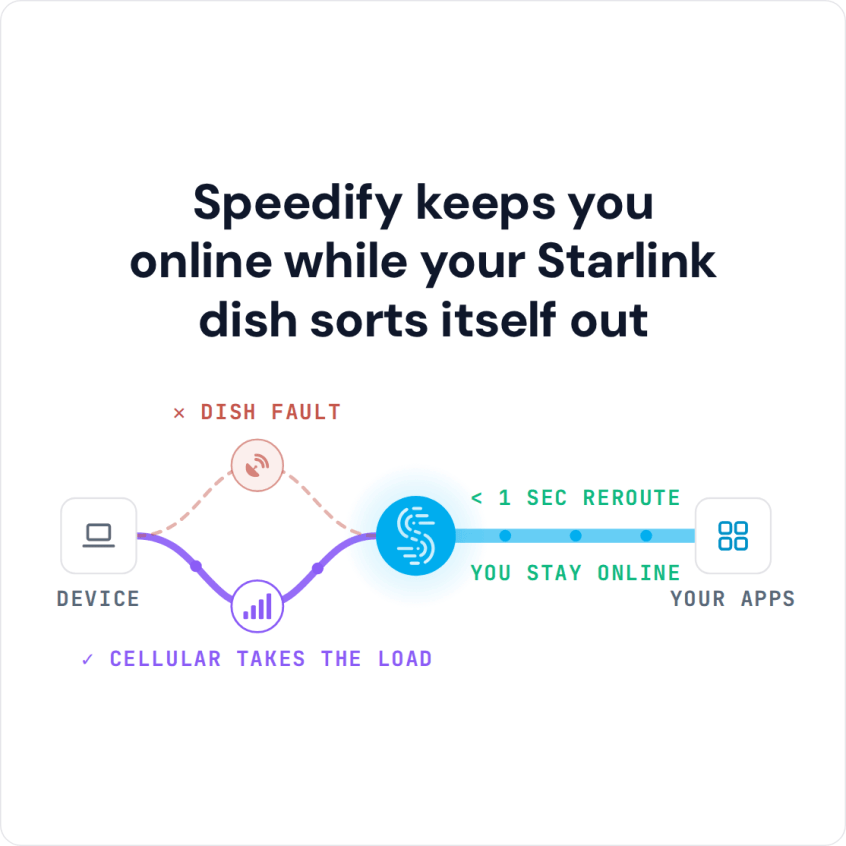
Speedify uses Starlink together with a second internet connection, like your phone’s 4G/5G cellular connection, so you stay online while an overheating Starlink dish cools down.
Speedify keeps you online while your Starlink dish sorts itself out
Starlink Internet Connection Dropouts Happen to Everyone
Speedify measures thousands of Starlink users in more than 150 countries. From 29 September to 12 October 2026, fixed Starlink dishes went offline for about 37 minutes a day on average, and Starlink dishes on RVs and boats for about 61 minutes a day.
Starlink also switches each dish to a new satellite every 15 seconds, and a switch can cause a short dropout. Even a perfectly installed Starlink dish goes offline, and about 7 in 10 Starlink users on Speedify use Starlink together with a second internet connection, like 4G/5G cellular.
What Happens When Your Starlink Dish Overheats
When the air around your Starlink dish gets hotter than 50°C (122°F), Starlink can show one of two alerts:
- Thermal Throttling: your Starlink dish is too hot and slows itself down to cool off.
- Thermal Shutdown: your Starlink dish has reached its highest safe temperature and stops working to cool off.
In both cases, your Starlink internet connection comes back once the Starlink dish cools down to its normal temperature.
Until then, your internet is slow or gone, which means:
- Your video meetings keep disconnecting
- Videos buffer while you stream
- Your online games drop out
- Important downloads stop halfway
How to Keep the Starlink Router and Power Supply from Overheating
The Starlink power supply can overheat too. When it does, Starlink shows a “Power Supply Thermal Throttling” alert and slows itself down to use less power, so the power supply can cool. Starlink’s advice is to put the power supply somewhere with plenty of air around it. Keep the Starlink router out of direct sun and closed cabinets for the same reason.
How to Keep Your Starlink Dish from Overheating
Starlink’s advice is to install your Starlink dish where air moves freely around it, away from heat sources like exhaust vents. Shade during the hottest part of the day helps too. But moving your Starlink dish isn’t always practical or possible. Overheating is one of the local causes behind most Starlink downtime, as the report on whether Starlink is down or only your dish is down shows across thousands of Starlink dishes.
Why a Second Internet Connection Keeps You Online While Starlink Cools Down
Your Starlink internet connection comes back once the Starlink dish cools, but on a hot afternoon that can take a while, and you can’t move the Starlink dish into the shade in the middle of a video call, a live stream or an online game. That’s why you need a second internet connection that takes over on its own.
Speedify uses your Starlink internet connection together with any other internet connection you have:
- 4G/5G cellular
- A DSL or cable line
- Public Wi-Fi in range
- A mobile hotspot
When your Starlink dish overheats and drops out, Speedify moves your internet traffic to your other internet connection right away, so you stay online while it cools.
How to Stay Online When Your Starlink Dish Overheats, with Speedify
- Get the Speedify app on your devices. It runs on Windows, Mac, Linux, Android, iOS and even on OpenWrt routers.
- Connect to both Starlink and your second internet connection.
- Open Speedify. It finds both internet connections and uses them at the same time on its own, so an overheating Starlink dish no longer takes you offline.


Because Speedify uses both internet connections at once, you also get the speed of both, not only failover when Starlink drops. Speedify needs that second internet connection: with Starlink alone it can’t keep you online, and if both are down at once, you are offline either way.
Download Speedify and stay online on the hottest days.
Speedify
Get started with Speedify today.
Combine Wi-Fi, 4G/5G cellular, Ethernet, Starlink, and more into one faster, steadier connection. Free to try — no credit card required.
🚀 Speed
Faster uploads and downloads by bonding all your connections at once.
📶 Stability
Automatic failover in under a second when any connection drops.
🔒 Security
AES-256 encryption on every connection, on every network you join.



15M+ downloads worldwide. 75K+ five-star reviews on iOS and Android.