
Speedify Is a VPN That Combines Starlink With 4G/5G Cellular, Wi-Fi, Ethernet to Keep You Private Without Slowing Down
Yes, Starlink works with a VPN. Starlink itself is an internet service, not a VPN, and it doesn’t come with one. You need a VPN on Starlink if you want to keep your browsing private on shared or public Wi-Fi, or if you work with company data. The catch is that most VPNs make Starlink slower and less steady, because they send all your traffic through one encrypted tunnel to one server.
Below: why a regular VPN slows Starlink down, what to look for in a VPN for Starlink, and how Speedify keeps Starlink private while making it faster and more reliable, by using it together with another internet connection, such as 4G/5G cellular, Wi-Fi or wired Ethernet.
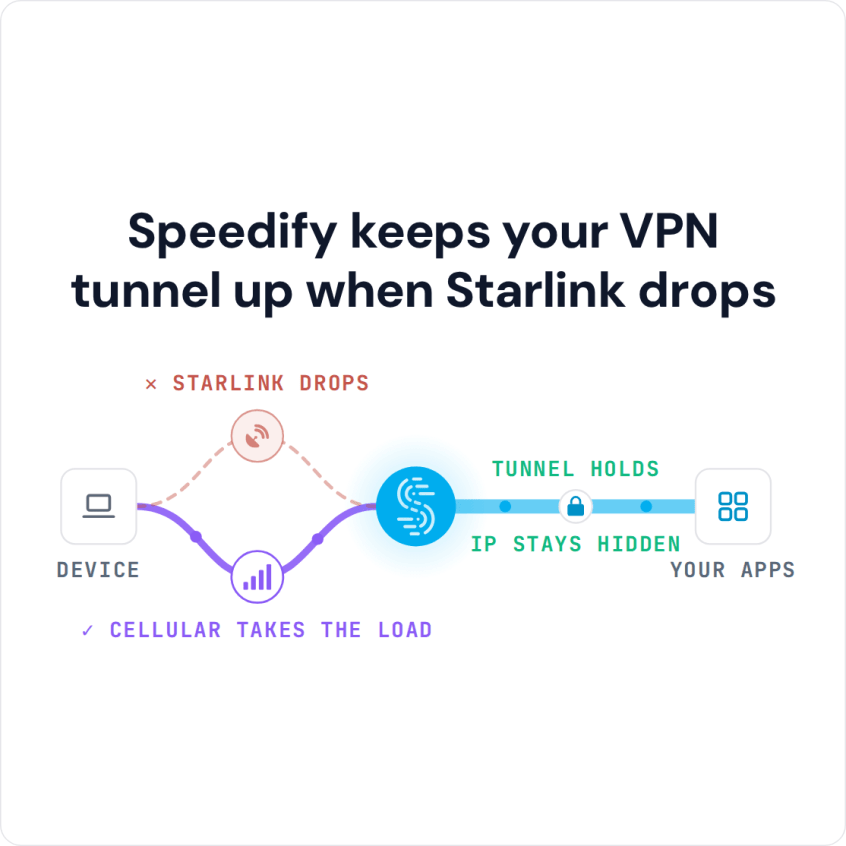
Speedify keeps your VPN tunnel up when Starlink drops
Starlink Internet Connection Dropouts Happen to Everyone
Speedify measures thousands of Starlink users in more than 150 countries. From 29 September to 12 October 2026, fixed Starlink dishes went offline for about 37 minutes a day on average, and Starlink dishes on RVs and boats for about 61 minutes a day.
Starlink also switches each dish to a new satellite every 15 seconds, and a switch can cause a short dropout. Even a perfectly installed Starlink dish goes offline, and about 7 in 10 Starlink users on Speedify use Starlink together with a second internet connection, like 4G/5G cellular.
How to Use a VPN on Starlink with Speedify
- Download Speedify on the computer or phone you use on Starlink. Speedify runs on Windows, macOS, iOS, Android and Linux.
- Open Speedify and sign in, or create a free account. The free tier includes 5 GB per month (Linux needs a paid plan).
- On a phone, tap Allow when your phone asks to add a VPN configuration.
- Stay on your Starlink Wi-Fi and add a second internet connection. On a phone, leave 4G/5G cellular on. On a computer, plug in an Ethernet cable from another internet connection, or connect a phone by USB (an iPhone works on Mac and Windows; an Android phone works on Windows, not on a current Mac).
- Speedify connects to a Speedify server automatically and encrypts your traffic over Starlink and the second internet connection at the same time. To use a different server location, choose a country or city under Servers in the app; Speedify does not unblock geo-restricted streaming content.
Why a Regular VPN Slows Starlink Down
- One server, one internet connection. A regular VPN sends everything to one server over Starlink alone. When Starlink drops for a moment as your Starlink dish switches satellites, the whole VPN waits, and sometimes has to reconnect.
- Encryption adds a little delay. On cable or fiber you barely notice it. On Starlink, where the delay already goes up and down, you feel it more.
- Nothing to fall back on. If Starlink stutters, the VPN stutters with it, because nothing else can carry your traffic.
- No extra speed. A regular VPN can’t make Starlink faster. It can only carry what Starlink already gives you, minus a little for the encryption.
What to Look for in a VPN for Starlink
The right VPN for Starlink does more than encrypt. It should ride out Starlink’s short drops without disconnecting, avoid putting all your traffic on one internet connection, and ideally add speed instead of taking it away. Strong encryption matters too, but on satellite internet, what the VPN does when the internet connection wobbles matters just as much.
How Speedify Is Different from a Regular VPN on Starlink
Speedify is a VPN that uses several internet connections at once. Speedify encrypts your traffic, then sends it over Starlink and a second internet connection at the same time. When Starlink loses data during a satellite switch, the other internet connection delivers it, so your VPN doesn’t stall the way a regular VPN does. You get privacy and a faster, more reliable Starlink internet connection at the same time, instead of trading one for the other.
Speedify needs that second internet connection to add speed and cover the drops. With Starlink alone, Speedify works as an encrypted VPN: it can’t make Starlink faster, and like any VPN it can be a little slower.
A VPN on Starlink matters most for people who work from home on company data, Roam users who switch between Starlink and hotel or campground Wi-Fi, and live streamers who need privacy and steady uploads at the same time.
Speedify can also run on a router that sits between your Starlink and your devices, so every device on the network uses it: OpenWrt 23.05 or later, GL.iNet firmware on listed models, and Powered by Speedify routers. A router needs a Router License; there is no free tier on routers.
Get Privacy and Speed on Starlink at the Same Time, with Speedify
Most VPNs make you choose between privacy and speed on Starlink. Speedify doesn’t. Speedify uses Starlink together with 4G/5G cellular, Wi-Fi or wired Ethernet, encrypts everything that runs over them, and moves your traffic to the stronger internet connection whenever Starlink weakens. You get an internet connection that is faster, more reliable, and more secure than Starlink alone. For a longer setup guide, see how to set up a VPN for Starlink.
For the details, see how Speedify combines internet connections, then read how Speedify handles the Starlink satellite switches every 15 seconds.
Speedify
Get started with Speedify today.
Speedify combines Wi-Fi, 4G/5G cellular, Ethernet, Starlink and satellite into one faster, more reliable internet connection. Free to try: 5 GB a month with a free account. No credit card required.
🚀 Speed
Faster uploads and downloads, because Speedify uses all your internet connections at once.
📶 Stability
If one internet connection drops, Speedify moves your traffic to the others in milliseconds.
🔒 Security
AES-256 encryption on every internet connection, on any network you join.



15M+ downloads worldwide. 75K+ five-star reviews on iOS and Android.