
Starlink VPN: Essential for Privacy and Global Access
The best VPN for Starlink keeps your internet traffic private without making Starlink slower. Most VPNs send everything through one encrypted tunnel to one server, which adds delay and stalls each time your Starlink dish switches satellites. To set up a VPN on Starlink, install the VPN app on each device, because the Starlink router can’t run a VPN itself.
Speedify is a VPN that encrypts your traffic and, at the same time, uses Starlink together with a second internet connection like 4G/5G cellular, Wi-Fi or Ethernet. Your Starlink internet connection stays private and gets faster and steadier, so uploads and downloads keep moving even when one internet connection dips.
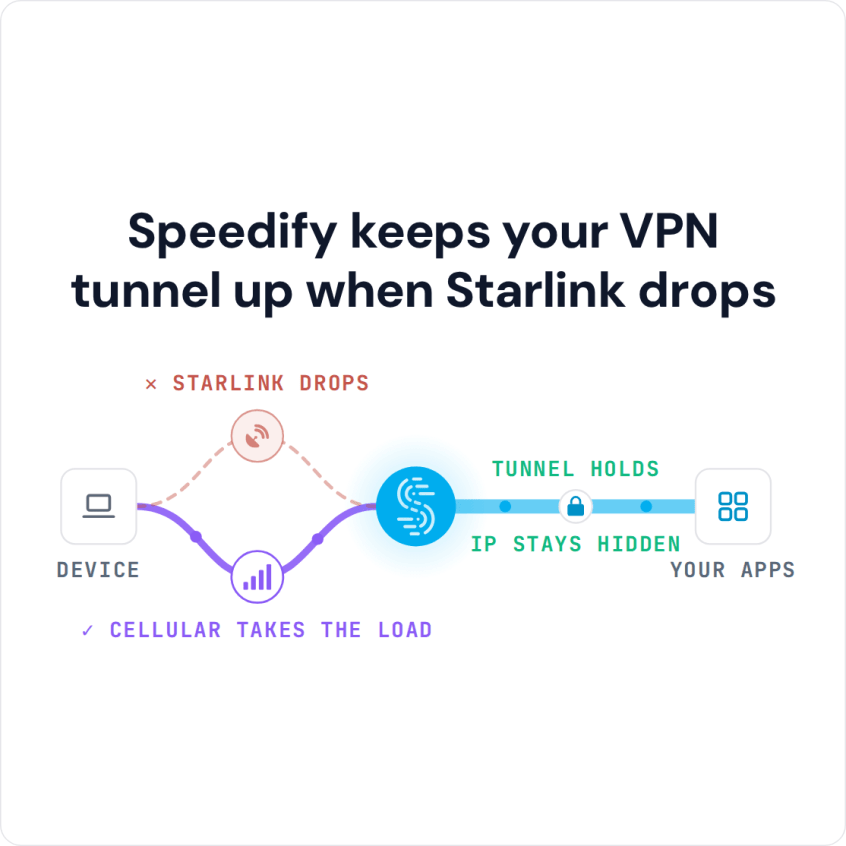
Speedify keeps your VPN tunnel up when Starlink drops
Starlink Internet Connection Dropouts Happen to Everyone
Speedify measures thousands of Starlink users in more than 150 countries. From 29 September to 12 October 2026, fixed Starlink dishes went offline for about 37 minutes a day on average, and Starlink dishes on RVs and boats for about 61 minutes a day.
Starlink also switches each dish to a new satellite every 15 seconds, and a switch can cause a short dropout. Even a perfectly installed Starlink dish goes offline, and about 7 in 10 Starlink users on Speedify use Starlink together with a second internet connection, like 4G/5G cellular.
Why Starlink Users Use a VPN
A VPN encrypts your internet traffic between your device and the VPN server, so others can’t easily watch what you do online. For Starlink users, a VPN helps in six ways:
Privacy: A VPN adds its own encryption to everything you send, which keeps your browsing private from your internet provider, advertisers, and anyone else on the same Wi-Fi network trying to watch it.
Shared IP addresses: On most plans, many Starlink users share one public IP address, the address websites see. Some websites and services block those shared addresses, and opening ports for things like game servers or security cameras gets harder. A VPN gives you a different public IP address, which gets you into websites that don’t accept Starlink’s shared ones.
Content from other countries: Connecting to a VPN server in another country changes the location websites see. That lets you reach streaming services and websites that are only available in that country.
Secure remote work: If you work remotely, a VPN gives you secure access to company networks, online services and private files. That matters most in remote areas where Starlink is often the only fast internet connection.
A steady IP address: A VPN built for changing internet connections keeps your IP address the same, so apps that break when your IP address changes keep working.
Fewer targeted slowdowns: When a network is busy, internet providers sometimes slow down specific kinds of traffic, like streaming or file sharing. Encrypted traffic is harder for an internet provider to identify and slow down, which can help keep your speeds steady.
How to Set Up a VPN with Starlink
Most VPN apps work on Starlink. VPN types such as SSTP, OpenVPN and WireGuard (the names you see in a VPN app’s settings) usually work best. Some older types used on company networks, such as GRE and IPsec without its NAT-T option, usually don’t connect, because Starlink users share IP addresses. If your work VPN won’t connect over Starlink, ask your IT team to switch it to one of the types that work.
The Starlink router can’t run a VPN itself: it has no admin web page, and its settings are only in the Starlink app. You have three ways to set up a VPN:
- Install the VPN app on each device: This is the easiest way. Install the VPN app on your computer, phone or tablet and connect to a VPN server. The Starlink router lets VPN traffic pass through to your device.
- Use your own router that runs a VPN: Put the Starlink router in Bypass Mode in the Starlink app, so it only passes the internet connection on, and connect your own router to it. Install the VPN on that router to protect every device on your network. This usually takes a router that runs software like DD-WRT or OpenWrt.
- Get a public IP address on a Priority plan: Some Local Priority and Global Priority plans can add a public IP address of your own, which makes a VPN on your router simpler. Public IP addresses aren’t available on every plan.
How a VPN Affects Starlink Speed and the Starlink App
A VPN can slow Starlink down slightly. Starlink’s satellites fly much closer to Earth than older satellite internet, so the delay is shorter, but a VPN adds encryption and a longer route for your data, and that adds a little more delay.
Pick a VPN known for fast, steady connections. Starlink has short drops as your Starlink dish switches satellites, and a VPN built to ride out drops handles them better than one that has to reconnect every time.
The Starlink app may not work properly while a VPN is on, and Starlink support can’t help with VPN problems, because the VPN isn’t part of Starlink’s network. That’s why it helps to use a VPN that shows Starlink alerts right in its own app.
How Speedify Works as a VPN for Starlink
Speedify is a VPN made for internet connections that come and go, like satellite internet. Speedify uses several internet connections at the same time, such as Starlink, 4G/5G cellular, Wi-Fi, DSL or Ethernet, and encrypts everything that runs over them.
Several internet connections at once: Speedify uses Starlink together with your other internet connections, including a second Starlink dish. Downloads and uploads get faster than on any one internet connection, and you get fewer dropouts. Speedify needs that second internet connection to speed things up: with Starlink alone, it encrypts your traffic but can’t make Starlink faster.
Automatic switching: If Starlink drops because of weather, a short outage or a satellite switch, Speedify moves your traffic to your other internet connections, so calls, streams and work keep going. Every Starlink dish switches satellites on the same schedule, so only an internet connection that isn’t Starlink, like 4G/5G cellular, covers those switches.
Lost data sent again on the other internet connection: If data gets lost on one internet connection, Speedify can send it over another one. Video calls and online games get fewer freezes and less lag.
Starlink alerts in Speedify: The Speedify app shows live reports and alerts straight from your Starlink dish, such as overheating, position problems, connection problems, hardware alerts and maintenance.
Calls and streams first: Speedify puts live audio and video first and adjusts as your internet connections change, so you get fewer glitches and less buffering.
Cellular sharing: Speedify’s cellular sharing lets devices running Speedify on the same Wi-Fi network share their 4G/5G cellular connections with each other, so every device gets a faster, more reliable internet connection.
Every major device: Speedify runs on Windows, macOS, Linux, iOS, Android and OpenWrt routers.
Security and privacy: Speedify encrypts everything you send with 256-bit encryption and keeps a strict no-logs policy.
Speedify
Get started with Speedify today.
Speedify combines Wi-Fi, 4G/5G cellular, Ethernet, Starlink and satellite into one faster, more reliable internet connection. Free to try: 5 GB a month with a free account. No credit card required.
🚀 Speed
Faster uploads and downloads, because Speedify uses all your internet connections at once.
📶 Stability
If one internet connection drops, Speedify moves your traffic to the others in milliseconds.
🔒 Security
AES-256 encryption on every internet connection, on any network you join.



15M+ downloads worldwide. 75K+ five-star reviews on iOS and Android.