

How Data Throttling is Changing and Affecting You
Your carrier’s fair-use limit lands mid-month and video quality falls off a cliff. Or your home provider slows one service and not the others, and no support agent will confirm it. Both are data throttling: your provider deliberately slows your connection, either after you use a set amount of data or for specific services, and both are measurable.
Speedify is an app for your phone, computer or tablet that uses more than one internet connection at once and encrypts the traffic on each, so neither your home provider nor your carrier can pick out a single app to slow. With a second internet connection, such as your phone’s 4G/5G cellular next to home Wi-Fi, a throttled connection is no longer the only one you have; on a single connection, Speedify still encrypts your traffic but cannot add speed or stop that connection from dropping. This guide covers how throttling and deprioritisation have changed, how to test your own connection, and how to work around what you find.
With Speedify, your internet stays on when one connection fails.
How to Tell If Your ISP or Carrier is Data Throttling: Test Your Internet Connection
Before jumping to any conclusions, you need to read the contract that you have with the ISP or carrier to see how much bandwidth you should be getting from them. With that information, here are 4 steps to determine if your ISP is throttling bandwidth:
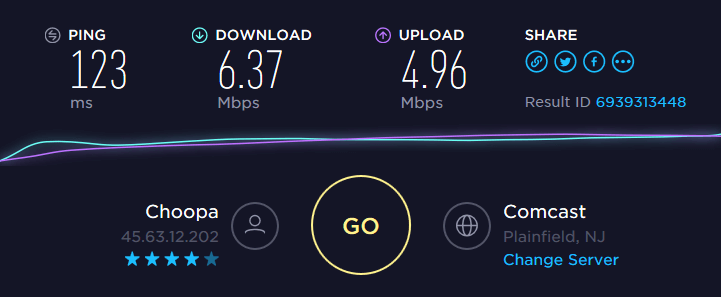
- Run an online speed test on the device(s) you’re using with high bandwidth applications, such as streaming video, online gaming, etc. This will give you an idea of the real bandwidth available for you.
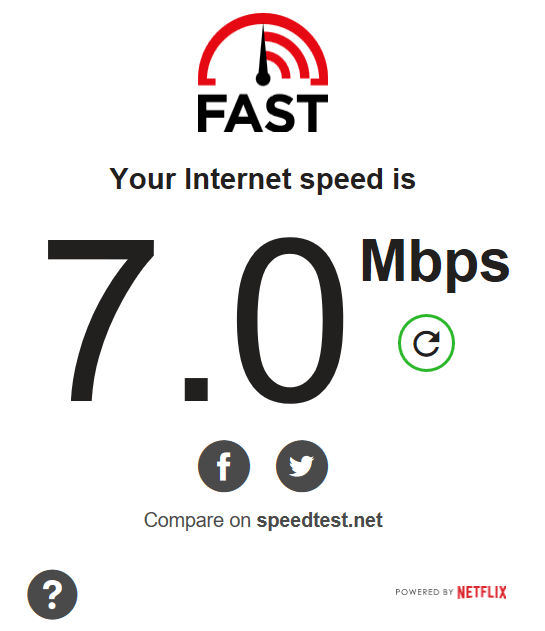
- If you’re having trouble with Netflix loading slowly or even buffering, run the Netflix FAST speed test. If the speed is much lower than the speed test at step 1, then it’s most likely your ISP is data throttling connections to Netflix.
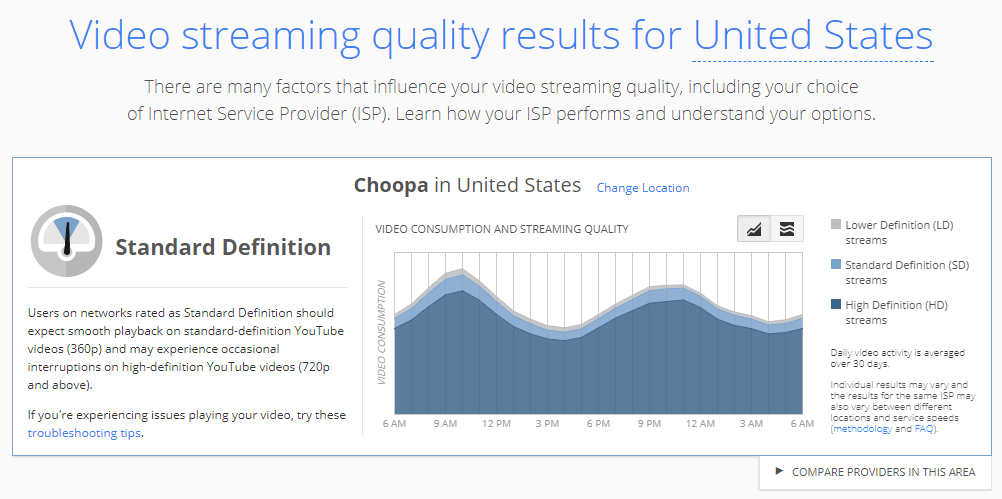
- If you’re having issues with YouTube, you can also check out the Google Video Quality report. It shows the performance of your Internet connections to YouTube’s servers. If the connection quality to YouTube is poor, but your Internet connection is fast, your ISP is most likely data throttling connections to YouTube.
- Run the Internet Health Test by Battle for the Net. This checks your Internet connection to see if there are problems at points of interconnection. Sometimes ISPs may throttle the performance at these points so that the other ISP pays an additional fee. It checks a number of different routes and detects if you’re experiencing degraded performance at one or more interconnection points. So, if you see a big difference in speeds between consecutive tests, you’re being data throttled by your ISP.
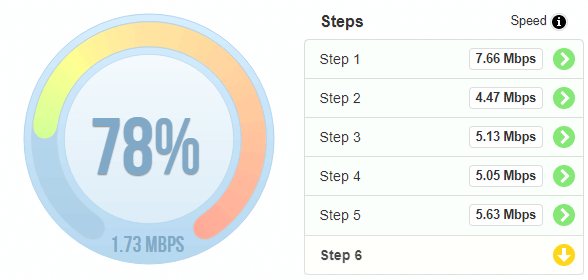
If there’s no evidence of data throttling done by your ISP or carrier after running the tests above, you may just need to upgrade to an Internet plan that delivers more bandwidth to you. Before paying for a bigger plan, it is worth knowing how to get faster internet without paying your ISP more.
How Speedify Stops ISPs and Carriers from Throttling Specific Services
Most cases of ISP and carrier data throttling are tied to certain websites and services. Providers analyze your traffic, usually through a technique called deep packet inspection, and depending on the services you’re accessing, they may have a policy to intentionally slow down that traffic. Wi-Fi throttling usually works the same way: on home Wi-Fi, the internet provider on the line behind your router is the one slowing you down, while public and hotel Wi-Fi networks can also cap speeds or slow specific services themselves.
If your ISP cannot inspect your traffic, it cannot throttle your internet speed for certain services. That is the idea behind stopping data throttling. A VPN is the easiest and most affordable way to stop throttling aimed at specific services, as it secures all internet traffic on your device, so that ISPs will not be able to distinguish between traffic. A VPN cannot lift a slowdown that your plan applies to all traffic after you use a set amount of data.
Speedify is a mobile VPN app for your computer and phone that encrypts your online data and combines internet connections for faster, more reliable internet, with internet failover protection.
Stop Data Throttling with Speedify: Encryption Plus Combined Internet Connections
There are many VPN alternatives to choose from. They all do the basic stuff: encrypting your online data so your ISP or carrier cannot see which services you use, which is how a VPN gets around data throttling.
But with bandwidth-hungry applications like live audio and video streaming, Amazon Prime, Hulu, YouTube and other streaming websites, Twitch, online gaming and business calls, other VPNs slow down your connection, as all the traffic has to be encrypted first before being transmitted.
Speedify works differently: while securing your online data, Speedify can also combine multiple internet connections at the same time, splitting your traffic across all of them. At home you can combine Wi-Fi, Ethernet and 4G/5G cellular; when travelling, Wi-Fi and 4G/5G cellular. With two or more internet connections you get more bandwidth and a connection that stays up when one of them drops.
If your ISP is limiting your internet connection, it’s time to stop data throttling. Get started with Speedify. You will be able to use the bandwidth you pay for, with your traffic encrypted and, with a second internet connection, more reliable internet.
Speedify
Get started with Speedify today.
Speedify combines Wi-Fi, 4G/5G cellular, Ethernet, Starlink and satellite into one faster, more reliable internet connection. Free to try: 5 GB a month with a free account. No credit card required.
🚀 Speed
Faster uploads and downloads, because Speedify uses all your internet connections at once.
📶 Stability
If one internet connection drops, Speedify moves your traffic to the others in milliseconds.
🔒 Security
AES-256 encryption on every internet connection, on any network you join.



15M+ downloads worldwide. 75K+ five-star reviews on iOS and Android.