
How Slow Download Speeds Affect You
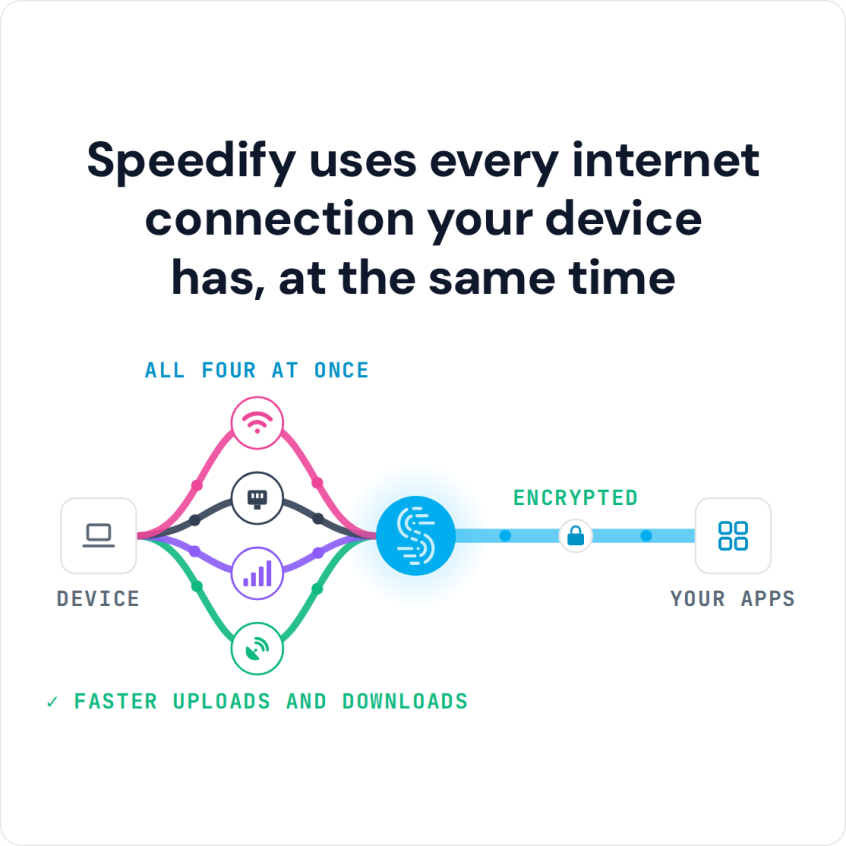
To speed up downloads, first rule out the usual causes on your side, then add bandwidth: run two or more internet connections, such as Wi-Fi, Ethernet, 4G/5G cellular or Starlink, at the same time. Speedify is an app that combines two or more internet connections at once, so you get faster downloads and uploads and stay online if one connection drops out.
Speedify uses every internet connection your device has, at the same time
How do I use WiFi and 4G/5G cellular at the same time with Speedify?

Pick your two internet connections and your device below and we'll take you to the step-by-step setup guide.


First, Test Your Download Speed Against Your ISP Plan
Start by checking whether the download speed you get from your ISP matches your contract. Test it at speedtest.net or with any other speed testing tool.
If the download speeds are not what your ISP promised, you may want to clarify with them why that is.
If you are getting the speeds in your contract but downloads still seem slow, something else may be causing the problem:
- Your ISP may be throttling your data.
- Several devices sharing one internet connection split its bandwidth, which slows each download.
- On Wi-Fi, distance from your router or modem weakens the signal and slows downloads, so move closer.
5 Tips on How to Speed Up Downloads
Here are some general steps you can take to optimize your download speed:
- Cancel any running downloads in the background. Operating system, video game and software updates can contribute to slow download speeds. Check for ongoing app updates, back-ups or background streaming apps.
- Download only one file at a time. Cancel simultaneous downloads to provide a higher total speed to the most important file.
- Disable your firewall only as a short test. Firewalls are an important safety mechanism, but some of them can slow downloads. Turn yours back on as soon as the download finishes.
- Use a wired connection instead of a wireless connection. Hooking directly into your router or modem will limit signal interference and maximize your download speed.
- Restart your device, and then start the download with only your browser running. Fewer running applications can create a faster download environment.
The tips above help only when something on your side is slowing the download. If you need faster download speeds, you need more bandwidth, and you can get more bandwidth by using 2 or more Internet connections at the same time.
How Speedify Speeds Up Downloads by Combining Internet Connections
Speedify combines multiple internet connections into one faster, more reliable connection, which raises your total bandwidth and download speed. Speedify’s way of combining internet connections uses every available connection at once, splitting traffic per packet, which works differently from load balancing.
For example, you can combine Wi-Fi and 4G/5G cellular on your phone, and combine Ethernet and Wi-Fi on your Mac or PC. Speedify also combines Wi-Fi and 4G/5G cellular on an iPad.
With your connections combined, files download faster, and failover protection keeps a download going if one connection drops, at home or on the go.
Speedify
Get started with Speedify today.
Combine Wi-Fi, 4G/5G cellular, Ethernet, Starlink, and more into one faster, steadier connection. Free to try — no credit card required.
🚀 Speed
Faster uploads and downloads by bonding all your connections at once.
📶 Stability
Automatic failover in under a second when any connection drops.
🔒 Security
AES-256 encryption on every connection, on every network you join.



15M+ downloads worldwide. 75K+ five-star reviews on iOS and Android.