
I Can’t Order with Just Eat… Is It Down?
The Just Eat app loads a blank screen, or your order sits there processing and never confirms. When Just Eat itself is up and running, the culprit is almost always the internet connection on your phone: short gaps in the signal cut the conversation between the app and Just Eat’s checkout partway through.
Speedify is an app that joins Wi-Fi, 4G/5G cellular data, wired Ethernet, Starlink and other internet connections into one steady internet connection, so the app never has to depend on a single weak signal.
What follows explains how to check whether Just Eat is genuinely down, and how using Speedify gets your order placed instead. The same applies when Uber Eats is not working.
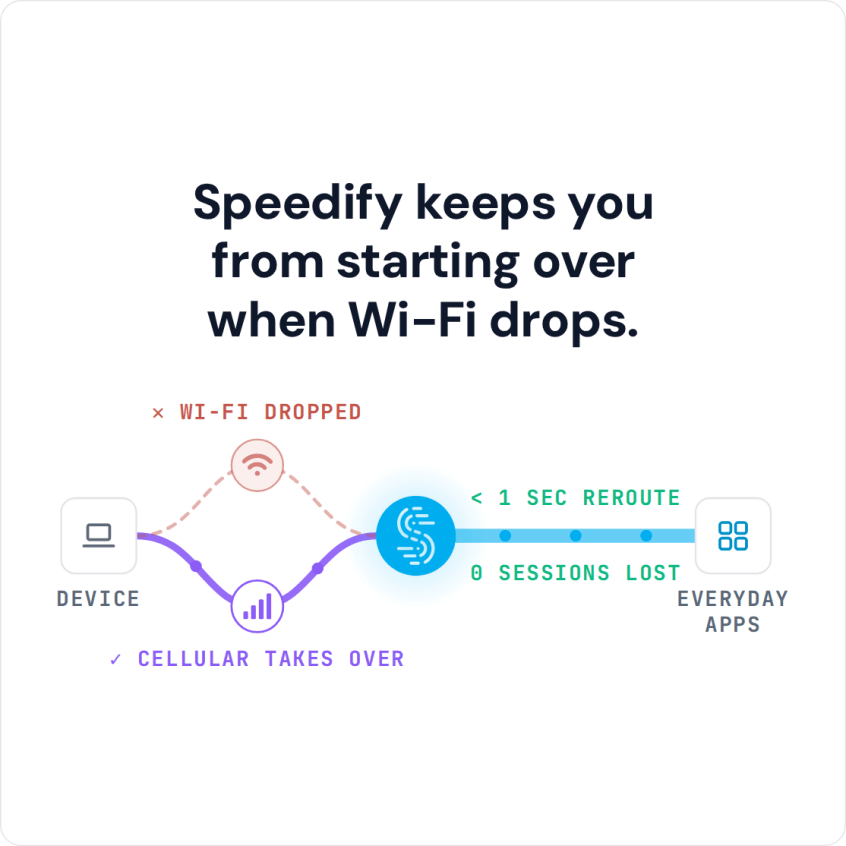
Speedify keeps you from starting over when Wi-Fi drops.
Why Does the Just Eat App Not Work?
The most common cause of the Just Eat app not working is actually your network. When you have a slow, or unreliable Internet connection, your Just Eat app isn’t able to work properly. Sometimes, you may not even realize that you have a connection problem until you try and use the service.
If your Wi-Fi connection has a momentary blip or your cellular connection fluctuates, the communication flow between your smartphone and the Just Eat servers gets interrupted. It can take a few moments for the data to catch up.
You may not be able to order or view all restaurants that you can order from in your area.
Just Eat App Issues Fixed by Speedify
Assuming the Just Eat service is online and there are no bugs in their app, then the culprit is definitely your network connection. Speedify fixes Just Eat issues because it improves your Internet connection. The Speedify app works by monitoring the quality of your Internet connections in the background and can bond your Wi-Fi and cellular connection simultaneously in a single “pipe” on your mobile device.
This improves your bandwidth and leads to a smoother Just Eat browsing and ordering process.
Speedify also routes data when something happens to one of your connections. If you are moving between Wi-Fi networks, or your Wi-Fi or cellular network suddenly go out, you stay connected because Speedify intelligently and automatically reroutes your data until you are connected again to both networks. Best of all, you don’t notice anything because Speedify takes care of it all in the background.
Speedify is available for iOS, Android, macOS, Windows and Linux devices.
Get All Three for Your Internet Connection: Reliability, Speed and Security
Speedify does more than just helping you get your food ordered online and managing your Internet connections. It is also a next-generation fast bonding VPN. It encrypts all of the data you send and receive from your device. This helps keep your private information and conversations secure from digital eavesdroppers and cyber thieves.
Speedify doesn’t just fix your Just Eat app connection problems. It also makes all your online apps more stable and secure, and improves your overall Internet experience.
Other VPNs slow down your Internet connection. There is no other app that works like Speedify. Only Speedify gives you advanced encryption while also speeding up your Internet connection.
If you are tired of glitches when ordering online with the Just Eat app, then start using Speedify today for improved network connectivity.
Speedify
Get started with Speedify today.
Combine Wi-Fi, 4G/5G cellular, Ethernet, Starlink, and more into one faster, steadier connection. Free to try — no credit card required.
🚀 Speed
Faster uploads and downloads by bonding all your connections at once.
📶 Stability
Automatic failover in under a second when any connection drops.
🔒 Security
AES-256 encryption on every connection, on every network you join.



15M+ downloads worldwide. 75K+ five-star reviews on iOS and Android.