

Video calls freeze, the game disconnects, the playlist stops. When your internet keeps dropping out or going in and out, the cause is usually one of four things: a router or modem that needs a restart or a firmware update, a Wi-Fi signal too weak where you sit, a loose or damaged cable, or a fault or outage at your internet provider.
Speedify is an app that runs your internet over Wi-Fi, 4G/5G cellular, wired Ethernet, Starlink and other internet connections at the same time, so one of them dropping does not put you offline. That needs two or more connections, for example home Wi-Fi plus a phone’s 4G/5G cellular: on a single connection, Speedify works as an encrypted VPN and cannot stop that connection from dropping. Below: how to find which cause you have, the fixes that work, and how Speedify keeps you online while the fault gets fixed. On a Windows computer, see what to do when PC internet stops working.
Speedify keeps you online when your connection keeps dropping.
Why Your Internet Keeps Dropping Out: The Common Causes
Start with where the drop happens. If every device loses the internet connection at once, the problem is the router, the modem or the line from your provider. If only one device keeps cutting out, look at that device’s Wi-Fi signal, adapter or settings. The usual causes:
- An outage or a line fault at your internet provider. Check the provider’s status page or app first.
- You are connected to a bad Wi-Fi hotspot.
- A loose or damaged cable between the wall socket, the modem, the router and your computer.
- A weak Wi-Fi signal: you are near the edge of the router’s range, or walls and floors are in the way.
- An overloaded Wi-Fi network in crowded areas such as stations, stadiums and concerts.
- Wireless interference with other Wi-Fi hotspots or devices nearby.
- Outdated network adapter drivers, or old firmware on the modem or router.
If the internet light on your router goes off or turns red each time, the router has lost the line from your provider: restart the modem and router, check the cables, then ask your provider to test the line. If the router stays online while devices drop, the fault is the Wi-Fi.
How to Fix Internet That Keeps Going In and Out
Try these one at a time; each one rules out a cause:
- Move closer to the Wi-Fi router, or move the router to a central, open spot away from walls, metal and microwaves. If the router has separate 2.4 GHz and 5 GHz networks, try the other one.
- Update your network adapter drivers and modem / router firmware by checking the manufacturers’ websites.
- Restart the modem and router by unplugging them for 30 seconds, then restart your phone or computer.
- Check the cable that runs into your modem / router and the one that connects that to your computer.
- If on a public Wi-Fi network, check whether you have to login again to the network. Or just connect to another Wi-Fi hotspot.
If the drops continue on every device, contact your internet provider: ask about outages in your area and ask them to test the line. Note when the internet drops; a pattern helps them find the fault.
Some drops are outside your control: a provider outage, a line fault that takes days to repair, or a Wi-Fi network you do not manage. For those, a second internet connection keeps you online while the first one is down.
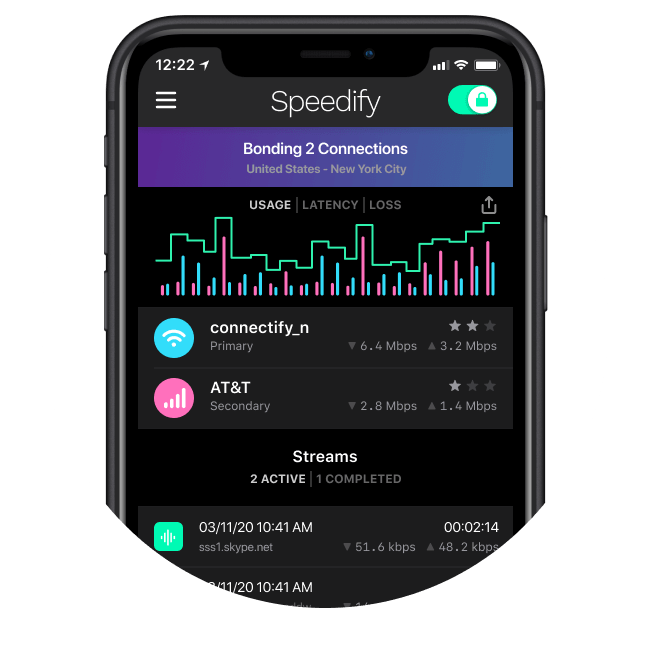
Stay Online When the Internet Keeps Dropping, with Speedify
Speedify uses two or more internet connections at once: Wi-Fi plus 4G/5G cellular on a phone, or Wi-Fi or Ethernet plus a phone connected by USB on a computer. When one connection drops, Speedify moves your traffic to the other (Speedify says in milliseconds) and keeps the same public IP address, so video calls, games and logged-in apps carry on.
Speedify can combine multiple internet sources into one connection, and it watches the quality of each connection in the background, so a connection that starts to falter carries less of your traffic before it drops completely.
Speedify will also prioritize sending data over Wi-Fi and Ethernet to keep metered connections such as 4G/5G cellular to a minimum. If your Wi-Fi drops, the cellular connection carries you only until the Wi-Fi is back.
Combining Connections, Not Load Balancing
Speedify is not a load balancer. A load balancer puts each download on one connection, so a drop on that connection breaks the download. Speedify spreads a single call or download across your connections, so a drop on one connection does not stop it.
Speedify is also a fast mobile VPN that uses advanced encryption to keep your data safe. Unlike traditional VPN apps that slow down your internet, Speedify sends your data to and from its VPN server over several connections at once.
Internet keeps dropping? With a second connection added, Speedify keeps you online through the drops. Get Speedify now!
Speedify
Get started with Speedify today.
Speedify combines Wi-Fi, 4G/5G cellular, Ethernet, Starlink and satellite into one faster, more reliable internet connection. Free to try: 5 GB a month with a free account. No credit card required.
🚀 Speed
Faster uploads and downloads, because Speedify uses all your internet connections at once.
📶 Stability
If one internet connection drops, Speedify moves your traffic to the others in milliseconds.
🔒 Security
AES-256 encryption on every internet connection, on any network you join.



15M+ downloads worldwide. 75K+ five-star reviews on iOS and Android.