
How is Distance Learning Affecting Students?
Distance learning stopped being optional and became the way a lot of classes are taught. Which means a household connection that used to carry email and video now has to carry a school day, several times over.
Speedify is an app for laptops, tablets and phones that uses more than one internet connection at the same time, so a class does not end because the Wi-Fi dipped for five seconds. On a single connection, Speedify works as an encrypted VPN and cannot stop that connection from dropping. For schools on satellite internet, see how to keep Starlink campus internet online. This post covers how distance learning is actually affecting students, and why unreliable internet is the part that hurts most.
How do I use WiFi and 4G/5G cellular at the same time with Speedify?

Pick your two internet connections and your device below and we'll take you to the step-by-step setup guide.


Slow and Unreliable Internet Connectivity Pains Students the Most when Learning Remotely
Students around the world name the same problem with distance learning: no fast and stable internet connection for live classes. It is not a general rule, but the problem shows up most in rural areas and in households that cannot afford a faster internet plan. Unfortunately, inequities are real when it comes to learning from home.
Getting back to the symptoms of unstable Internet: just count the times you or somebody in your online class says “can you hear me?” or “I can’t understand what you’re saying”. If those phrases come too often in the conversation, then you’ve got a hardware, software or an Internet problem you need to address.
Choppy audio and frozen video often mean packet loss: the connection loses some of the data on its way, which happens most at the edge of Wi-Fi or 4G/5G cellular range.
Teachers face the same problem from the other side. When the teacher’s connection drops, the whole class waits, and a teacher with a steady connection can do more than lecture, with online collaboration tools for quizzes and brainstorming.
Troubleshooting Internet Connection Problems for Students
Disclaimer: this guide does not cover whether your webcam and microphone are set up correctly, or whether the settings are right for your Zoom / Google Classroom / other remote learning tool. It assumes those are all good.
The real distance learning challenge for students is that troubleshooting Internet connection issues takes time. It’s like taking a second job as your own IT support person. You have to at least follow these steps:
- Restart your modem / router.
- If possible, use a wired connection to your computer. Or at least move closer to the Wi-Fi router.
- Close non-essential apps that might be hogging the bandwidth. Also ask your family to refrain from streaming videos or getting on video calls while you’re attending remote classes.
- Test your Internet speed to make sure you’re getting the speed you’re paying for.
- Call your Internet Service Provider and wait until they solve the issue… that’s days, usually.
In certain situations there’s the possibility of recording your class so you can download them and watch later. But most of the classes are still happening live. Here is how to fix internet problems in online classes.
So, the essence of making the most out of online learning is a solid Internet connection that’s fast and stable. Meet Speedify, your solution to avoid distance learning challenges for students and teachers.
Get Rid of Connectivity-Related Distance Learning Challenges for Students with Speedify
Install Speedify on the device you’re using to attend your online classes (computer, tablet or smartphone). Speedify is a VPN service that combines connections, so you can use all of your Internet connections at once. You get one connection with more speed and reliability, and you are protected from online snoops who are after your data.
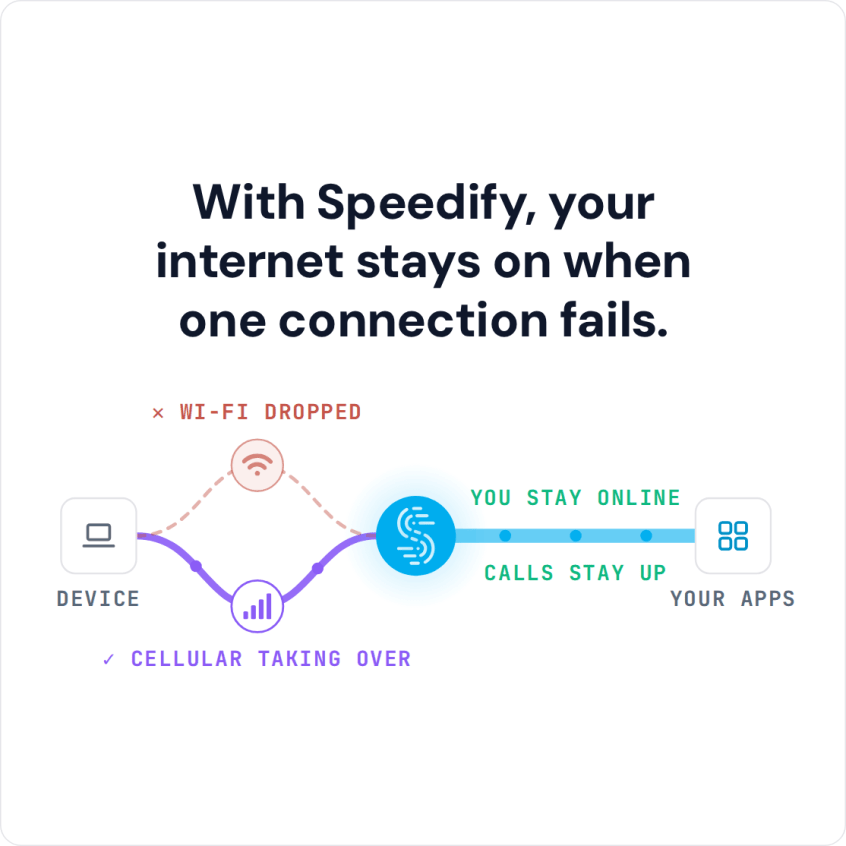
Speedify gets the extra speed by combining connections, which also allows you to remain connected online even if one of your connections drops.
How do you get a second Internet connection to use at the same time, you ask? It’s simple: you probably have a smartphone, so you can tether it to your computer and use its 4G/5G cellular. It’s even simpler if you use a tablet or the smartphone for class: just turn on the cellular connection. Don’t worry about paying more: with Speedify you can set how much cellular data it uses, so you don’t go over your plan.
Now you know: solve Internet connection related distance learning challenges for students by using Speedify! Try it now and focus on learning new things, not on doing IT support!
Speedify
Get started with Speedify today.
Speedify combines Wi-Fi, 4G/5G cellular, Ethernet, Starlink and satellite into one faster, more reliable internet connection. Free to try: 5 GB a month with a free account. No credit card required.
🚀 Speed
Faster uploads and downloads, because Speedify uses all your internet connections at once.
📶 Stability
If one internet connection drops, Speedify moves your traffic to the others in milliseconds.
🔒 Security
AES-256 encryption on every internet connection, on any network you join.



15M+ downloads worldwide. 75K+ five-star reviews on iOS and Android.