
Speedify Gets Journalists in the Field Faster Upload and Download Speeds on Starlink, and a Reliable, Secure Internet Connection
Yes, journalists can use Starlink to file stories, upload photos and video, and go live from disaster zones, remote areas and open country where wired internet is missing and cellular is weak or overloaded.
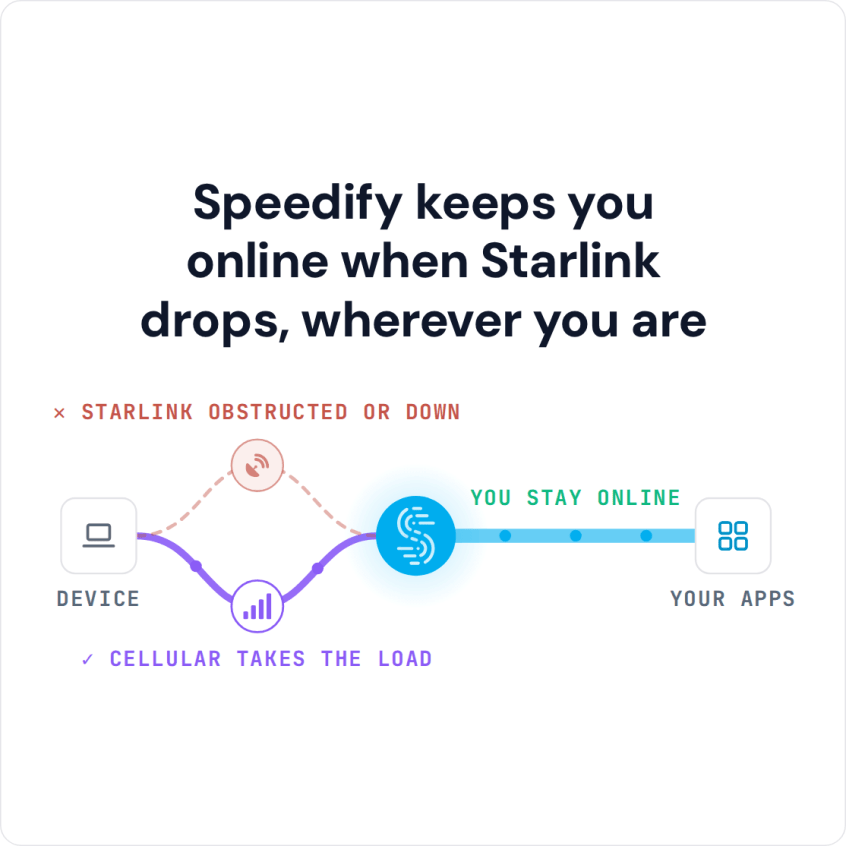
On deadline, a Starlink drop in the middle of an upload costs you. Speedify is an app for your laptop or phone that uses Starlink and 4G/5G cellular at the same time, so uploads and live shots keep going over cellular when Starlink drops. Speedify also encrypts everything you send.
Speedify keeps you online when Starlink drops, wherever you are
Watch now
How Speedify combines internet connections on any hardware
Get started with Speedify for your business
Speedify offers three commercial paths. They work together, and most enterprise customers use two or more.
01
Speedify Teams
Speedify on every supported OS for every team member
Centralized dashboard for billing, user provisioning, and usage analytics
CSV import/export and a RESTful management API
02
Speedify for Routers
License for supported OpenWrt routers
Powered by Speedify hardware lineup ready to deploy out of the box
Miri, GL.iNet and other partner models
Covers every device on the network, with no per-device install
03
Embed Speedify into your product
A · DIY
Build it yourself with the Speedify SDK.
Integrate Speedify into your iOS, Android, Windows, macOS, Linux or QNX product. Full developer documentation, sample code and supported integration paths. Your team owns the build, and the Speedify SDK handles combining the internet connections.
B · CUSTOM ENGINEERING
Have the Speedify team build it for you.
How Starlink Works for Journalists in the Field
Field reporters often work where the news is happening because the usual infrastructure is missing or broken: after natural disasters, in rural communities and at events out in the open.
Starlink brings internet to those places. Starlink lists downloads of 45 to 280 Mbps, uploads of 10 to 30 Mbps and a delay of 25 to 60 milliseconds on land. That’s enough to send high-resolution photos, upload video, hold live video interviews and file copy as you go. Older satellite internet had too much delay for two-way video calls. Starlink doesn’t.
The weak spot is that Starlink is still one internet connection. Your Starlink dish switches satellites about every 15 seconds, and trees, buildings or weather can block it. A drop during a live shot or a large upload is hard to recover from on deadline.
How Speedify Keeps Journalists Online on Starlink
Speedify runs on your laptop, phone or field kit and uses every internet connection you have at the same time. With Starlink and a cellular connection both working, you get more upload speed than either one gives alone, so large files upload faster. See how Speedify combines internet connections. For a live shot, Speedify can send the same video over both internet connections at once, so a drop on one doesn’t reach your viewers.
Speedify needs that second internet connection. With Starlink alone, Speedify can’t add speed or stop drops, so bring a cellular hotspot or modem, even where the signal is weak.
Speedify also encrypts all internet traffic, which protects your sources, messages and unpublished material from being read on the network.
How to Use Speedify with Starlink for Field Reporting
Step 1: Set Up the Starlink Dish at Your Location
Place the Starlink dish with a clear view of the sky. In disaster areas you may need a portable mount to lift it above rubble or vehicles. Connect it to your laptop or field router.
Step 2: Add a 4G/5G Cellular Internet Connection
Connect a 4G/5G cellular modem or mobile hotspot, or share your phone’s cellular connection. Wherever there is any cellular signal, even a weak one, Speedify can use it next to Starlink.
Step 3: Download and Run Speedify
Download Speedify on your laptop or phone. Speedify finds every internet connection and starts using them right away. Uploads, live shots and file transfers all run over both.
Which Journalists Get the Most from Starlink and Speedify
- TV news crews going live from outdoor or remote locations with no venue internet
- Photojournalists and video journalists uploading large files from disaster areas and remote communities on deadline
- Freelance reporters who need a portable internet setup without a newsroom tech team behind them
- News organizations sending field reporters out with Starlink and cellular kits
- Documentary filmmakers sending footage home from remote locations during a shoot
Speedify Is Used on Millions of Devices Worldwide
Speedify has made internet connections faster and more reliable for businesses and individuals since 2014.
15M+
Speedify downloads worldwide75K+
5-star reviews for Speedify on iOS and Android82
Speedify server points of presence in 50+ cities on 6 continents500TB+
Of internet traffic carried by Speedify every weekSpeedify Partners
Speedify works with these companies to bring faster, more reliable internet and networking technology to their customers and employees.


Speedify Also Shows Your Starlink Dish Status in the Field
Speedify shows real-time Starlink dish alerts in the app. If your Starlink dish has a problem, such as overheating, Speedify shows an alert once the problem has lasted 15 seconds, so you can fix the problem before your window to file closes.
For freelance reporters and filmmakers: Download Speedify to use Starlink and cellular together in the field.
For newsrooms and media companies: Speedify can combine Starlink and cellular in every field kit your team carries. Contact Us to plan the setup.
Speedify Business Solutions
Speedify Teams
Speedify for Routers

Speedify Embedded Solutions and Integrations
Add Speedify to your own app or hardware with the Speedify SDK. Your product then combines internet connections, fails over automatically when one drops, and encrypts the traffic, using the same technology as the Speedify app.