
Get Cost-Effective Zero Downtime Internet for Your Business
A redundant internet connection means a second internet connection from a different provider or technology, so one outage cannot stop work at home or in the office. One provider means one failure away from a stopped office, and a failover line that only switches on after a drop still costs you the call you were on.
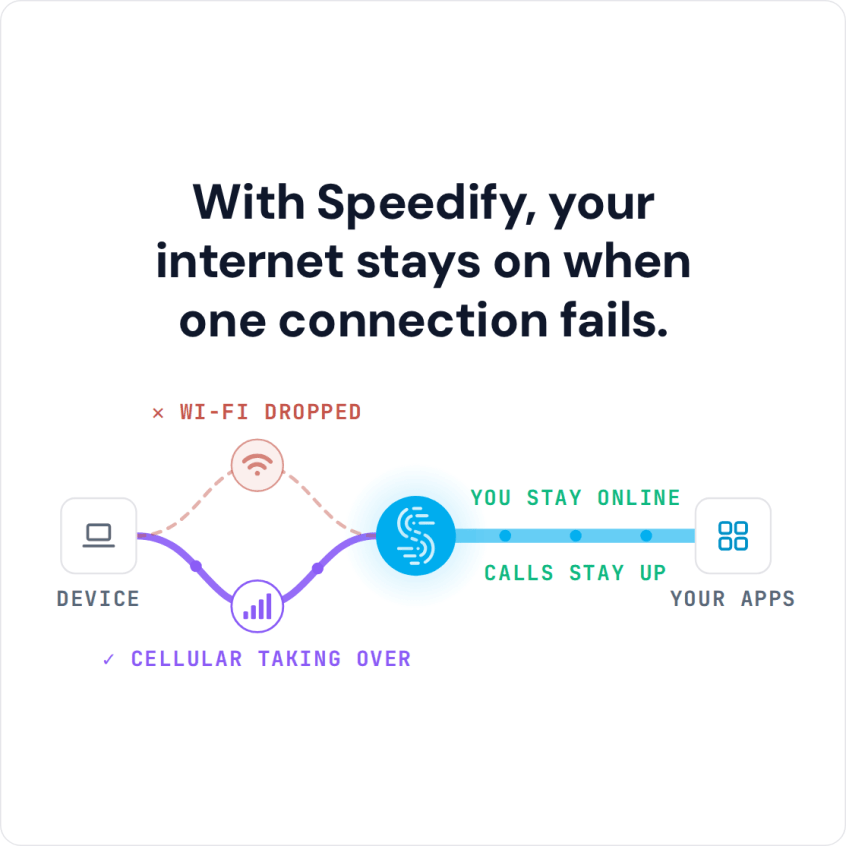
Speedify is software that combines two or more internet connections at once, such as cable broadband and a 5G home internet or cellular line, so a failure is absorbed rather than switched over. With a single connection, Speedify works as an encrypted VPN and cannot keep that connection from dropping.
Keep reading to see what a redundant internet connection looks like at home or in the office, how to avoid network downtime, and how Speedify uses both lines at once.
Watch now
How Speedify combines internet connections on any hardware
Get started with Speedify for your business
Speedify offers three commercial paths. They work together, and most enterprise customers use two or more.
01
Speedify Teams
Speedify on every supported OS for every team member
Centralized dashboard for billing, user provisioning, and usage analytics
CSV import/export and a RESTful management API
02
Speedify for Routers
License for supported OpenWrt routers
Powered by Speedify hardware lineup ready to deploy out of the box
Miri, GL.iNet and other partner models
Covers every device on the network, with no per-device install
03
Embed Speedify into your product
A · DIY
Build it yourself with the Speedify SDK.
Integrate Speedify into your iOS, Android, Windows, macOS, Linux or QNX product. Full developer documentation, sample code and supported integration paths. Your team owns the build, and the Speedify SDK handles combining the internet connections.
B · CUSTOM ENGINEERING
Have the Speedify team build it for you.
What Does Zero Downtime Mean and How It Can Help
A zero downtime strategy is a collection of the infrastructure, architecture and design decisions organizations make to ensure their applications remain online and performant. When it comes specifically to your internet connectivity, zero downtime means being always online.
In practice, your internet comes back quickly from outages and other network events, so calls, file transfers and business systems keep working. For a business, that protects productivity during an outage.
What a Redundant Internet Connection for Home or Office Looks Like
A redundant internet connection pairs two lines that do not fail together: cable or fiber with a 5G home internet plan, for example, or a fixed line with Starlink or a cellular modem. Choose a second provider whose network does not share the first one’s cables or towers, because two plans on the same network tend to go down together. A wireless second line (cellular, 5G home internet or Starlink) is the usual choice at home, since it needs no new cable to the building.
How the two lines are used matters as much as having them. A dual-WAN failover router switches to the second line only after the first fails, which changes your public IP address and drops calls, VPN sessions and remote desktop logins. Speedify uses both lines at the same time, and because your traffic leaves through the Speedify server, the public IP address stays the same when one line fails, so logged-in sessions and calls carry on.
How to Avoid Network Downtime: Four Strategies
There are multiple strategies on how you can minimize or eliminate network downtime and achieve zero downtime. These include:
- Using multiple internet connections with a tool like Speedify that combines them for redundancy and failover.
- Employing redundant hardware, such as spare servers, routers, switches and UPS systems, to protect against failure and power outages.
- Doing proactive maintenance by keeping software and firmware up-to-date to address vulnerabilities and improve performance.
- Monitoring network usage and performance to identify potential issues before they escalate.
When you combine these strategies you should be able to reduce the risk of network downtime and increase the reliability of your network.
Redundancy Is the Backbone of a Zero Downtime Strategy
Zero downtime is a key component that allows you to use your network if something happens to the network infrastructure or even to external parties, such as ISPs.
Redundancy refers to multiple strategies, such as extra network hardware for failures, overprovisioning with additional bandwidth, decentralized distribution of business-critical applications over multiple data centers, etc. These all can reduce the impact of failures. But the most important aspect of redundancy when it comes to network resilience is being able to access the Internet.
Connection aggregation, a technique related to link aggregation, combines multiple network connections (such as Ethernet, Wi-Fi or cellular) in parallel into one higher-bandwidth link. If one connection fails, traffic shifts to the remaining active connections. It is like merging several lanes into one wider road.
For zero downtime, the point of combining connections is redundancy: no single line can take the whole connection down.
Top Solutions for Zero Downtime Architecture Deployment
These are five widely used solutions that are also used for zero downtime strategies in the B2B space and even in homes recently, especially if the Internet is used for activities such as live streaming, playing games online or even working remotely:
-
Load balancers distribute traffic across multiple servers or Internet connections, ensuring optimal resource utilization. Load balancers automatically reroute traffic if a server or connection becomes unavailable. One of the downsides of load balancing is that activities using only a single network socket to connect to the Internet will not be optimized through load balancing. For instance, video streaming, VPN connections, and large file transfers are not sped up by a load balancer.
-
SD-WAN (Software-Defined Wide Area Network) dynamically manages traffic across different network paths, including satellite, broadband, and cellular. It adapts to changing conditions, optimizing performance and reliability. This results in addressing Internet connectivity issues such as network congestion, jitter, packet loss and service outages. It gives businesses a competitive edge by increasing bandwidth and network reliability.
- Network failover solutions automatically switch to a second internet connection when the primary link fails. Examples include dual WAN routers and cellular failover devices. Cellular-based failover is the most popular, as it can be deployed anywhere there’s a cell signal available.
-
Cloud-based resilience refers to leveraging cloud services, such as Amazon AWS, to ensure that a cloud-based system or application recovers quickly and effectively from disruptions, such as hardware failures, network outages, cyberattacks, etc. Cloud resiliency includes a set of strategies, technologies and best practices designed to minimize downtime, ensure data integrity and maintain uninterrupted service delivery in the cloud environment.
-
Hybrid networks combine wired and wireless connections for flexibility and redundancy. For instance, using both fiber-optic lines and 4G LTE ensures connectivity even if one medium fails. Typical deployment scenarios for hybrid access networks include hybrid routers and aggregation gateways with load balancing functionality.
How Speedify Keeps Remote Work Online: Combining Connections at the Packet Level
Speedify is a set of networking tools built to improve the speed, stability and security of your internet. To keep you online, Speedify spreads individual packets across all of your available internet connections, so even a single large transfer, such as a video stream, an upload or a download, uses every connection at once, and losing one connection does not end it.

Speedify’s protocol can open up multiple sockets over each connection. If there’s packet loss on one of the TCP sockets, only the network packets being sent over that socket are delayed, as the TCP protocol will keep trying to send those, while the other sockets can continue sending other packets. This minimizes the negative effects of high latency and packet loss on connection performance.
As opposed to the limited “backup flow” ability of MPTCP, Speedify uses multiple types of connection priorities (Automatic, Primary, Secondary, Backup and Never) and spreads traffic across the connections it combines according to their performance and the priorities you set. Speedify will send as much data as it can on:
- non-metered connections, such as wired Ethernet and Wi-Fi, before sending a lot of data through cellular
- lower latency connections, such as wired (cable, DSL), before wireless (cellular, satellite)
- higher bandwidth connections before slower ones.
Redundant Mode: Every Packet Over Each Connection
For the calls that matter most, Speedify’s Redundant Mode goes further than splitting traffic: Speedify sends every packet over each connection (up to three) and uses whichever copy arrives first. With two or more internet connections, a call or live stream stays consistent even when each line is flaky, and ping follows whichever connection is faster at that moment.
The trade-off is data. Each connection carries the full load, so Redundant Mode uses data faster on a capped 4G/5G cellular plan, and more battery on laptops and phones. Use Redundant Mode for calls and live streams where a dropout costs you, and Speedify’s default mode for everyday browsing and downloads.
Speedify Features That Keep a Redundant Internet Connection Working
Speedify is built for all devices and available anywhere you need better Internet. The core features include:
- network resilience: when one connection drops, Speedify moves its traffic to your other working connections (Speedify says this happens in milliseconds) and keeps the same public IP address.
- enhanced streaming and QoS: Speedify automatically prioritizes streams over other network traffic to help avoid stuttering, buffering and disconnects during important video calls or livestreams.
- connection priorities and limits: with Speedify you can automatically manage your connections or manually set priority levels to fine tune how and when they should be used. You can even set data and rate limits to prevent overages on costly metered connections.
- encryption: under the hood Speedify works like a VPN, so all traffic is encapsulated and passed through an encrypted tunnel (DTLS 1.2 with AES-256-GCM or ChaCha20-Poly1305) to the Speedify server.
Enterprise solutions include Speedify Teams, which adds user management, billing and usage statistics for organizations, with settings pushed through the Teams API; the Speedify SDK, a toolkit that can be built into existing software to improve or customize network behavior; and Powered by Speedify embedded solutions for routers, networking appliances and smart devices.
Speedify Is Used on Millions of Devices Worldwide
Speedify has made internet connections faster and more reliable for businesses and individuals since 2014.
15M+
Speedify downloads worldwide75K+
5-star reviews for Speedify on iOS and Android82
Speedify server points of presence in 50+ cities on 6 continents500TB+
Of internet traffic carried by Speedify every weekSpeedify Partners
Speedify works with these companies to bring faster, more reliable internet and networking technology to their customers and employees.


Who Uses Speedify for Redundant Internet
Speedify serves several kinds of users with zero downtime needs. Target verticals include:
- first responders: crews such as firefighters, emergency medical services and rescue services need the best internet connection they can get in the scenarios they face. Whether in a remote area or on top of a mountain, fast and stable connectivity is paramount.
- live streamers and broadcasters: whether it’s online influencers, educational services, religious services, or media production companies, everybody needs to avoid dropouts and the low quality video you get when your internet connection starts acting up.
- enterprises and even SMBs, for remote work purposes, where you also need an extra layer of security. Important internal calls and client facing ones should not suffer because one of the people on the call has a poor internet connection.
Speedify has options from a single remote worker to a whole organization, and the Speedify team can discuss custom deployments.
Speedify Business Solutions
Speedify Teams
Speedify for Routers

Speedify Embedded Solutions and Integrations
Add Speedify to your own app or hardware with the Speedify SDK. Your product then combines internet connections, fails over automatically when one drops, and encrypts the traffic, using the same technology as the Speedify app.