
What Is the Speedify SDK?
A product that depends on someone else’s internet connection inherits every problem with it: the stalled upload, the dropped call, the support ticket that is not really about your software.
The Speedify SDK puts Speedify’s technology for combining internet connections inside your own app, so your product can use several internet connections at once instead of relying on whichever one the device happened to pick. The gains need two or more connections on the device; with one, Speedify works as an encrypted VPN and cannot stop that connection from dropping.
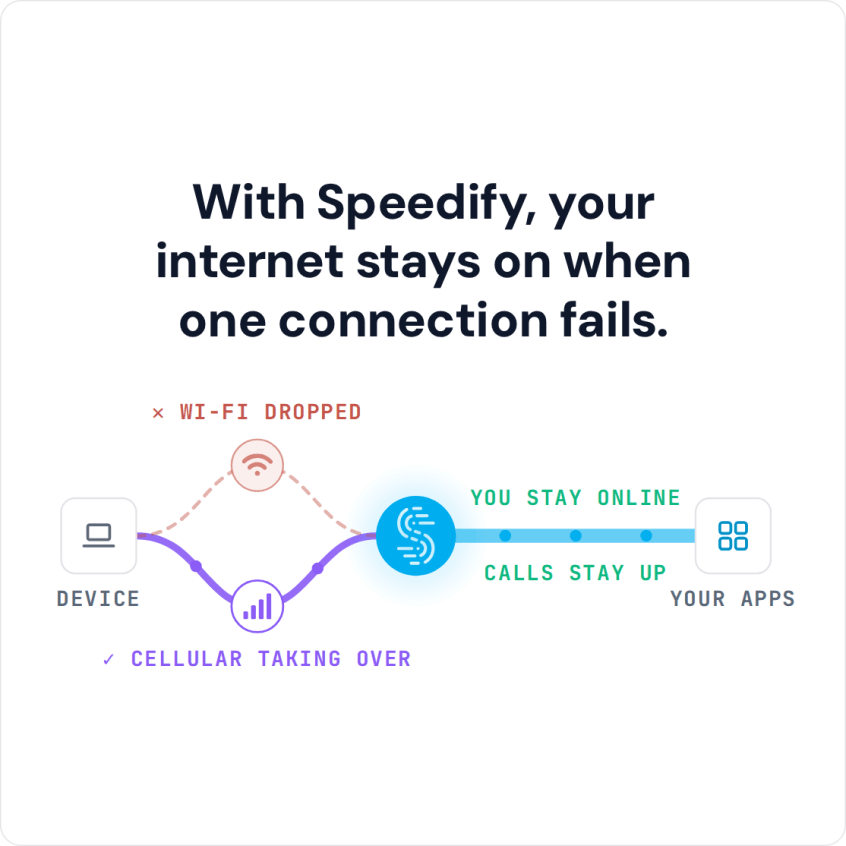
With Speedify, your internet stays on when one connection fails.
Read on to see what the SDK includes, how it improves connectivity, how many connections a user typically has available, and what teams have built with it.
Watch now
How Speedify combines internet connections on any hardware
Get started with Speedify for your business
Speedify offers three commercial paths. They work together, and most enterprise customers use two or more.
01
Speedify Teams
Speedify on every supported OS for every team member
Centralized dashboard for billing, user provisioning, and usage analytics
CSV import/export and a RESTful management API
02
Speedify for Routers
License for supported OpenWrt routers
Powered by Speedify hardware lineup ready to deploy out of the box
Miri, GL.iNet and other partner models
Covers every device on the network, with no per-device install
03
Embed Speedify into your product
A · DIY
Build it yourself with the Speedify SDK.
Integrate Speedify into your iOS, Android, Windows, macOS, Linux or QNX product. Full developer documentation, sample code and supported integration paths. Your team owns the build, and the Speedify SDK handles combining the internet connections.
B · CUSTOM ENGINEERING
Have the Speedify team build it for you.
How Speedify SDK Helps Provide Better Connectivity
Essentially by using the Speedify software development kit, you can embed all the features that improve the speed, reliability and security of the Internet connection regardless of network technology.
Any software application that has a strong networking component will benefit from the connection-combining features offered in the Speedify SDK. Live streaming software, surveillance apps, video streaming apps, video calling apps, games, social media apps, security software and even specialized networking software modules, all enriched with Speedify’s feature set, will benefit from a better connectivity experience for their users in the form of:
- Failover and Gapless Handoff: if one connection drops or is inconsistent, Speedify moves traffic to the other working connection(s) in milliseconds, according to Speedify.
- Increased Speed: by combining all available connections, the app can use up to 95% of their combined speed (Speedify’s published figure), within any server-side limits.
- Extra Security: Speedify can add an extra layer of security by encrypting all traffic with DTLS 1.2 and AES-256-GCM or ChaCha20-Poly1305.
This is done using proprietary functionalities like:
- Speedify Protocol: up to 8 connections to the server are made for each Internet source to deliver the best Internet performance.
- Cellular sharing: share cellular connections back and forth between multiple Speedify users on the same local network.
- WAN Smoothing: optimize traffic by helping maintain smooth and error free sessions via intelligent forward error correction techniques.
How Many Internet Connections Users Typically Have
As mentioned above, the Speedify SDK will have the biggest impact on apps using the Internet intensively. Depending on where users are located at the moment of using the app, there are three main connectivity scenarios:
- At home or at the office, where usually the Internet connection is fairly stable, but not 100% immune to hiccups and outages. Some use dedicated network equipment such as multi-WAN routers (including Powered by Speedify bonding routers like the Miri X510) to handle such situations.
- On the go, in the city or in places with good cellular coverage, where users just rely on their cellular connectivity or use the Speedify app on their devices to combine two or more sources.
- In places with poor coverage, where the main Internet source is satellite and maybe some legacy DSL connections that can also be used together for redundancy, either by manually switching between them or, again, using the Speedify app.
Generally speaking, most users have access to two connections: a 4G/5G cellular connection on their smartphone and a Wi-Fi or wired network from their primary ISP. So why shouldn’t every app use these intelligently?
Speedify SDK Implementation Examples
Here are some examples of how the Speedify SDK can help various types of apps provide better Internet connectivity.
Live streaming software can function much better when a fast and reliable connection is provided. This will translate into better video quality and fewer dropouts.
Video conferencing and video surveillance apps that are streaming live will also be able to deliver audio-video streams of much higher fidelity without interruptions.
Multiplayer online games are particularly sensitive to latency and dropouts: combining two or more connections keeps the game session going when one connection drops, and in Redundant Mode, Speedify sends each packet over every connection and uses the copy that arrives first, so your ping follows whichever connection is faster at that moment.
Video streaming software, whether it’s live TV or on-demand movies, can also provide a better experience, especially with the Bypass feature included in the Speedify SDK.
Internet Service Providers can use Speedify to power enhanced connectivity through their own apps and/or just use the advanced security features offered by the VPN encryption. For example, Speedify SDK is integrated in the flagship Xfinity Mobile App for xFi Complete customers, providing the VPN technology for Advanced Security on the go. This protects mobile devices connected to unsecured Wi-Fi networks, encrypting transmitted data.
Reasons to Consider Using the Speedify SDK
As a software developer of any type of apps which have a networking component, it’s important that you can provide the best Internet quality for users. Fast, reliable and secure Internet is already the standard.
When using the Speedify SDK, you will get flexible deployment options, such as:
- tapping into the Speedify Cloud, which has servers in more than 50 locations around the world
- access to dedicated managed servers in the cloud
- using your own self-hosted servers
- option to license the operation of the complete system
- custom engineering services to help with integration and customization.
Speedify is very versatile and customizable to serve any specific purpose you may have. Whether you want to prioritize streaming traffic, create specific QoS rules, do port forwarding through the VPN tunnel or bypass specific apps from that secure tunnel, Speedify has you covered.
Speedify Business Solutions
Speedify Teams
Speedify for Routers

Speedify Embedded Solutions and Integrations
Add Speedify to your own app or hardware with the Speedify SDK. Your product then combines internet connections, fails over automatically when one drops, and encrypts the traffic, using the same technology as the Speedify app.