

Speedify Uses Starlink Together with Another Internet Connection for Faster Uploads and Downloads Than a Speed Test Shows
To run a Starlink speed test, use the speed test built into the Starlink app, or any speed test website on a device connected to your Starlink Wi-Fi. Then compare your result with Starlink’s own numbers: 45 to 280 Mbps download (most users get over 100 Mbps), 10 to 30 Mbps upload, and a delay (ping) of 25 to 60 milliseconds on land.
One speed test only shows what your Starlink dish is doing right now. Speedify, an app that uses all of your internet connections at the same time, including Starlink plus 4G/5G cellular, cable or another Starlink dish, shows your Starlink speed live and gets you past what one Starlink dish can do. Below: how to run a Starlink speed test, how to read it, and how to make those numbers bigger.
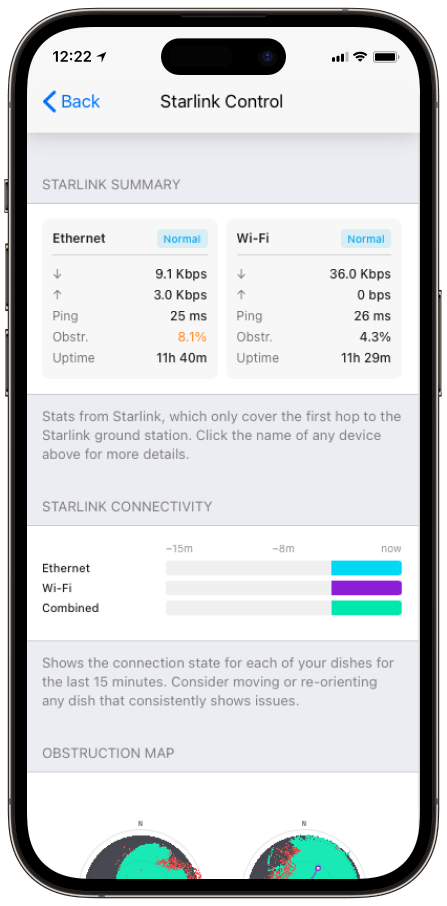
Monitor your Starlink dish performance inside Speedify.
Starlink Internet Connection Drops Happen to Everyone
Speedify measures thousands of Starlink users in more than 140 countries. In September 2026, fixed Starlink dishes went offline for about 38 minutes a day on average, and Starlink dishes on RVs and boats for about 46 minutes a day.
All Starlink dishes also see short dropouts roughly every 15 seconds as the Starlink internet connection switches from one moving satellite to the next. Even a perfectly installed Starlink dish goes offline, and about 7 in 10 Starlink users on Speedify use Starlink together with a second internet connection, like 4G/5G cellular.
How to Run a Starlink Speed Test
- Use the Starlink app’s speed test. The Starlink app, on the App Store and Google Play, has a built-in speed test that measures download speed, upload speed and ping.
- Check it on a speed test website. Any speed test website gives you a second reading. Test from a computer plugged into the Starlink router with an Ethernet cable, so a weak Wi-Fi signal doesn’t lower the result.
- Test at different times of day. Starlink speeds drop in the evening in busy areas, when more people use the Starlink network at once, so one test isn’t the whole picture.
How to Read Your Starlink Speed Test Results
- Download speed is how fast things come to you: streaming, web pages, downloads.
- Upload speed is how fast things leave you: video calls, live streams, cloud backups. It’s the tighter limit on Starlink.
- Ping is the delay, in milliseconds, before the internet answers. Lower is better for games and video calls.
Your result also depends on your plan. Here are the speeds Starlink lists for each plan:
| Starlink Plan | Download Speed | Upload Speed |
|---|---|---|
| Residential Lite | 80 to 200 Mbps | 15 to 35 Mbps |
| Residential 100 Mbps | 80 to 100 Mbps | 15 to 35 Mbps |
| Roam | 65 to 260 Mbps | 15 to 35 Mbps |
| Local Priority and Global Priority | 135 to 310 Mbps | 20 to 44 Mbps |
When the Starlink network is busy, Priority plans are served first and Residential Lite is always slowed first, so evening results on Residential Lite drop the most. If your results are far below your plan’s numbers at every time of day, see 11 fixes for slow Starlink.
How to Monitor Your Starlink Speed Over Time
The Starlink app’s Statistics page charts your download and upload speed, so you can spot patterns: a slowdown every evening, or a dip every time the wind moves a branch into view. Advanced users run their own tools that read the Starlink dish’s data and chart it. Speedify’s Starlink Control Center shows live speed, ping and obstruction for each Starlink dish, and for every Starlink dish at once if you use more than one.
How Speedify Gets You Faster Starlink Upload and Download Speeds
Once you know the most one Starlink dish can do, the way past it is a second internet connection. Speedify sends your traffic over two internet connections at the same time. Use your Starlink with 4G/5G cellular, or use two Starlink dishes, and Speedify gives you the upload and download speed of both combined, instead of stopping at what one Starlink dish can do. That matters most for uploads, a single Starlink dish’s weakest number. If one internet connection drops, Speedify switches your traffic to the other automatically, so the upload keeps going. With Starlink alone, Speedify can’t add speed: it needs that second internet connection. Businesses sharing data across several Starlink dishes can read more in Starlink data pooling for business.
Who Needs More Speed Than One Starlink Dish Gives
Rural families. A family whose speeds sag in the evening uses Starlink and 4G/5G cellular together with Speedify, for steadier speeds when everyone’s online.
Video creators. A creator who checks upload speed before publishing uses two Starlink dishes together, so a large upload or a live stream gets the upload speed of both.
Remote offices. An office that tests one Starlink dish and finds it too slow adds a second Starlink dish or a 4G/5G cellular connection with Speedify, and gets the speed of both.
Test Your Starlink Speed, Then Make It Faster with Speedify
Run the speed test, watch the charts, and learn what your Starlink dish does on a good day and a bad one. Then get the speed one Starlink dish can’t reach by using a second internet connection with Speedify.
Speedify
Get started with Speedify today.
Combine Wi-Fi, 4G/5G cellular, Ethernet, Starlink, and more into one faster, steadier connection. Free to try — no credit card required.
🚀 Speed
Faster uploads and downloads by bonding all your connections at once.
📶 Stability
Automatic failover in under a second when any connection drops.
🔒 Security
AES-256 encryption on every connection, on every network you join.



15M+ downloads worldwide. 75K+ five-star reviews on iOS and Android.