
Speedify Uses Several Starlink Dishes at Once for More Speed, So One Starlink Dish Going Down Doesn’t Take You Offline
Starlink data pooling lets a business share one data allowance across several Starlink dishes on the same Starlink account, instead of each dish having its own. A busy site can use data a quiet site isn’t using, and you manage one pool and one bill.
Data pooling doesn’t make those Starlink dishes work together for more speed, or move your traffic when one dish drops. Speedify does that part: it uses all your Starlink dishes at the same time, for nearly their full speed combined, and switches your traffic to the others automatically when one drops. Below: how data pooling works, what Speedify adds, and which setup fits your sites.
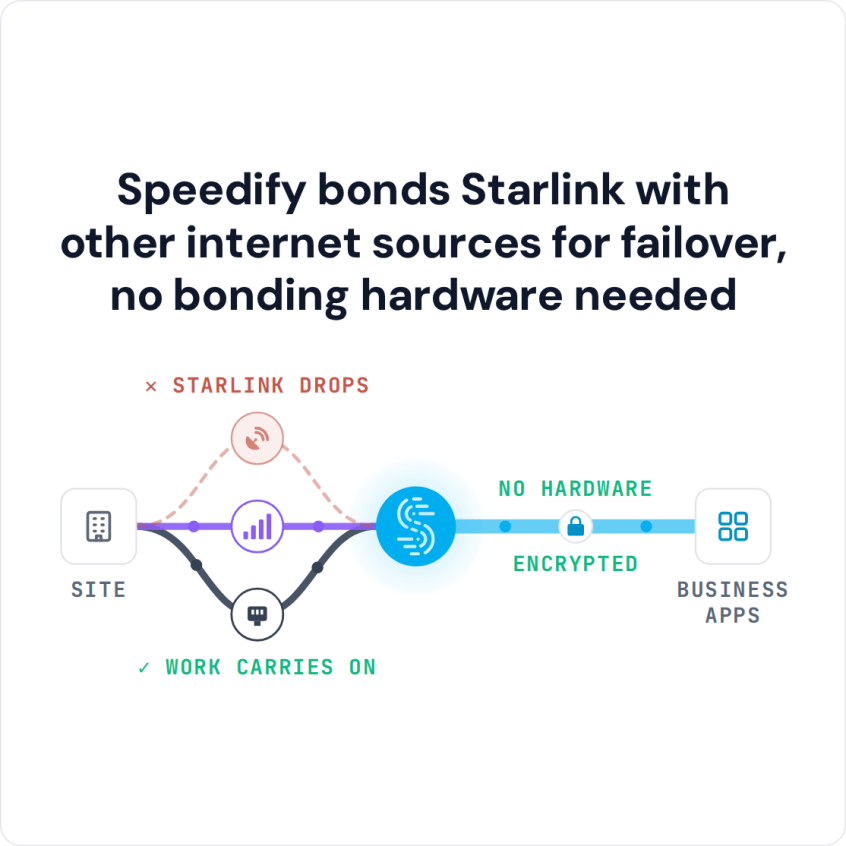
Speedify bonds Starlink with other internet sources for failover, no bonding hardware needed
Watch now
How Speedify's channel bonding technology works on any hardware
Get started with Speedify for your business
Speedify offers three commercial paths. They're not exclusive — most enterprise customers combine two or more.
01
Speedify Teams
Speedify on every supported OS for every team member
Centralized dashboard for billing, user provisioning, and usage analytics
CSV import/export and a RESTful management API
02
Speedify for Routers
License for supported OpenWrt routers
Powered by Speedify hardware lineup ready to deploy out of the box
Miri, GL.iNET, and other partner models
Whole-LAN bonding without per-device install
03
Embed Speedify into your product
A · DIY
Build it yourself with the Speedify SDK.
Integrate Speedify into your iOS, Android, Windows, macOS, Linux, or QNX product. Full developer documentation, sample code, and supported integration paths. You own the build, we provide the bonding stack.
B · CUSTOM ENGINEERING
Have us build it for you.
What Starlink Data Pooling Is and What It Does for a Business
Data pooling is a setting on your Starlink business account. It lets every Starlink dish registered to that account draw from one shared data allowance. Which plans offer it can vary by country, so check your Starlink account.
If your business runs Starlink dishes at several sites, or several dishes at one site, data pooling means:
- A busy Starlink dish doesn’t run out of data while another dish sits on unused data.
- One bill and one data allowance to manage for every Starlink dish on the account.
- Data goes where it’s needed, without a limit per dish holding one site back.
Data pooling only changes how your data allowance is shared. On its own, it doesn’t make several Starlink dishes work together for more speed, or switch your traffic when one drops. That’s what Speedify adds.
How Speedify Makes Several Starlink Dishes Work Together
Without Speedify, several Starlink dishes at the same site work separately. A typical router uses one Starlink dish at a time, or puts each app on one dish. If that dish weakens or fails, your network either moves to the second dish (if you’ve set that up) or goes offline. Your upload and download speed is whatever one Starlink dish can give you.
Speedify’s technology for combining internet connections changes that. Speedify uses every Starlink dish at the same time and spreads your network’s traffic across all of them:
- Combined speed. For example, two Starlink dishes giving 200 Mbps download each get you nearly the full 400 Mbps combined across your network with Speedify.
- Automatic switching when a Starlink dish drops. When one Starlink dish drops, because something blocks its view or it has a hardware fault, Speedify moves your traffic to the other dishes automatically. Satellite switches and storms hit every Starlink dish at a site at once, so add 4G/5G cellular to cover those. Internet phone calls, video meetings and company VPN connections keep going.
- Traffic goes to the Starlink dish working best. Speedify keeps checking each Starlink dish for speed, delay and lost data, and sends more traffic over the one doing best at that moment, so one slow Starlink dish slows your network down less.
Speedify’s Starlink Control Center also shows every Starlink dish’s live status, speed, ping, obstructions, uptime and alerts in one place. See how to manage two Starlink dishes at once with Speedify.
Four Business Setups for Starlink Dishes and Speedify
- Several Starlink dishes at one site, used together with Speedify. The direct fix when one Starlink dish isn’t enough. Connect every Starlink dish to a router that runs Speedify and has several internet ports. Speedify uses all the Starlink dishes and switches traffic between them when one drops. This fits remote sites, large properties and busy operations where 4G/5G cellular is missing or unreliable.
- Data pooling across several sites, with Speedify at each site. If each of your remote locations runs its own Starlink dish on a shared data pool, Speedify runs separately at each site and uses the local Starlink dish together with any 4G/5G cellular there. The shared pool cuts account paperwork, and Speedify keeps each site online.
- Starlink dishes plus 4G/5G cellular, with Speedify. Where there’s cellular coverage, the steadiest setup uses Starlink with cellular from more than one carrier. A Starlink outage doesn’t affect cellular networks, and the reverse is true too. Speedify uses both at the same time for the most speed and the most protection from drops.
- Starlink Maritime plus an older ship satellite system, with Speedify. Offshore platforms and ships that run both Starlink Maritime and an older satellite system (VSAT) can use both at once with Speedify, which sends traffic to whichever is working better at the moment.
How to Run Speedify with Several Starlink Dishes
On a router (covers the whole network)
- Connect every Starlink dish to a router that runs Speedify on OpenWrt, each on its own internet port.
- Install Speedify on the router and activate your Router License.
- In Speedify, set every Starlink internet connection to Primary. Speedify uses all the Starlink dishes at the same time and handles the switching on its own.
- Every device on the network gets the combined Starlink speed, with nothing to install on each one.
With Speedify Teams (manage each device)
- Create a Speedify Teams account and install the Speedify app on the devices that need it.
- In the Teams dashboard, set connection priorities, set data limits for each type of internet connection, check usage for each device, and manage everything from one place.
Businesses That Benefit from Starlink Data Pooling with Speedify
- Remote and spread-out operations. Businesses with several field sites, each with a Starlink dish on a shared pool, manage data from one account while Speedify keeps each site online.
- Construction and infrastructure projects. Large sites can put Starlink dishes in different areas. Speedify uses them together on the site network for more speed and automatic switching.
- Farms. Farms on large rural properties can place Starlink dishes at different spots. Speedify uses them together where they meet on the network, and data pooling puts them on one bill.
- Ships and offshore platforms. Vessels running Starlink Maritime alongside an older satellite system or a second Starlink dish use Speedify to combine them and send traffic where it moves best.
- Managed service providers. IT companies that set up Starlink at client sites use Speedify Teams to set connection priorities and check each site’s internet connections from one dashboard.
Speedify Is Used on Millions of Devices Worldwide
Speedify has made internet connections faster and more reliable for businesses and individuals since 2014.
15M+
Speedify downloads worldwide75K+
5-star reviews for Speedify on iOS and Android82
Speedify server points of presence in 50+ cities on 6 continents500TB+
Of internet traffic carried by Speedify every weekSpeedify Partners
Speedify works with these companies to bring faster, more reliable internet and networking technology to their customers and employees.


Speedify Plans for Several Starlink Dishes
Speedify Teams gives your IT team one view of every device and site. Set priorities for each internet connection, set data limits by connection type to stay within your Starlink data pool, and check speed and uptime across all of it. Speedify Teams costs $89.99 per user per year, with a 5-user minimum.
If you need a fixed IP address for remote access, or so business software can recognize your sites, Speedify Dedicated Servers give you a managed private server that nobody else shares. If your data has to stay on your own equipment, Speedify Self-Hosted Servers give you full control over where the server is and how it’s set up.
Speedify Business Solutions
Speedify Teams
Speedify for Routers

Speedify Embedded Solutions and Integrations
Embed Speedify software into your app or hardware products and leverage the core channel bonding technology of Speedify in new and interesting ways.