
The Best Internet Setup for Full-Time RV Living
A typical RV Wi-Fi installation has a Starlink dish on the roof, a cellular router that uses SIM cards from two carriers at once, and one Wi-Fi network inside for every device in the RV. That’s the best RV internet setup for full-time RV living, because coverage changes from campsite to campsite: cellular thins out in the mountains, campground Wi-Fi gets overloaded, and Starlink needs open sky. It also matters for families doing remote learning from an RV.
Speedify is an app that uses every internet connection at your site at the same time: Wi-Fi, cellular and Starlink. While all of them work, you get faster downloads and uploads, and when one gets weak or drops, Speedify moves your traffic to the others automatically, so you stay online. With only one internet connection at a site, Speedify works as an encrypted VPN and cannot stop it from dropping.
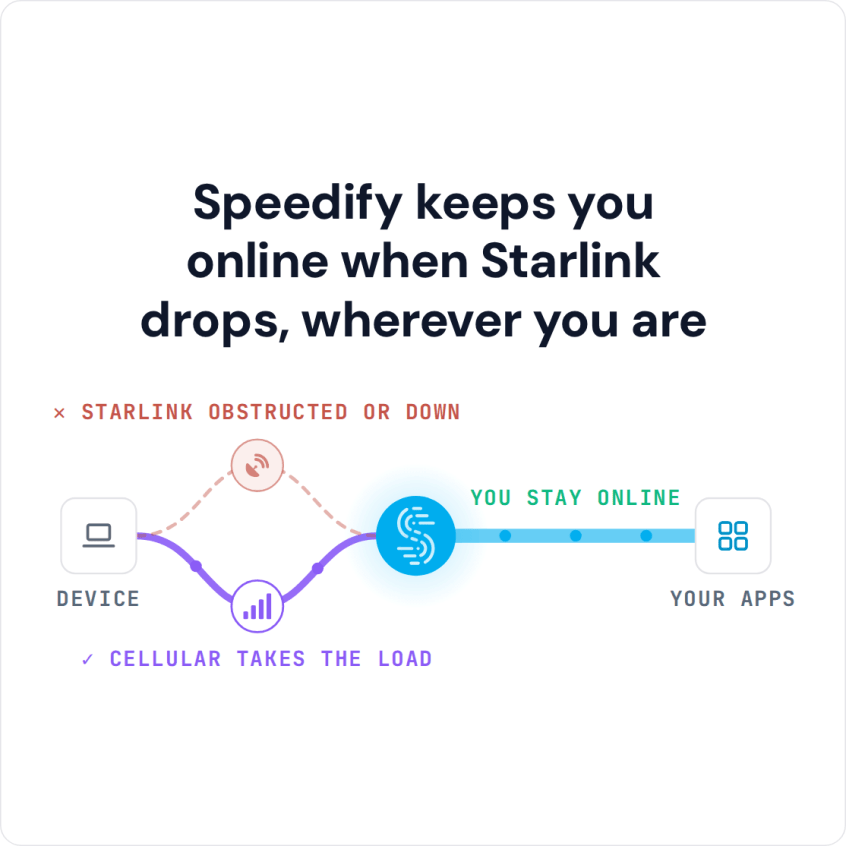
Speedify keeps you online when Starlink drops, wherever you are
Watch now
How Speedify combines internet connections on any hardware
Get started with Speedify for your business
Speedify offers three commercial paths. They work together, and most enterprise customers use two or more.
01
Speedify Teams
Speedify on every supported OS for every team member
Centralized dashboard for billing, user provisioning, and usage analytics
CSV import/export and a RESTful management API
02
Speedify for Routers
License for supported OpenWrt routers
Powered by Speedify hardware lineup ready to deploy out of the box
Miri, GL.iNet and other partner models
Covers every device on the network, with no per-device install
03
Embed Speedify into your product
A · DIY
Build it yourself with the Speedify SDK.
Integrate Speedify into your iOS, Android, Windows, macOS, Linux or QNX product. Full developer documentation, sample code and supported integration paths. Your team owns the build, and the Speedify SDK handles combining the internet connections.
B · CUSTOM ENGINEERING
Have the Speedify team build it for you.
Why RV Internet Drops: Coverage Gaps and Relying on One Internet Connection
Every internet connection an RVer relies on has a weak spot. Campground Wi-Fi gets overloaded once fifty RVs stream video at once. Cell towers thin out in mountain passes and on public land. Starlink needs a clear view of the sky, and tree cover or a canyon wall can block it for hours. Living on the road full time, you hit all three again and again, and an RV with only one internet connection has nothing to fall back on.
RV Internet Options: When to Use Starlink, 4G/5G Cellular or Campground Wi-Fi
Starlink covers remote boondocking sites (camping off-grid, away from campgrounds) where nothing else reaches, but it draws more power than a cellular router and needs open sky. Starlink Residential plans are for one fixed address, so full-time RVers use a Roam plan, which works on the move. Cellular carriers cover towns, highways and most campgrounds, and plans on two carriers cover the dead zones that hit one network but not the other. Campground Wi-Fi is free when it’s there, but shared, slow and different at every park.
A Powered by Speedify router (a router with Speedify built in) lets your RV use all three as one internet connection instead of switching between them by hand, the same way as turning a travel router into an internet gateway that combines internet connections, just in an RV that moves every few days.
How to Get More Speed from Campground Wi-Fi, 4G/5G Cellular and Starlink
Campground Wi-Fi: park as close to the park’s access point as the site allows, and pick the 5 GHz network if the park offers one, since it is faster and less crowded than 2.4 GHz. If several networks are in range, try another one: fewer guests on it usually means more speed. A Wi-Fi repeater (extender) mounted in or on the RV can pick up a weak park signal and rebroadcast it inside.
4G/5G cellular: check each carrier’s coverage map for the route before you leave. A mobile hotspot or cellular router that supports as many of the carrier’s frequency bands as possible, and has ports for an external antenna, holds a signal longer in fringe areas. In RV Mobile Internet’s testing, a roof-mounted MIMO antenna beat an amplified signal booster about 70 to 80% of the time; a booster is worth it mainly when upload speed matters, for live streaming or video calls.
Starlink: run the obstruction check in the Starlink app at every new site, not only when you first mount the dish, and clear snow, leaves or debris off it. Heavy rain can still slow Starlink down until it passes.
How Speedify Uses Starlink, Cellular and Campground Wi-Fi Together in Your RV
Speedify uses Starlink, cellular and campground Wi-Fi together, so your RV gets nearly their full combined speed, more than any single internet connection gives you. When campground Wi-Fi gets flooded by other guests streaming in the evening, Speedify sends more traffic over Starlink or cellular automatically, and the other way around when trees block your Starlink dish. When one internet connection drops completely, Speedify switches your traffic to the others, so a video call or a work VPN keeps going. The same setup works for van life internet.
Speedify uses as many internet connections as your RV has, commonly two cellular carriers plus Starlink and campground Wi-Fi at the same time. A router running Speedify can use two cellular modems (one SIM card from each carrier) and a Starlink dish together. Check the router’s specs before you buy: many routers with two SIM slots have only one modem and use one SIM card at a time.
Campground Wi-Fi is shared with every other guest in the park. Speedify encrypts your traffic across every internet connection it uses, so other people on the park network cannot read it, and Speedify keeps no record of the sites you visit.
How to Install RV Wi-Fi with Speedify on a Laptop or Travel Router
Running Speedify directly on a laptop or phone works if you travel alone and don’t need to share the internet with other devices. It needs no extra hardware. A travel router running Speedify is better for a family or an RV full of devices, because every device on board shares the combined internet connection without installing Speedify on each one. You can start with a basic router and upgrade later.
- List every internet connection you usually have at a site: Starlink, your main carrier, a second carrier and campground Wi-Fi.
- Mount the Starlink dish where it has a clear view of the sky (the Starlink app can check for obstructions), and put the router near the middle of the RV so its Wi-Fi reaches every device.
- Decide what runs Speedify: one laptop, or a travel router for the whole RV.
- Download Speedify and connect each internet connection.
- In the Speedify app, set any cellular plan with limited data to Backup, so Speedify uses it only when the others drop and doesn’t use it up without warning.
Two ways to share Speedify without a dedicated router: a Windows laptop running Speedify can share its combined internet connection over Wi-Fi with every other device in the RV, and a Raspberry Pi running Speedify for Linux can share it over Ethernet or Wi-Fi, which turns the Pi into an RV Wi-Fi router. Speedify on Linux needs a paid plan.
Sample RV Internet Setups by Budget
A budget setup pairs one carrier’s unlimited hotspot plan with campground Wi-Fi, with Speedify on a laptop. A mid-range setup adds a second carrier and a basic travel router, so every device in the RV shares the combined internet connection.
A full boondocking setup adds Starlink to two carriers. That’s where Speedify helps most, since tree cover and distance from the towers rarely hit Starlink and both carriers at once. Speedify still needs at least two working internet connections at a site: it can’t create a signal in a canyon with no cellular coverage and no view of the sky.
Speedify Is Used on Millions of Devices Worldwide
Speedify has made internet connections faster and more reliable for businesses and individuals since 2014.
15M+
Speedify downloads worldwide75K+
5-star reviews for Speedify on iOS and Android82
Speedify server points of presence in 50+ cities on 6 continents500TB+
Of internet traffic carried by Speedify every weekSpeedify Partners
Speedify works with these companies to bring faster, more reliable internet and networking technology to their customers and employees.


For RV rental companies and crews working on the road: Speedify can combine Starlink and cellular in every vehicle you run. Contact Us to plan the setup.
For full-time RVers: Download Speedify to use Starlink, cellular and campground Wi-Fi together in your RV.
Speedify Business Solutions
Speedify Teams
Speedify for Routers

Speedify Embedded Solutions and Integrations
Add Speedify to your own app or hardware with the Speedify SDK. Your product then combines internet connections, fails over automatically when one drops, and encrypts the traffic, using the same technology as the Speedify app.