
Internet Access when Traveling: How to Get Online on the Go
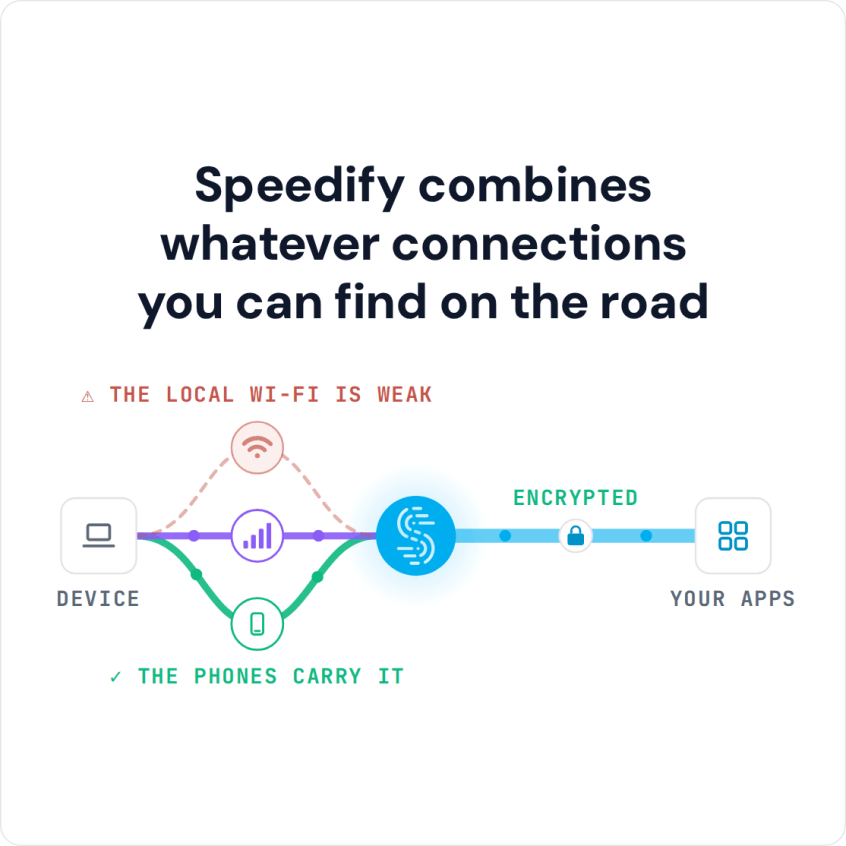
The most reliable way to get high-speed internet while traveling, on a train, a bus or in a hotel, is to use more than one connection at once: the public Wi-Fi plus your phone’s 4G/5G cellular. Speedify is an app that combines Wi-Fi, 4G/5G cellular, Ethernet, Starlink and satellite internet connections into one faster connection, so a bad hotspot or a coverage gap no longer knocks you offline. Traveling with others? You can also combine the 4G/5G cellular connections of two smartphones.
If one connection drops, Speedify keeps you online on the other. Speedify runs on Windows, macOS, Android, iOS, and Linux.
Speedify combines whatever connections you can find on the road
How to Combine Public Wi-Fi and 4G/5G Cellular While Traveling
- Download Speedify on the phone or laptop you travel with (Windows, macOS, iOS or Android).
- Open Speedify and create a free account (the free tier includes 5 GB per month), or sign in.
- Join the train, bus, hotel or airport Wi-Fi and keep 4G/5G cellular on. On a laptop, tether your phone by USB to add its 4G/5G cellular (iPhone on Mac or Windows, Android on Windows).
- Connect. Speedify uses both connections at once and moves your traffic to the working one if one drops.
- To protect your data plan, set the cellular connection’s priority to Secondary or Backup in Speedify so it carries less of your everyday traffic.
How do I use WiFi and 4G/5G cellular at the same time with Speedify?

Pick your two internet connections and your device below and we'll take you to the step-by-step setup guide.


Best Way to Get Internet While Traveling: Use Two Connections at Once
While traveling, don’t rely on a single Internet connection, for two reasons:
- you will run into bad Wi-Fi hotspots on public Wi-Fi, on trains, in hotels and at airports.
- some areas have no cellular coverage, at least not from your carrier.
If you combine 2 connections, you are far less likely to go offline while traveling, because both would have to fail at the same time.
Speedify works like a VPN, and its own technology lets it combine multiple Internet connections at once. On a single connection, Speedify works as an encrypted VPN and keeps minimizing packet loss as you move around, but it cannot stop that connection from dropping; the big speed gains need a second connection.
Why Internet on a Train or Bus Is Slow and Unstable
When you’re traveling by train or bus, it can be hard to get any work done or stream video, because the Wi-Fi onboard is usually slow and unstable, and your own 4G/5G cellular signal fades in and out along the route.
Compared to wired connections, wireless connections are far more prone to sporadic and temporary connectivity issues.
This is what happens when you see the Internet is slow: packets of transmitted data are lost or received out of order. The connection tries to re-synchronize, thus slowing down the whole process.
How Speedify Gets More Bandwidth from Lossy Connections While Traveling
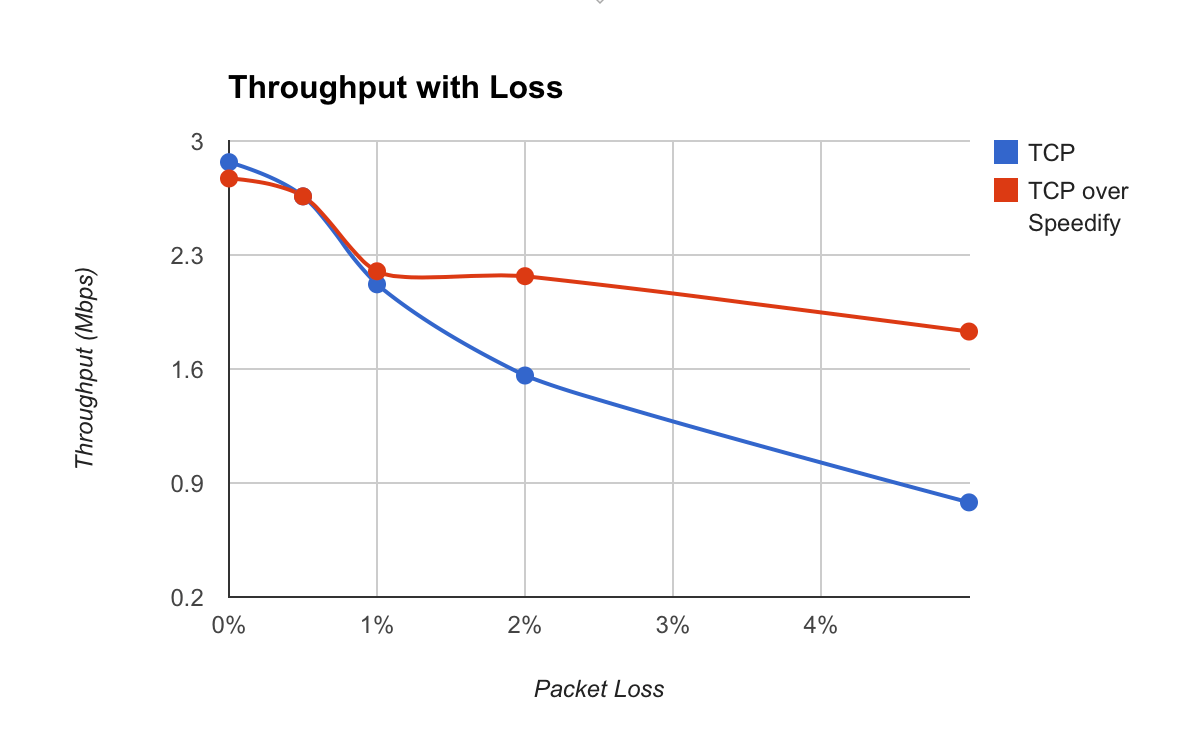
On unreliable public networks, Speedify detects when a packet has been lost and resends it quickly, before it turns into a slowdown. In Speedify’s own tests below, that recovery let a single lossy connection deliver up to twice the bandwidth it managed without Speedify; Speedify cannot push a connection past what its signal allows, which is why a second connection matters:
Combine Wi-Fi and 4G/5G Cellular While Traveling Without Going Over Your Data Plan
On your phone you always have 2 connections available: Wi-Fi and 4G/5G cellular. On a laptop, tether your phone to add its 4G/5G cellular connection. Speedify combines the 2 connections, and you can set data limits and connection priorities in the app, so you can stay within your plan’s data allowance and avoid extra fees from your mobile provider.
Here’s how Speedify improves your available bandwidth when you’re using 2 Internet connections, as explained above:
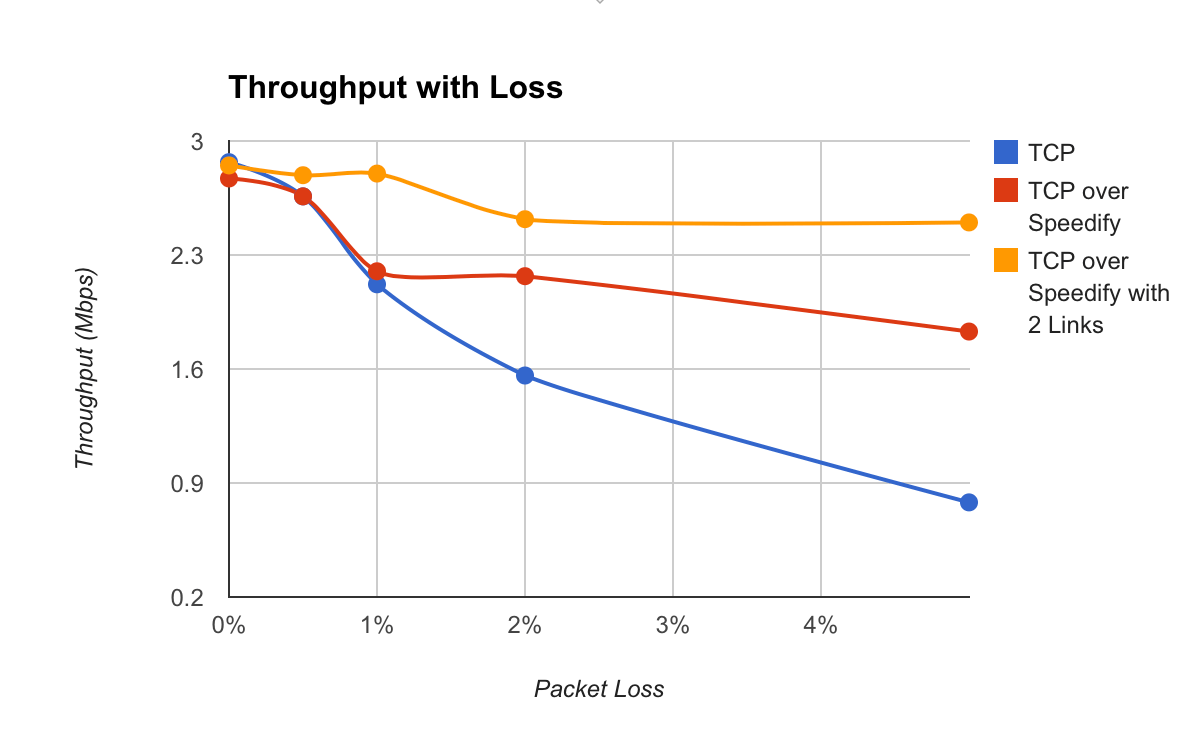
In the test, with 2 active Internet connections, Speedify delivered more than 3 times the bandwidth of a single connection without Speedify.
Failover Keeps You Online While Traveling When One Connection Drops
With 2 or more connections, even if one of them drops completely, you stay online. Speedify monitors the quality of each connection and, as one degrades, starts to shift the transmission to the other working connection, so calls and streams keep going.
Once the dropped connection is available, Speedify will start using it again.
How to Get a Secure Internet Connection When Traveling
Connecting to public Wi-Fi hotspots can be dangerous, as many cyber attackers lurk around just to get your private data. Using a VPN will protect you, but most of them will also slow down the Internet.
Speedify’s fast encryption runs across all your internet connections at once, so you get less of the slowdown a single-connection VPN often causes and do not have to trade speed for security.
Speedify also keeps no record of the sites you visit and does not sell your personal data, unlike some other VPNs (or even your own ISP).
The best way to get high-speed internet while traveling is to combine 2 connections with Speedify. Start with a free account, which includes 5 GB per month.
Speedify
Get started with Speedify today.
Speedify combines Wi-Fi, 4G/5G cellular, Ethernet, Starlink and satellite into one faster, more reliable internet connection. Free to try: 5 GB a month with a free account. No credit card required.
🚀 Speed
Faster uploads and downloads, because Speedify uses all your internet connections at once.
📶 Stability
If one internet connection drops, Speedify moves your traffic to the others in milliseconds.
🔒 Security
AES-256 encryption on every internet connection, on any network you join.



15M+ downloads worldwide. 75K+ five-star reviews on iOS and Android.