
Unbreakable VPN Connection for Live Broadcast Journalism by Combining Starlink, Wi-Fi, 4G, 5G, and DSL with Speedify
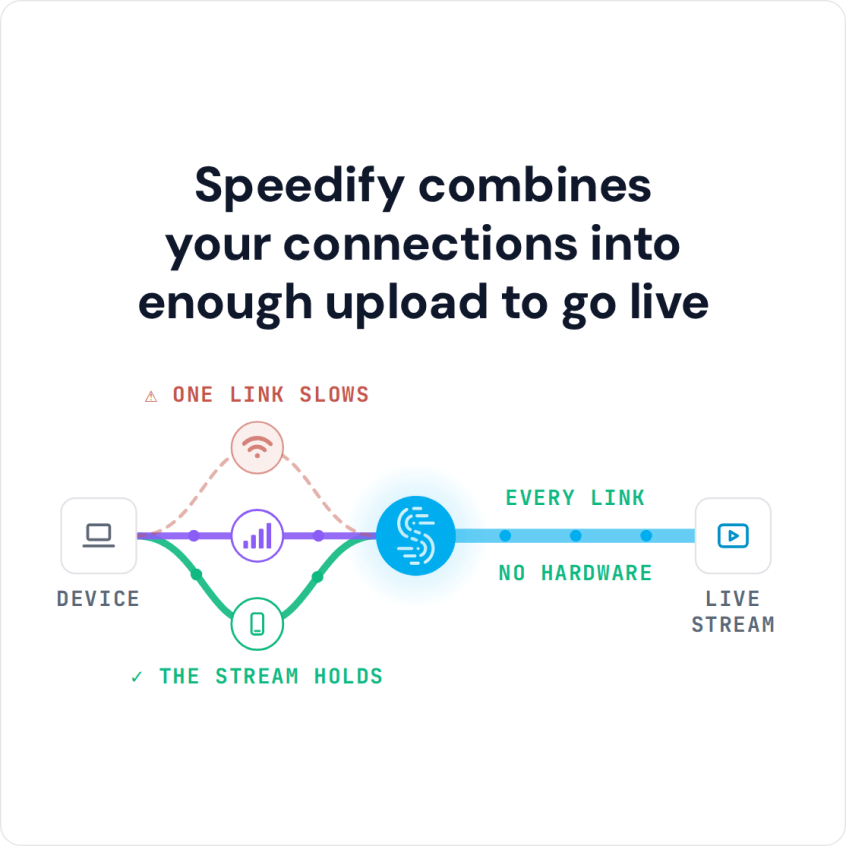
Live broadcast journalism from the field needs an upload that stays steady and a connection that is encrypted. Speedify is an app that combines Wi-Fi, 4G/5G cellular, Ethernet, Starlink and satellite internet connections into one faster, steadier connection for your upload, keeps the broadcast running if any single connection drops, and encrypts your traffic like a VPN. Failover needs two or more connections, such as Wi-Fi and a phone’s 4G/5G cellular; on a single connection, Speedify still encrypts the stream but cannot stop that connection from dropping.
Here is what it takes to report live from anywhere with faster uploads and reliable internet.
Speedify combines your connections into enough upload to go live
How do I use WiFi and 4G/5G cellular at the same time with Speedify?

Pick your two internet connections and your device below and we'll take you to the step-by-step setup guide.


Requirements for Live Broadcast Journalism
Live broadcast journalism needs little equipment. You can use a dedicated broadcasting app or go live on YouTube or Facebook Live. Facebook Live is easy to start and reaches a wide audience, since so many people already use Facebook.
All you need is a Facebook account (which you probably have already) and a stable internet connection. You might be getting speeds close to 1 Gbps at home, but if you’re planning to live broadcast something outside your home, you’ll have to depend on public Wi-Fi or a 4G/5G cellular connection.
Public Wi-Fi at an event is shared by everyone nearby, so its performance drops. Large venues usually have several Wi-Fi routers placed in different locations.
Those routers get swamped as people connect to them. Combining several connections, for example the venue Wi-Fi and your phone’s 4G/5G cellular, gives the stream more bandwidth than any one of them alone.
To combine these connections you need an app that does link aggregation, which merges the bandwidth of several connections into one.
Staying Safe while Broadcasting Live with a VPN
Streaming a theater performance is one thing. Reporting a crime is different. If you report on police brutality or another incident that could put you at risk, you may want to protect your identity.
If you use Facebook Live, viewers see the name on your account, and Facebook’s rules require the name you use in everyday life. For sensitive reporting, consider streaming from your news outlet’s page or another account that does not tie the stream to your personal profile.
Another thing you’ll need is a VPN. Whatever account you stream from, your IP address can still point back to you.
A VPN routes your traffic through its own server, so the streaming platform sees the server’s IP address instead of yours, which makes a live report harder to trace back to you.
Speedify Combines Link Aggregation and VPN Encryption for Live Broadcast Journalism
Speedify does both jobs in one app: it encrypts your connection like a VPN and combines your internet connections for faster, steadier uploads.
Speedify runs on Windows, macOS, iOS, Android and Linux, so you can use it on a laptop, smartphone or tablet. Speedify combines 2 or more connections for faster uploads, and it also works with a single connection, making it more stable.
On a slow connection, a Facebook Live stream turns pixelated and stalls for viewers. With Speedify running, you do not have to manage anything: the app automatically combines all active connections on your device.
Paid Speedify plans include servers in over 50 locations, and you can pick a server country in the app. When you go live on YouTube or Facebook Live through Speedify, your upload uses all your connections and the platform sees the Speedify server’s IP address instead of yours.
Speedify keeps no record of the sites you visit and does not sell personal data. Speedify does record connection metadata (your IP address, device ID, connection times and data used), so treat it as protection from the platform and the local network, not as full anonymity.
To go live from a phone, install Speedify for iPhone from the App Store or Speedify for Android from Google Play, then start your broadcast as usual.
Speedify
Get started with Speedify today.
Speedify combines Wi-Fi, 4G/5G cellular, Ethernet, Starlink and satellite into one faster, more reliable internet connection. Free to try: 5 GB a month with a free account. No credit card required.
🚀 Speed
Faster uploads and downloads, because Speedify uses all your internet connections at once.
📶 Stability
If one internet connection drops, Speedify moves your traffic to the others in milliseconds.
🔒 Security
AES-256 encryption on every internet connection, on any network you join.



15M+ downloads worldwide. 75K+ five-star reviews on iOS and Android.