
Best Internet While Traveling: Forget About Service Plan Add-Ons or Mobile Hotspots
Speedify gives you faster, more reliable internet while traveling by using more than one connection at the same time – a train or hotel Wi-Fi plus a phone’s 4G/5G. Speedify is an app that combines two or more internet connections at once into one faster connection, so working and streaming on the move stay smooth.
If one connection drops, Speedify keeps you online on the other with no interruption. Speedify runs on Windows, macOS, Android, iOS, and Linux.
Speedify combines whatever connections you can find on the road
How do I use WiFi and 4G/5G cellular at the same time with Speedify?

Pick your two internet connections and your device below and we'll take you to the step-by-step setup guide.


Speedify – Your Secure, Fast and Reliable Travel Companion App for Best Internet while Traveling
Speedify is a unique software app available for iPhone, Android, Mac and PC, which was built specifically with this goal in mind: to harness and optimize all the Internet connections you have available, resulting in faster, more reliable, and secure Internet.
Speedify is a VPN built for mobility that uses patent-pending channel bonding technology to use multiple Internet connections at once and correct the Internet transmission errors you normally get when moving around.
Explained: How Speedify Helps Deliver the Best Internet While Traveling
When you’re traveling by train or bus it can be hard to get any work done, or even just relax on social media with a flaky, slow, or unreliable Wi-Fi connection.
Compared to wired connections (which are unavailable while traveling), wireless connections are far more prone to sporadic and temporary connectivity issues.
This is what happens when you see the Internet is slow: packets of transmitted data is lost or received out of order and the connection tries to resync, thus slowing down the whole process.
Speedify Improves Internet Bandwidth on the Train, Bus or RV
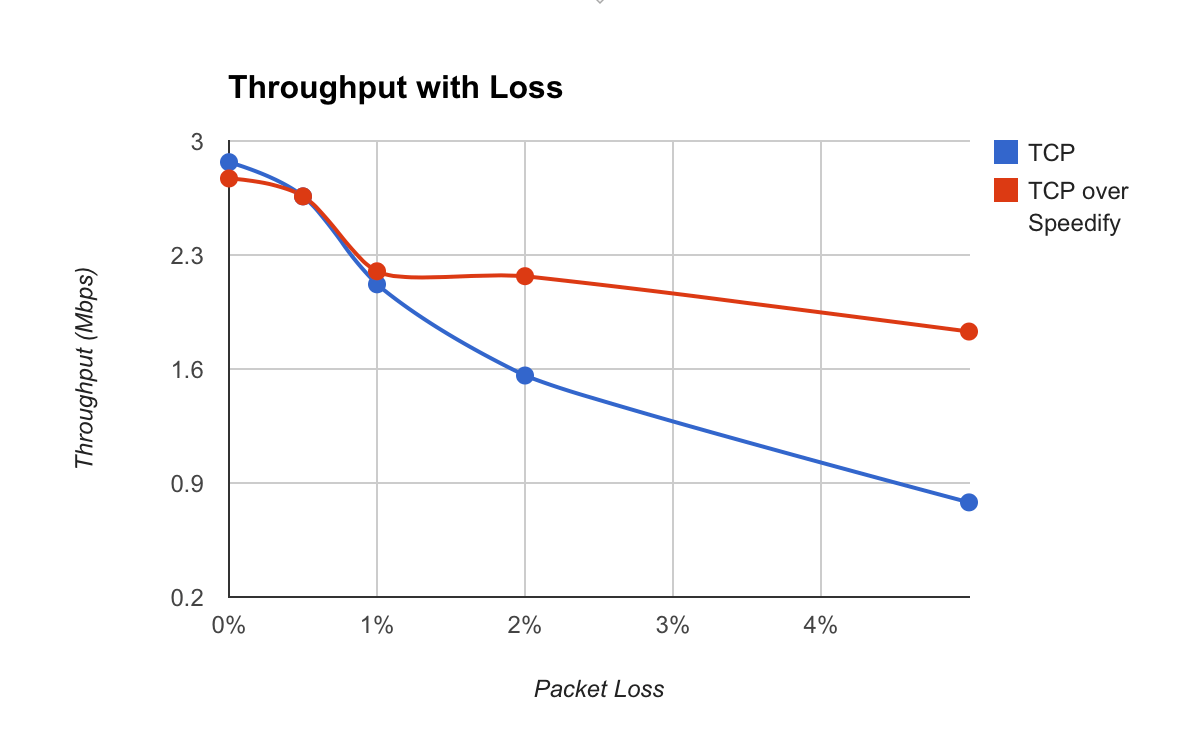
This is where Speedify steps up: on “lossy” and unreliable public networks, it instantly detects when a packet has been lost and resends it before any slowdowns occur. So, even if you’re using a single connection with Speedify, it will improve the whole experience, delivering up to twice the bandwidth than when not using Speedify, as you can see from our tests below:
Can I combine Wi-Fi and Mobile Data to get the best Internet while traveling? With Speedify, now you can!
The great thing about Speedify is that it can combine multiple Internet connections to give you a secure, fast and reliable connection. On your phone you permanently have 2 connections available: the train or bus Wi-Fi and your mobile data connection. If you’re using your laptop, you can tether your phone so you can also benefit from the mobile data. Speedify intelligently combines the 2 connections on your phone so you won’t pay any extra fees to your mobile provider for going over your plan’s data allowance.
Here’s how Speedify improves your available bandwidth when you’re using 2 Internet connections, as explained above:
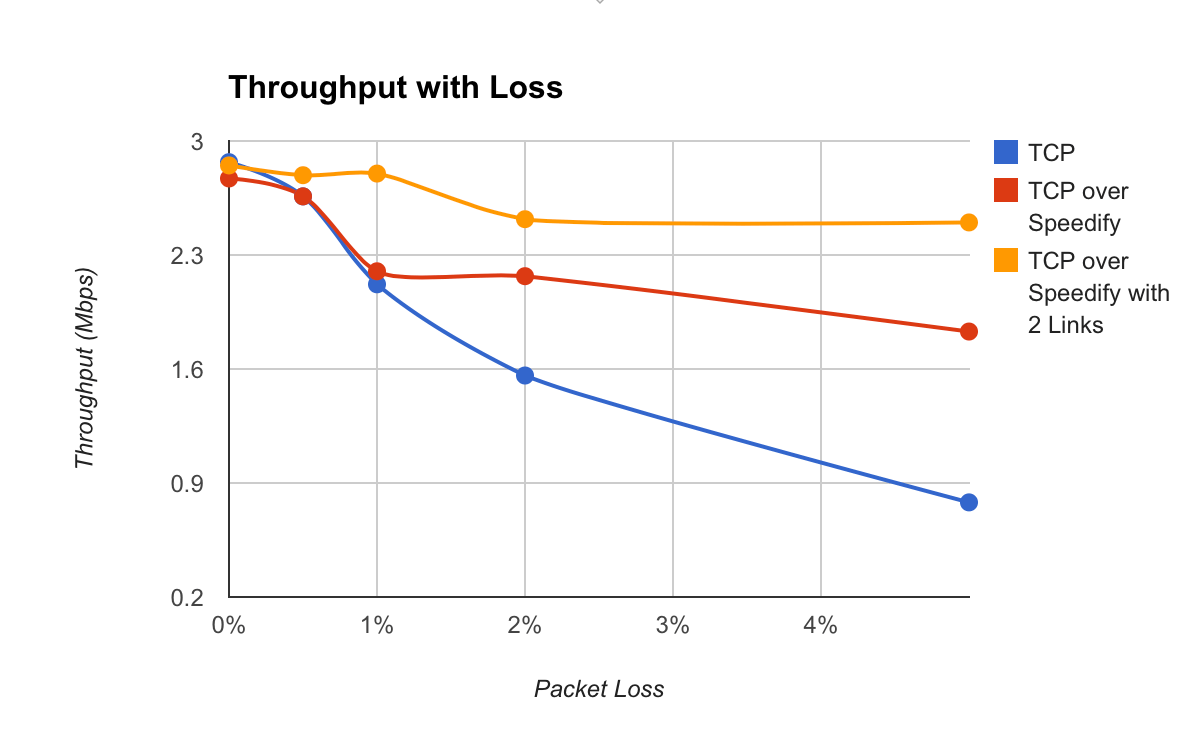
As you can see, with 2 active Internet links while traveling, Speedify delivers more than 3 times the bandwidth you can get versus not using Speedify at all. That’s very cool indeed!
Reduce Buffering, Increase Enjoyment, Get the Best Internet while Traveling
Plus – if you’re using 2 or more connections, even if one of them completely drops, you won’t get any annoying buffering screen or skip a beat on your Spotify, as Speedify intelligently monitors the quality of your connections and will know before this happens to shift the transmission to the other working connection.
Speedify Keeps You Safe Online, Doesn’t Compromise on Speed
While traveling, connecting to public Wi-Fi hotspots can be dangerous, as many cyber attackers lurk around just to get your private data. Using a VPN will protect you, but most of them will also slow down the Internet, as all data passes through their servers first before going to or from its final destination.
Speedify doesn’t slow down your online speed, as it uses a proprietary encryption algorithm that is fast and secure, to make sure you don’t compromise speed for security.
Plus – most important – Speedify doesn’t log any data regarding your online activity, as other VPNs (or even your own ISP) might do, in order to sell your browsing data to marketing agencies – ever wondered how come “the ads” know you’ve been looking at something in particular?
It’s time you take over your Internet connection and use it on your own terms. Get the best Internet while traveling. Speedify provides the speed, security and reliability for this. Get started with Speedify FREE now – no strings attached, no email sign-up necessary!
Speedify
Get started with Speedify today.
Combine Wi-Fi, 4G/5G cellular, Ethernet, Starlink, and more into one faster, steadier connection. Free to try — no credit card required.
🚀 Speed
Faster uploads and downloads by bonding all your connections at once.
📶 Stability
Automatic failover in under a second when any connection drops.
🔒 Security
AES-256 encryption on every connection, on every network you join.



15M+ downloads worldwide. 75K+ five-star reviews on iOS and Android.