
Unbreakable VPN Connection for Travel by Combining Starlink, Wi-Fi, 4G, 5G, and DSL with Speedify
Install a travel VPN before you leave home, not after you land. Some countries make VPN provider websites hard to reach, so downloading one on arrival is a gamble.
Speedify is the app to have installed: Speedify encrypts your internet traffic like any VPN, then runs on airport or hotel Wi-Fi and your phone’s 4G/5G cellular data at the same time, so uploads and downloads speed up rather than crawl.
What follows explains the content restrictions you may meet abroad and how Speedify protects you on the road – your traffic stays private on networks you do not control, and one flaky Wi-Fi network cannot knock you offline mid-call.
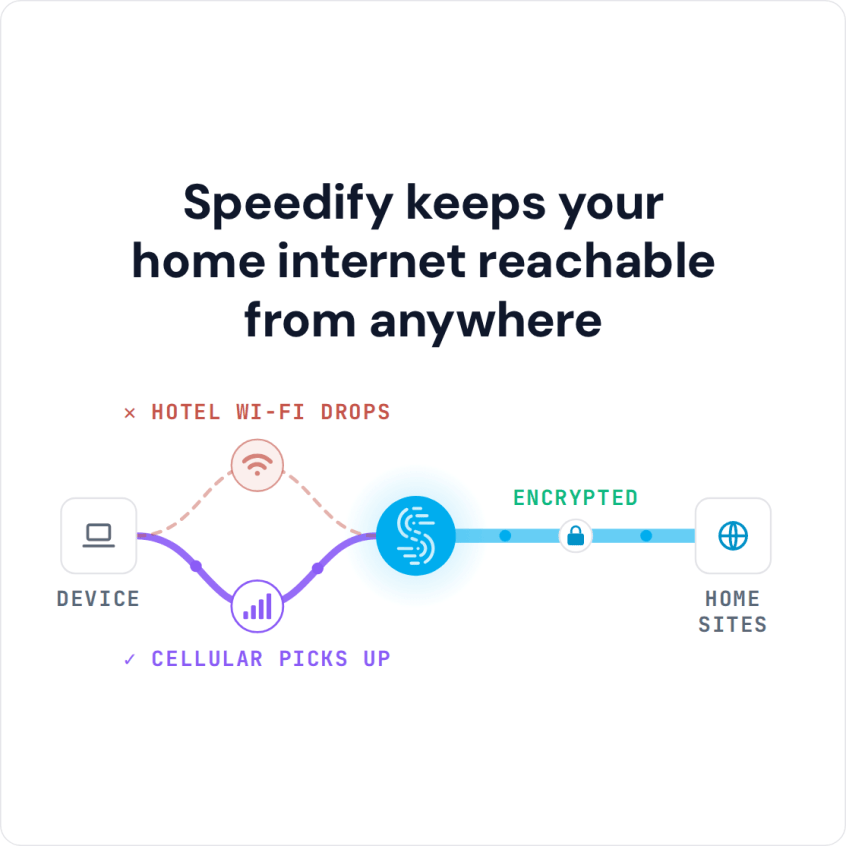
Speedify keeps your home internet reachable from anywhere
Say No to Slow, Miserable, and Downright Frustrating Internet While Traveling
Using a VPN is pretty simple. Almost all VPNs have their own apps. Just download the app for your device and start using it. Here’s how to use a VPN when traveling.
Make sure you download the VPN while you’re in your home country. This is because the destination country might have banned VPN websites. This means you might not be able to download and install a VPN there.
If you want to install the VPN on your phone, you’ll find the app in the Google Play Store or App Store. Here are the pros and cons of a phone VPN. And if you want to install it on your laptop or Macbook, you’ll find the app installation file on the VPN website.
Most VPNs are easy to use. But also, most VPNs slow down the connection. This is because they encrypt the traffic and reroute it through one of their own servers. This needs extra resources and time. Thus the speed difference.
The good thing is that there’s a VPN that doesn’t just encrypt and reroute your traffic but also actually makes your connection faster. Speedify is the solution to all your content streaming issues when you’re on the move.
How Speedify Keeps you Protected When Traveling
When you use Speedify, you can connect to any of the 50+ locations on the network. It’s easy to select your desired location. Once you connect, your traffic will become anonymous, routed through that location. This way, the ISP or the government cannot see what you’re doing. Also, the website you access cannot see your real IP.
If you’ve just arrived in your destination country, you’ll need to connect to the airport Wi-Fi. As you might already know, public Wi-Fi networks have somewhat of a bad reputation as they can be hacked.
If you connect to a public wireless network, you are exposed to the risk of being monitored by a hacker. But if you connect using Speedify, your data will be secure. Even if the network is hacked, nobody can spy on your online actions.
Speedify doesn’t just keep you secure on public Wi-Fi networks but on all networks you connect to.
How Speedify Gets You a More Stable and Fast Internet Connection when Traveling
Speedify combines two or more networks at once, to provide more stable and fast internet. Let’s say you’re at the airport and getting slow Wi-Fi internet. You can combine the cellular connection together with the WiFi, to get increased speeds.
While other VPNs just encrypt and reroute the data, Speedify also combines multiple connections to improve internet stability and speed.
How to use a VPN when traveling: stay safe, reliable and fast! Combining multiple connections securely with Speedify is super easy. Just open the app and connect to the primary network. Now add another network as the secondary connection. Speedify will automatically combine these two connections.
That’s it! Using Speedify needs just a few easy steps and you can enjoy unrestricted internet and experience fast streaming services even if the Wi-Fi at your hotel is sucky!
Don’t let travel keep you away from fast and secure internet. Download Speedify and experience faster-than-ever internet.
Speedify
Get started with Speedify today.
Combine Wi-Fi, 4G/5G cellular, Ethernet, Starlink, and more into one faster, steadier connection. Free to try — no credit card required.
🚀 Speed
Faster uploads and downloads by bonding all your connections at once.
📶 Stability
Automatic failover in under a second when any connection drops.
🔒 Security
AES-256 encryption on every connection, on every network you join.



15M+ downloads worldwide. 75K+ five-star reviews on iOS and Android.