
You Can Combine Multiple Internet Connections Together – Like Starlink, Wi-Fi, 4G, 5G, and DSL – with Speedify, to Fix Slow Buffering & Stream Lag issues on Twitch
When Twitch keeps buffering, even on good internet, the cause is usually an unsteady connection rather than a slow one. As a streamer you drop frames and the stream health warning turns red; as a viewer the picture keeps buffering or dropping to a lower resolution.
Speedify is an app that sends or receives that video over several internet connections at once, so losing one does not cost you the broadcast or the stream you are watching. Speedify needs a second internet connection to help: on a single connection it works as an encrypted VPN, does not make that connection faster and can be a little slower.
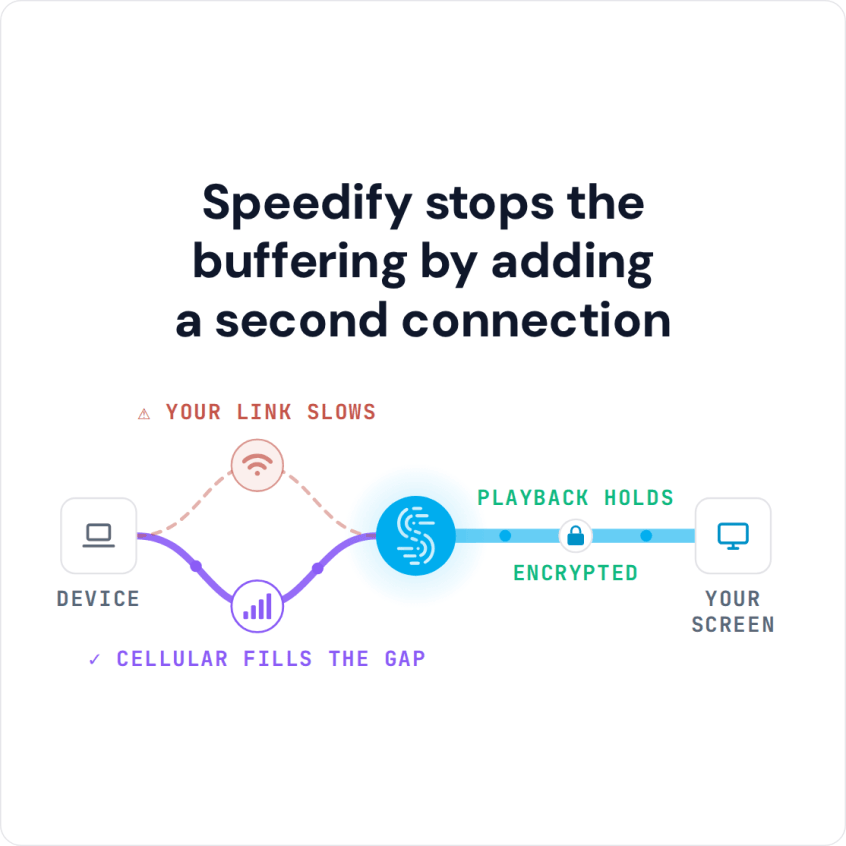
Speedify stops the buffering by adding a second connection
Keep reading to see how to stop packet loss and bandwidth drops when streaming on one connection, what changes with two, and how watching improves as well.
For everything Speedify does for Twitch, on both sides of the stream, see Speedify for Twitch.
How to Fix Twitch Buffering with Speedify
- Download Speedify on the computer you stream from or the phone you watch on (Windows, macOS, iOS, Android).
- Open Speedify and create a free account (the free tier includes 5 GB per month), or sign in.
- Give Speedify a second internet connection: on a computer, add Ethernet, a second Wi-Fi network or a phone connected over USB; on a phone, keep Wi-Fi on and turn on cellular data.
- Connect. Speedify sends traffic over both connections at once and moves it to the working one when one weakens.
- Open Twitch, or start your stream in OBS, and use it as usual.
Fixing Packet Loss and Bandwidth Drops while Streaming to Twitch with One Connection
On one connection, Speedify still fights packet loss: Speedify detects lost packets and resends them, and uses forward error correction, so a stream stutters less. If you want to secure your internet connection as well, Speedify encrypts it (AES-256-GCM or ChaCha20-Poly1305) and hides your home IP address from the sites and services you connect to; that encryption can cost a little speed on one connection.
Streaming to Twitch with Two Internet Connections
Speedify lets you combine the bandwidth of multiple connections. If you have a second Wi-Fi network nearby or a smartphone you can tether to your PC, Speedify adds its capacity to your main connection. On a 2 Mbps connection, a second connection of similar speed gives the stream close to the combined upload of both (Speedify publishes up to 95% of combined speed), and Speedify encrypts the traffic as it goes.
In a Speedify play test, a Battlefield 1 stream in HD over a 3 Mbps connection buffered and broke up without Speedify. With Speedify combining that connection with a nearby Xfinity hotspot that added 6 Mbps, the 9 Mbps total carried a fairly smooth stream.
Why Twitch Is So Laggy for Viewers, on Mobile and Desktop
For viewers, Twitch is usually laggy because the connection cannot hold a steady video rate, so the player buffers or drops the resolution. Speedify is available for desktop (PC & Mac) and mobile (iOS & Android), so you can catch up with your favorite Twitch streamers on the go. On a phone, Speedify combines Wi-Fi and 4G/5G cellular; at home, Speedify can combine your home Wi-Fi with a second connection so you can view streamed video in HD with less buffering.
Why a Twitch Stream Will Not Load at All
When a stream refuses to load rather than stuttering, and Twitch itself is up, the cause is almost always on your side of the connection. The usual candidates: your ISP cannot deliver the speed you are paying for, there is a temporary fault on their network, they are throttling video, or you are losing packets on a wireless link.
Run a speed test first and compare it against your contract. If the numbers are far off, that is a conversation with your ISP. In most cases the speed test comes back fine and the stream still will not load, because the problem is stability rather than headline speed.
Twitch Error Loading Data: What to Check First
The “error loading data” message shows up for viewers and broadcasters alike, and it has three common causes worth ruling out in order.
Start with Twitch itself. Twitch’s status page will tell you within seconds whether the problem is shared by everyone. Next, disable ad blocking for Twitch. Blocked ad requests are the single most frequent trigger for this error, and it affects Chrome, Firefox, Brave, Opera, Edge and Safari alike. Only then look at your own connection.
A second internet connection that you switch to by hand is the standard answer to the third one, and it only half works. Switching means reconnecting, and the stream ends while that happens. Running both connections at once is what removes the gap.
Speedify Keeps Twitch Streams Going When One Connection Drops
Whether you’re using Twitch to stream your own gameplay or just to watch, Speedify encrypts your connection and, with a second internet connection, can fix slow Internet speeds that one connection cannot.
Get started with Speedify today for FREE: a free Speedify account includes 5 GB per month.
Speedify
Get started with Speedify today.
Speedify combines Wi-Fi, 4G/5G cellular, Ethernet, Starlink and satellite into one faster, more reliable internet connection. Free to try: 5 GB a month with a free account. No credit card required.
🚀 Speed
Faster uploads and downloads, because Speedify uses all your internet connections at once.
📶 Stability
If one internet connection drops, Speedify moves your traffic to the others in milliseconds.
🔒 Security
AES-256 encryption on every internet connection, on any network you join.



15M+ downloads worldwide. 75K+ five-star reviews on iOS and Android.